





Uncategorized
Multi-Pin Radio Connector Types: A Professional Identification Guide

Aug
Have you ever ordered a batch of high-spec headsets only to realise the plugs won’t physically fit your handhelds? It’s a common frustration in the security and events industries where a lack of standardisation makes identifying multi-pin radio connector types feel like a guessing game. Buying expensive accessories that don’t fit isn’t just a waste of your budget; it’s a direct threat to your team’s ability to communicate during critical operations.
We understand that proprietary names and subtle pin variations are incredibly confusing. That’s why we’ve produced this professional guide to help you identify the exact interface your two-way radio requires. You’ll learn how to distinguish between Motorola, Hytera, and Kenwood fittings whilst discovering why these multi-pin systems offer superior audio reliability compared to standard two-pin alternatives. By the end of this article, you’ll know exactly which earpiece adapter or headset to choose to keep your communications secure and your equipment ROI high.
Key Takeaways
- Learn how to identify specific multi-pin radio connector types by brand, including Motorola GCAI and Hytera PD7 series, to ensure a perfect technical fit.
- Discover why multi-pin interfaces provide superior strain relief and durability compared to standard 2-pin connectors by using secure bolted or screwed attachments.
- Understand the role of professional connectors in supporting advanced radio features like GPS telemetry and emergency ‘Man Down’ safety functions.
- Find out how to manage mixed radio fleets efficiently by using specialised earpiece adapters to maintain cross-brand compatibility.
Understanding Multi-Pin Radio Connector Types and Their Purpose
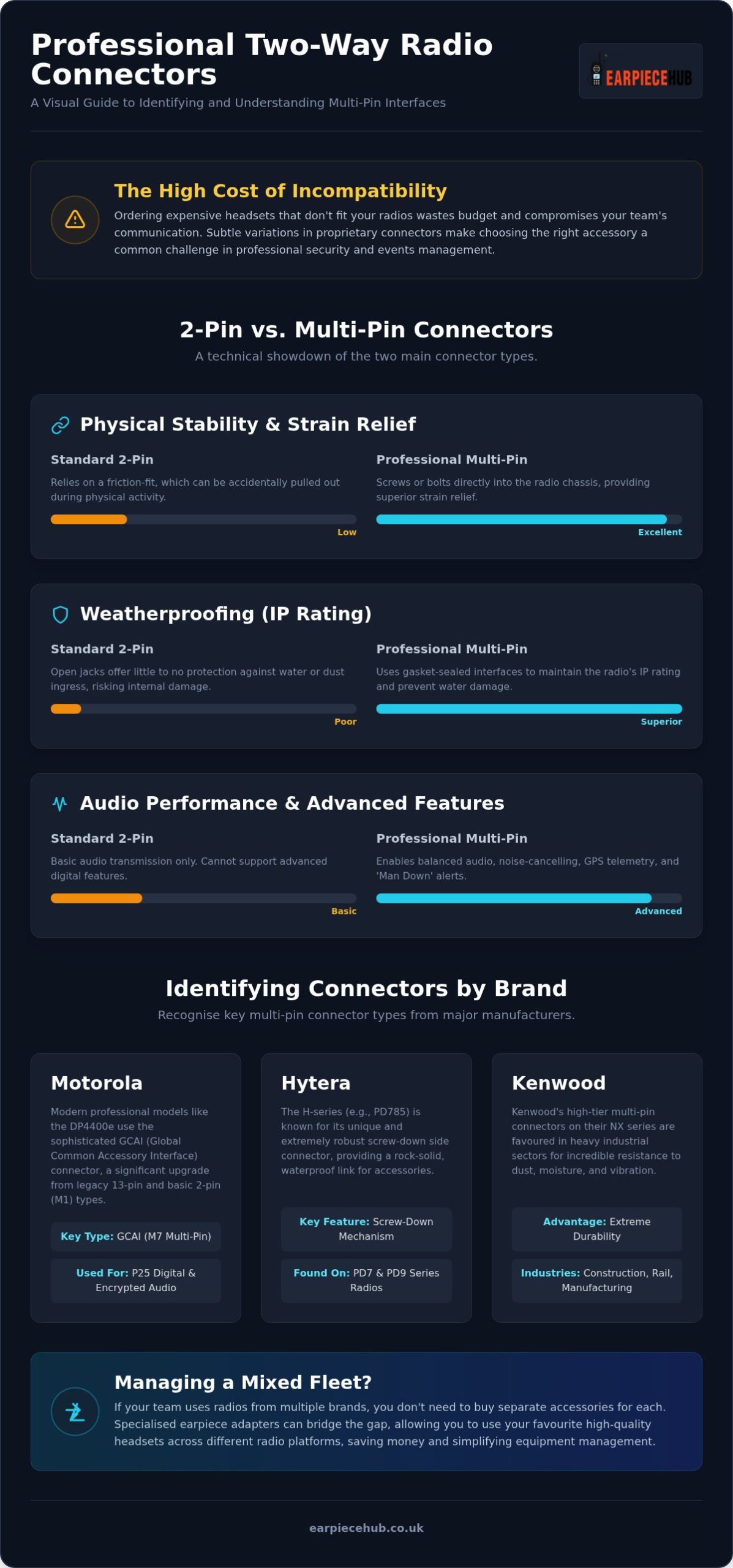
Multi-pin connectors are proprietary interfaces used to link earpieces, remote speaker microphones (RSMs), and headsets to professional two-way radios. Whilst entry-level devices often use standard 2-pin jacks, mid-to-high-tier digital radios have shifted towards complex multi-pin radio connector types to handle the demands of modern security. This category is broad. It ranges from compact 6-pin Hirose connectors to the massive 14-pin Motorola GCAI interfaces.
The side-connector maintains the radio’s structural integrity and signal quality. Unlike consumer-grade Microphone Connectors, these professional interfaces are built for rugged durability. They don’t just transmit audio; they protect the internal circuitry from the elements.
2-Pin vs Multi-Pin: Which is better for your team?
Choosing between these multi-pin radio connector types and standard jacks depends on your environment. Consider these physical and technical differences:
- Physical Stability: Standard 2-pin connectors rely on friction-fit, which can pull out during a scuffle or when snagged on a vest. Multi-pin versions usually screw or bolt directly into the radio chassis for superior strain relief.
- Audio Performance: Multi-pin allows for balanced audio and advanced noise-cancelling, which is vital in high-noise environments.
- Weatherproofing: If you use IP-rated waterproof radios, multi-pin is essential. The gasket-sealed interface prevents water ingress that would destroy a standard jack.
The Anatomy of a Radio Connector
Most professional connectors use a ‘Pogo’ pin system. These spring-loaded contacts compress against the radio’s gold-plated pads to reduce mechanical wear. A central guide pin ensures the accessory aligns perfectly every time. This prevents bent contacts and ensures a secure link for data-heavy features like GPS or emergency telemetry. This precision engineering ensures your audio doesn’t fail when needed most.
Identifying Connectors by Brand: Motorola, Hytera, and Kenwood
Identifying multi-pin radio connector types depends on recognising the specific physical footprint used by major manufacturers. While entry-level models often stick to top-mounted jacks, professional handhelds favour side-mounted interfaces. These are easily spotted by their gold-plated contact pads and dedicated screw holes. Recognising these by sight saves time and prevents the costly mistake of ordering incompatible gear for your team.
Motorola Connector Guide
Motorola’s evolution is a masterclass in connector history. The legacy GP340 ‘Warhorse’ used a large 13-pin side connector, but modern units like the DP4400e and DP4800e utilise the sophisticated GCAI (Global Common Accessory Interface) connector. This M7 multi-pin type is vastly different from the M1 2-pin found on the DP1400. Many professional public safety devices follow Project 25 (P25) standards for interoperability, requiring these high-density pins to handle complex data and encrypted audio signals simultaneously. The GP300 series legacy still creates a ‘multiplying’ effect in the market, where many modern 2-pin accessories still use that classic spacing despite the shift to multi-pin for high-tier digital handhelds.
Hytera and Kenwood Variations
Hytera’s H-series, such as the PD705 and PD785, features a unique screw-down side connector that provides a rock-solid link. It’s distinct from the smaller, slimmer multi-pin found on the PD6 series. Kenwood’s NX series also employs high-tier multi-pin configurations. These are heavily favoured in heavy industrial sectors like construction or rail for their incredible resistance to dust, moisture, and constant vibration. Understanding these diverse multi-pin radio connector types is vital for fleet managers. If you’re managing a mixed fleet, you can find an earpiece adapter for any radios to bridge the gap and keep your favourite headsets in service across different platforms.
Why Professionals Choose Multi-Pin over Standard Connectors
Professional radio users don’t settle for standard jacks. The transition to multi-pin radio connector types is driven by the need for mission-critical reliability. While a 2-pin connector relies on simple friction, a multi-pin interface is typically bolted or screwed directly to the radio chassis. This provides superior strain relief. It ensures that your accessory stays connected during a struggle or when navigating tight spaces. By moving the stress to the chassis, you also protect the radio’s internal PCB from the repetitive wear and tear that often ruins standard 3.5mm ports.
These interfaces support advanced safety features like GPS telemetry and ‘Man Down’ alerts. High-tier standards, such as those discussed by CISA Project 25, rely on these high-density pin configurations to maintain secure, encrypted data streams alongside voice. For covert operations, the locking mechanism is vital. It prevents the earpiece from popping out and broadcasting your position through the radio’s speaker at the worst possible moment.
Durability and Environmental Protection
Multi-pin connectors are essential for maintaining a radio’s IP67 or IP68 rating. They use sophisticated gasket seals to keep out dust and moisture. In rainy UK environments, these multi-pin radio connector types prevent corrosion on the spring-loaded contacts. Standard jacks often leak during heavy downpours, leading to expensive circuit damage or total equipment failure. These connectors ensure your gear survives the British weather whilst remaining fully functional.
Audio Fidelity and Noise Cancellation
By utilising dedicated pins for independent microphone and speaker paths, these connectors deliver unmatched audio fidelity. Door supervisors and event staff benefit from balanced audio that significantly reduces background hiss. This clarity is a game-changer in high-decibel environments where every word counts. If you need this level of reliability, shop our professional radio accessories to upgrade your kit today.
Selecting the Right Accessory and Maintaining Your Connection
Selecting the correct accessory starts with a precise compatibility check. You shouldn’t rely on visual similarity alone. Various multi-pin radio connector types look identical but feature different internal wiring or pin assignments. Always match the earpiece SKU directly to your radio’s model number to avoid total audio failure during a shift. If you’ve upgraded your fleet but kept legacy accessories, adapters are the most cost-effective solution. They allow you to use your favourite earpieces across different brands whilst maintaining signal integrity.
Earpiece Hub Solutions for Mixed Fleets
Managing a team with both Motorola and Kenwood handhelds is a significant logistical challenge. We provide specialised earpiece adapters to standardise your equipment across mixed fleets. This ensures your staff can swap devices without losing connectivity. You can choose from several professional styles to suit your specific operation:
- Acoustic Tube: The industry standard for covert security and discrete communication.
- D-Shape: A versatile, hygienic option that sits comfortably over the ear for long shifts.
- G-Shape: Offers a secure, wrap-around fit that stays in place during active movement or scuffles.
Browse our range of multi-pin earpieces and adapters to find the right interface for your hardware.
Maintenance Tips for Long-Life Connectors
To ensure reliable communication, you must prevent carbon buildup on the spring-loaded pogo pins. Use alcohol wipes to gently clean the contact points once a week. This simple protocol maintains a low-resistance path for clear audio. When attaching accessories, seat the connector flush against the radio before tightening the screw. This prevents cross-threading, which can permanently damage the radio’s side port. Replace your gear immediately if you notice pin fatigue, where pins no longer spring back, or if cable fraying appears near the strain relief points.
Secure Your Communications with the Right Interface
Identifying the correct multi-pin radio connector types is the first step toward building a resilient communication network. Professional interfaces provide superior strain relief and essential weatherproofing that standard jacks simply cannot match. Whether you are managing a mixed fleet using specialised adapters or maintaining individual units with strict cleaning protocols, a secure connection ensures your team remains audible in high-stakes environments. Don’t let a poor fit compromise your operational security or lead to expensive audio failure during a critical shift.
Earpiece Hub has provided specialist UK support since 2015. We offer expertly tested compatibility for Motorola, Hytera, and Kenwood equipment to eliminate guesswork and improve your equipment ROI. If your security operation requires urgent hardware, take advantage of our next-day delivery to keep your team fully connected. Shop Professional Multi-Pin Earpieces at Earpiece Hub today. Equip your staff with the reliable hardware they need to perform their duties with total confidence.
Frequently Asked Questions
What is the difference between a 2-pin and a multi-pin radio connector?
A 2-pin connector uses two separate jacks that rely on friction to stay in place. In contrast, multi-pin radio connector types use a single interface with multiple contact points, often secured with a screw or bolt. This design provides better strain relief and supports advanced data features like GPS or noise cancellation, making it the standard for high-tier professional digital radios used in security.
Can I use an adapter to connect a 2-pin earpiece to a multi-pin radio?
Yes, you can use a dedicated earpiece adapter to bridge the gap between different connection standards. These adapters screw into the multi-pin side port and provide a standard 2-pin socket for your existing accessories. This is a cost-effective way to standardise gear across a mixed fleet of Motorola or Kenwood radios without replacing your entire stock of favourite acoustic tubes or D-shape earpieces.
Are multi-pin connectors waterproof?
Most multi-pin connectors are designed to maintain the radio’s IP67 or IP68 waterproof rating. They achieve this through rubber gasket seals and a tight, bolted connection that prevents water ingress. Whilst standard 2-pin jacks often leave the internal circuitry vulnerable to moisture during heavy rain, these multi-pin interfaces ensure your equipment remains fully functional in the challenging coastal or rainy environments common across the UK.
Why does my Motorola radio have so many different connector types?
Motorola uses various multi-pin radio connector types to distinguish between different tiers of hardware and functionality. For instance, the entry-level DP1400 uses a basic 2-pin jack, whereas high-tier handhelds require a high-density GCAI connector to handle encrypted audio and telemetry data. These proprietary designs ensure that accessories match the specific power and data requirements of the radio’s internal processor for maximum operational reliability.
How do I clean the pins on my radio connector if audio becomes crackly?
You should clean the gold contact pads and pogo pins using a lint-free cloth or a cotton bud dipped in isopropyl alcohol. Gently wipe away any dirt, oils, or carbon buildup that can cause intermittent signal loss. Avoid using abrasive materials that might scratch the plating. Regular maintenance ensures a low-resistance connection, preventing the crackling audio that often disrupts communications during critical security or event operations.
