





Uncategorized
Cross-Brand Radio Earpiece Compatibility: The Professional UK Guide

Aug
That 2-pin plug might look identical to your Motorola kit, but plugging it into a Kenwood radio could be the quickest way to silence your communications during a critical operation. It’s a common frustration for security teams and fleet managers who find themselves stuck with a drawer full of incompatible accessories and a mounting bill for replacements. Managing cross-brand radio earpiece compatibility is often seen as a technical minefield, especially when universal claims don’t live up to the pressure of a live event.
We understand that audio failure isn’t just an inconvenience; it’s a safety risk that compromises your entire operation. Discover how to successfully mix and match radio earpieces across different brands whilst maintaining audio clarity and fleet reliability. We’ll break down the specific wiring requirements for Motorola, Hytera, and Kenwood systems, explain how universal earpieces bridge the gap, and show you how to build a modular kit that works with any radio in your fleet.
Key Takeaways
- Identify why identical-looking plugs often fail by distinguishing between physical connector shapes and proprietary electrical wiring.
- Master cross-brand radio earpiece compatibility to successfully integrate Motorola, Kenwood, and Hytera hardware within a single professional fleet.
- Evaluate the benefits of universal earpieces with interchangeable leads as a streamlined alternative to using bulky adapters on legacy headsets.
- Maximise equipment lifespan by selecting components with robust strain relief and performing regular stress tests on your audio accessories.
The Challenge of Cross-Brand Radio Earpiece Compatibility
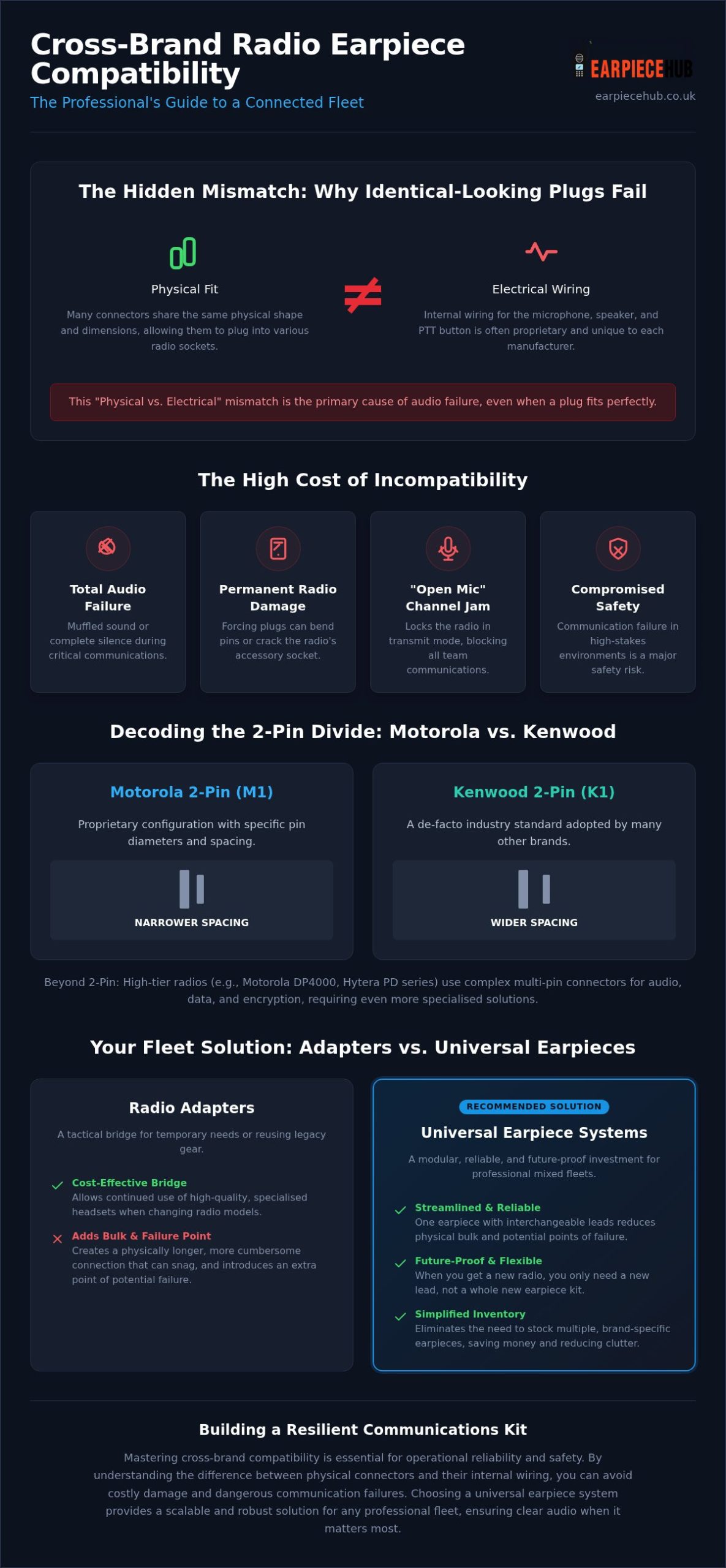
Cross-brand radio earpiece compatibility refers to the technical ability to operate one manufacturer’s audio accessory with a different brand’s radio body. Whilst many plugs share a similar appearance, physical fit doesn’t guarantee functional audio. Major brands like Motorola and Kenwood often utilise proprietary wiring configurations to protect their ecosystems, creating a significant hurdle for organisations with mixed fleets. This “Physical vs Electrical” mismatch is the primary reason a 2-pin plug might slide into a socket but fail to transmit or receive.
Why ‘One Size’ Does Not Fit All
Connectivity varies from simple 1-pin and 2-pin jacks to complex multi-pin digital arrays used in high-end security operations. Even within the same physical footprint, internal standards for microphone sensitivity and impedance differ. These RF connector standards are critical to audio clarity. A mismatch can lead to muffled sound or total silence. Digital PTT protocols add another layer of complexity. The radio must correctly interpret the electronic signal sent by the earpiece button to open the channel, a process that differs between analogue and digital systems.
The Risks of Forced Compatibility
Using incompatible accessories isn’t just a budget drain; it’s a hardware risk. Poorly manufactured third-party plugs can put undue stress on the radio’s accessory socket, leading to permanent physical damage. More dangerously, wiring conflicts can trigger “open mic” scenarios. This occurs when the radio’s circuitry incorrectly detects a pressed PTT button, locking the device in transmit mode. This silences the user’s incoming traffic and jams the entire channel for the team. It’s a failure that compromises safety and communication reliability during critical tasks.
Decoding Common Connector Standards: Motorola, Kenwood, and Hytera
Identifying the correct connector is the first step in achieving cross-brand radio earpiece compatibility. Motorola remains the most diverse manufacturer, ranging from the classic M1 2-pin to the rugged multi-pin interfaces found on the DP4000 series. In contrast, the Kenwood 2-pin (K1) has become a de-facto industry standard, widely adopted by brands like Baofeng and Retevis. Hytera presents its own challenges, utilising specialised connectors for the PD and BD series that require precise matching to ensure PTT functionality.
The Motorola vs Kenwood 2-Pin Divide
At a glance, Motorola and Kenwood 2-pin plugs look identical. They aren’t interchangeable. Motorola pins are typically 2.5mm and 3.5mm in diameter with a narrower spacing compared to the Kenwood standard. A quick visual check reveals that Kenwood pins are set slightly further apart. Attempting to force a Kenwood earpiece into a Motorola radio can bend the internal pins or crack the housing. If you’re managing a mixed fleet, using a Universal earpiece and connector system is often more efficient than maintaining separate inventories for each plug type.
Multi-Pin Digital Connectors
High-tier radios like the Motorola DP4800 series use side-mounted multi-pin connectors to handle both high-definition audio and data. These interfaces are far more complex to adapt than simple 2-pin jacks because they involve multiple contact points for GPS data and advanced encryption. Research through the Public Safety Communications Research program highlights how standardising these interfaces is vital for interoperability during large-scale operations. Whilst simple adapters exist for some digital models, the complexity of the wiring often makes a dedicated universal kit the only reliable choice for maintaining cross-brand radio earpiece compatibility in professional environments.
Adapters vs Universal Earpieces: Choosing Your Solution
Deciding how to manage a mixed fleet often comes down to budget versus operational efficiency. Achieving cross-brand radio earpiece compatibility can be handled via external adapters or by switching to modular universal kits. Whilst adapters allow for the immediate reuse of legacy hardware, universal systems offer a more streamlined, future-proof approach for growing teams. The choice depends on whether you’re protecting an existing investment or building a more resilient, scalable infrastructure.
When to Use a Radio Earpiece Adapter
Adapters serve as a cost-effective bridge, allowing you to retain high-quality noise-cancelling headsets when switching radio bodies. They are ideal for temporary “loaner” radios or when transitioning a fleet over several months. However, they add physical bulk and create an extra point of failure at the connection site. If your organisation adheres to the Project 25 (P25) standard for interoperability, you’ll know that maintaining a secure, reliable connection is paramount. For expensive 3-wire covert kits, an earpiece adapter for any radios is often significantly cheaper than a total replacement.
The Benefits of Universal Earpiece Kits
Universal earpieces utilise a modular connector system with interchangeable leads. This allows you to standardise your earpiece stock whilst keeping the flexibility to change radio brands without discarding the entire surveillance kit. Maintenance is simplified; if a lead fails, you replace the specific cable rather than the whole acoustic tube assembly. This modularity reduces downtime and stockroom clutter. Larger security fleets are rapidly moving towards these systems to reduce long-term waste and improve logistical speed. To streamline your equipment and ensure total fleet readiness, shop our universal earpieces and headsets today.
Ensuring Reliability in Professional Environments
Reliability in the field depends on more than just a successful initial connection. For security professionals, cross-brand radio earpiece compatibility must survive the physical rigours of a twelve-hour shift. Conduct a “Stress Test” by moving through a full range of motion whilst wearing the kit. This ensures the adapter or universal lead doesn’t snag or disconnect during an intervention. Pay close attention to strain relief on your connectors. Quality adapters feature reinforced housing to prevent the internal wiring from snapping under the pressure of sudden movements or equipment snags.
Before every shift, perform a comprehensive “Comms Check.” Verify both incoming audio clarity and Push-to-Talk (PTT) responsiveness. This identifies issues like bent pins or loose sockets before they become critical failures. Regular maintenance is equally vital. Clean your acoustic tubes monthly to prevent wax build-up and inspect the pin alignment on third-party adapters to ensure a flush fit with the radio body. These small steps prevent audio degradation and ensure your fleet remains operational when it matters most.
Covert and Surveillance Requirements
Door supervisors and close protection teams require absolute discretion. When using adapted 2-wire or 3-wire kits, ensure the PTT button doesn’t “hot mic” or stay open due to wiring mismatches. This is a common risk when mixing digital radio bodies with older analogue accessories. If you only need to receive instructions, “Listen Only” earpieces are the simplest way to achieve cross-brand radio earpiece compatibility without navigating complex PTT protocols.
Fleet Maintenance and Spare Parts
Organise your kit bag with a variety of adapters to handle unexpected radio substitutions during large-scale events. Keeping a stock of replacement ear tips and acoustic tubes ensures your cross-brand setup remains hygienic and functional. This proactive approach to fleet management prevents minor hardware issues from derailing a professional operation. Efficient kit organisation reduces downtime and ensures your team is ready for any equipment changes on the fly.
Secure Your Fleet’s Communication Future
Achieving seamless cross-brand radio earpiece compatibility is about more than just finding a plug that fits. It requires a clear understanding of proprietary wiring standards and the tactical choice between modular universal kits or cost-effective adapters. By standardising your accessories, you eliminate the risk of audio failure and protect your budget from unnecessary hardware replacements. Whether managing a small security team or a large-scale fleet, the right connector strategy keeps your lines of communication open and reliable.
At Earpiece Hub, we provide the technical expertise needed to bridge the gap between Motorola, Kenwood, and Hytera systems. Our professional-grade noise-cancelling options ensure clarity in high-pressure environments; whilst our specialist UK technical support is available to assist with complex fleet configurations. With Next Day Shipping available across the UK on all in-stock items, your team won’t be left waiting for essential kit. Take control of your audio setup and ensure every member of your team stays connected. Shop our range of Universal Earpieces and Adapters now.
Frequently Asked Questions
Can I use a Kenwood 2-pin earpiece on a Motorola radio?
No, they are not interchangeable despite looking similar. Motorola and Kenwood use different pin diameters and spacings. Forcing a connection can damage the radio’s accessory port. To use a Kenwood headset with a Motorola body, you must use a specific adapter designed to convert the wiring and physical alignment. This is a common hurdle in managing cross-brand radio earpiece compatibility within mixed fleets.
Do earpiece adapters reduce the audio quality of my radio?
High-quality adapters do not reduce audio clarity, provided they feature gold-plated contacts and proper impedance matching. Cheap, unbranded alternatives often suffer from poor shielding, which introduces interference or hum during transmissions. Using professional-grade adapters ensures that your noise-cancelling features remain effective. Always check the strain relief on the adapter to prevent signal intermittent failure caused by cable fatigue during active security operations.
What is a ‘Universal’ radio earpiece and how does it work?
A universal radio earpiece features a modular design where the earpiece head is separate from the connector lead. This allows you to swap only the bottom cable to match different radio brands like Hytera or Motorola. It’s a strategic solution for organisations that frequently update their radio hardware. By standardising the earpiece kit, you maintain consistent user comfort whilst ensuring total cross-brand radio earpiece compatibility across your entire equipment inventory.
Will using a third-party earpiece void my radio’s manufacturer warranty?
Generally, using a third-party accessory does not void the radio’s warranty unless the accessory itself causes physical or electrical damage to the device. Manufacturers like Motorola and Kenwood specify that warranties cover defects in their own hardware. However, a poorly fitting plug that breaks the internal pins of the accessory socket would likely be classed as user-inflicted damage. Stick to reputable specialist retailers to ensure your accessories meet safety standards.
How do I know which connector type my radio uses?
You can identify your connector type by checking the model number under the battery or on the side of the radio body. Common codes include M1 for Motorola 2-pin or K1 for Kenwood 2-pin. Alternatively, consult a compatibility chart from a specialist hub or contact technical support with your radio’s specific model name. Professional retailers can quickly confirm if your device requires a multi-pin digital connector or a standard jack.
