





Uncategorized
Radio Accessory Compatibility Guide: Match Your Accessory to Your Radio
Oct
An accessory can carry the right brand name and still be the wrong fit for your radio. Compatibility starts with the exact radio model and the accessory’s stated fit, not the label on an earpiece, headset or microphone. Listings can look almost identical, yet a mismatch may leave you without the listening or speaking function you need. This radio accessory compatibility guide shows you what to check before choosing.
Start with the radio’s full model name, then compare it with the compatibility details in the product description. Next, match the accessory type to its intended use: listening, speaking or noise-cancelling audio. A familiar brand name alone isn’t enough to assume an accessory works across different radios, so check the specific product details before you choose.
Key Takeaways
- Use this radio accessory compatibility guide to compare your radio’s exact model with the accessory’s stated compatibility.
- Match the accessory to the job: listening, speaking or noise-cancelling use requires the right type.
- Brand names alone aren’t enough; check whether the product description names your radio brand or model.
- Examples such as acoustic tube earpieces for Motorola radios, D-shape earpieces for Hytera radios and G-shape earpieces for Kenwood radios show how product descriptions guide selection.
Radio accessory compatibility: what must match your radio?
Compatibility comes down to the radio model, the accessory’s stated fit and the function you need. A matching brand name is not enough. A manufacturer may use different connections across its radio range, so an accessory described for one model or series may not fit another from the same brand.
A two-way radio lets users transmit and receive voice communications, but not every accessory handles both tasks. A listen-only earpiece lets you hear radio audio; it isn’t a speaking accessory. If you need to transmit, choose a product whose description explicitly identifies a push-to-talk (PTT) function or control. Match the stated function to the way you use the radio.
Which radio details should you identify first?
Find the full brand and model name on the handset or in its documentation. Record the complete model identifier, including any letters or numbers that distinguish it from similar radios. Then compare it with the accessory description. A listing may name a compatible brand, a model series or a particular connector, each of which helps narrow down the intended fit.
Start with the radio model and the accessory’s stated compatibility. Use these details as your first check rather than relying on appearance or brand alone.
- Radio: note the full brand and model.
- Compatibility: look for the named brand or model series in the product description.
- Function: distinguish listening-only products from accessories described with PTT or a microphone.
These checks help prevent a familiar-looking plug or shared brand label from standing in for a proper match. Keep the radio’s model information to hand as you compare options in this radio accessory compatibility guide.
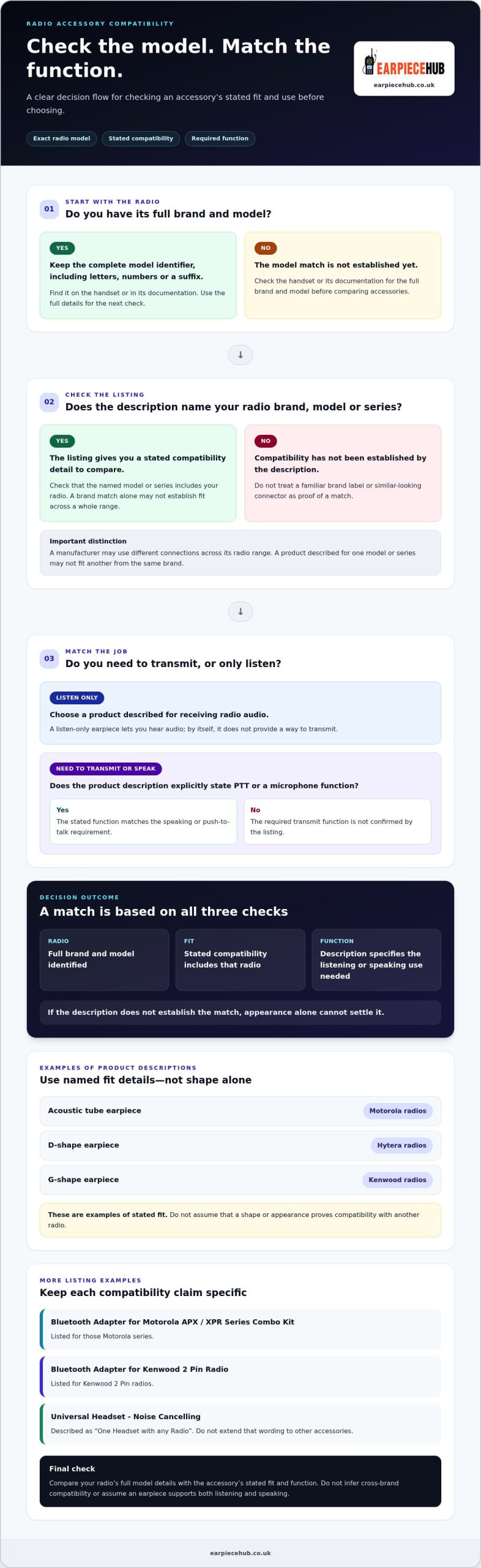
How to check radio accessory compatibility before choosing
Use the product description as a matching tool, not just a sales label. Work through these checks before selecting an accessory:
- Identify the radio. Write down its full brand and model, including any series or suffix shown on the handset or in its documentation.
- Compare the stated compatibility. Check whether the product description names your radio brand, model or series. Don’t infer a match from a similar-looking connector.
- Match the function. Decide whether you need to listen only, transmit using push-to-talk (PTT), or speak through a microphone. Choose a product whose description states the function you require.
Match connector, listening and speaking requirements
Check that the accessory’s named compatible brand or model includes your radio. If the listing names a model series, don’t assume every radio in that brand’s range belongs to it. Likewise, don’t infer cross-brand compatibility from a similar-looking connection. If the description doesn’t establish the match, appearance alone can’t settle it.
Read function details just as carefully. A listen-only earpiece is for receiving audio; it doesn’t, by itself, provide a way to transmit. For speaking, look for a description that explicitly specifies PTT or a microphone function. Don’t assume an earpiece supports both directions of communication.
Check the model, stated compatibility and required function before choosing. Keep those details together as you compare products, so your decision is based on the listed fit and use rather than guesswork.
Use these checks to narrow your options, then browse Earpiece Hub radio accessories and compare the compatibility details provided for each item.
Choose a compatible radio accessory from Earpiece Hub
Once you’ve identified your radio and the function you need, use the product description to narrow your choice. Earpiece Hub offers acoustic tube earpieces for Motorola radios, D-shape earpieces for Hytera radios and G-shape earpieces for Kenwood radios. These examples show why the stated compatibility matters: choose by the named brand or model, not by shape or appearance alone.
The range also includes listen-only earpieces, Bluetooth accessories with PTT, speaker microphones and headsets. For example, the Bluetooth Adapter for Motorola APX / XPR Series Combo Kit is listed for those Motorola series, while the Bluetooth Adapter for Kenwood 2 Pin Radio is listed for Kenwood 2 Pin radios. Keep those named compatibility details specific to each product. The Universal Headset – Noise Cancelling is described as “One Headset with any Radio”; don’t extend that wording to other accessories.
Use product descriptions as the final compatibility check
Read the product description for the named compatible brand or model and the stated function. Use those details as your reference for accessory fit, and avoid extending a product’s compatibility claims to other radio models or accessories.
A practical radio accessory compatibility guide ends with a clear comparison: your radio’s model details against the accessory’s stated fit. If the description doesn’t establish a match, don’t rely on a similar-looking connector or familiar brand label as proof.
Browse radio accessories and select an option based on the compatibility and function described for that product.
Make your next accessory choice with confidence
Put the radio’s model details beside the accessory description before you choose. Treat compatibility as something to verify, not a guess based on a familiar badge or connector shape. This radio accessory compatibility guide gives you a practical starting point, and the same habit can help when replacing equipment or organising accessories for a team. Keep the model information accessible so you can compare future replacements against the same reference.
Earpiece Hub brings together radio accessories, including earpieces, headsets, adapters and speaker microphones. Product descriptions identify supported brands or models where applicable, helping you narrow the options and focus on an accessory suited to your radio and intended use.
Browse Earpiece Hub radio accessories and compare the stated compatibility before choosing the option that fits your setup.
