





Uncategorized
Choosing the Best Kenwood Radio Remote Speaker Microphone for Professional Use in 2026

Aug
You’re managing a busy security detail when the wind picks up and the rain starts to lash down. Suddenly, your critical message is lost to static because your equipment isn’t up to the task. It’s a scenario many professionals face when a sub-standard Kenwood radio remote speaker microphone fails at the exact moment it’s needed most. Whether it’s audio cutting out in noisy environments or a cable fraying at the connector point, equipment failure isn’t just an inconvenience; it’s a safety risk.
We understand that you need gear that’s as dependable as your team. As a specialist hub for communication accessories, we’ve designed this guide to help you select the right tools to ensure crystal clear audio transmission every time. You’ll learn how to identify the correct pin configurations and choose rugged designs that offer hands-free operation and durability against rain and dust. We’ll examine the essential features for 2026, including reinforced cables and noise-cancelling components, so you can invest in tools that truly last.
Key Takeaways
- Understand how an RSM improves operational safety by allowing hands-free communication whilst keeping your radio securely fastened to your belt.
- Identify whether your specific device requires a 2-pin K1 connector or a multipin digital connection to ensure your Kenwood radio remote speaker microphone fits perfectly.
- Evaluate the technical differences between IP54 and IP67 ratings to ensure your equipment survives harsh weather and demanding professional worksites.
- Master essential maintenance habits, such as correct cable routing and connector cleaning, to prevent corrosion and maximise the longevity of your gear.
What is a Kenwood Radio Remote Speaker Microphone and Why Use One?
A Kenwood radio remote speaker microphone, often called an RSM or shoulder mic, is a professional peripheral that connects directly to your two-way radio. It clips to your lapel or epaulette, allowing you to transmit and receive messages without unhooking the radio from your belt. This setup is a standard requirement for security personnel, construction workers, and event staff who need to keep their hands free whilst maintaining constant contact.
Using an RSM offers several functional advantages over using a standalone radio:
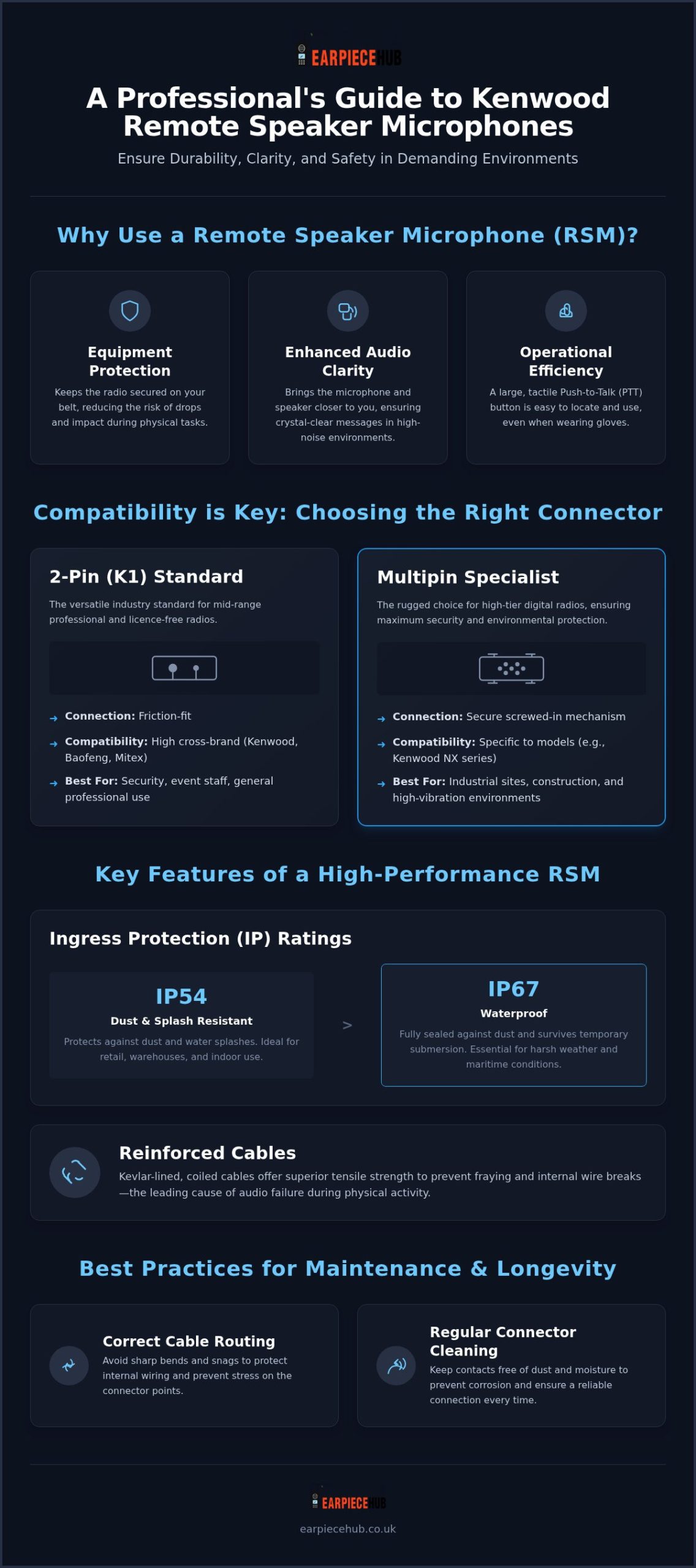
- Equipment Protection: By keeping the radio unit in a pouch or on a belt clip, you reduce the risk of dropping the device or exposing it to impact during physical tasks.
- Audio Clarity: Bringing the microphone closer to your mouth and the speaker closer to your ear ensures messages are heard clearly, even in high-noise environments.
- Operational Efficiency: The large Push-to-Talk (PTT) button on the side of the microphone is easier to locate than the smaller buttons on the radio itself, especially when wearing thick gloves.
The Role of RSMs in Professional UK Sectors
In the UK security industry, reliability is everything. Our Reliable Specialist approach at the Hub ensures that your equipment doesn’t fail during high-stakes operations. For door supervisors, maintaining a professional appearance is vital. An RSM allows for discreet communication whilst keeping the radio body out of sight. It provides a polished, authoritative look that signals a well-equipped security presence. Choosing a high-quality Kenwood radio remote speaker microphone is about more than just convenience; it’s about safety and response speed when every second counts. Whether you’re managing a crowded venue or a construction site, the right microphone ensures your team stays synchronised without the delay of fumbling for a handheld unit. For those who also take part in tactical simulations and field training, you can explore AEG Airsoft Rifles at Socom Tactical Airsoft to find high-performance equipment for your next exercise.
Kenwood Compatibility: Choosing Between 2-Pin and Multipin Connectors
Selecting the correct Kenwood radio remote speaker microphone begins with identifying your device’s connection port. Kenwood utilises two primary standards: the ubiquitous 2-pin K1 connector and the more robust multipin interface. Getting this choice wrong means your equipment won’t just perform poorly; it won’t connect at all. You must match the physical pin spacing and diameter to your specific radio model to maintain a secure electrical path.
The 2-Pin (K1) Standard
The K1 connector is the industry standard for mid-range professional portables. It features a specific 12mm pin spacing that’s become a benchmark for reliability in the security and event sectors. This physical configuration is so common that it allows for high levels of cross-compatibility. Many accessories designed for Kenwood ProTalk or licence-free models also function perfectly with Baofeng, Mitex, and Retevis radios. This versatility is a core part of achieving radio network interoperability across different hardware brands whilst keeping equipment costs manageable.
Multipin and Specialist Connectors
For high-tier digital radios, such as the Kenwood NX series, a multipin connector is the preferred choice. Unlike the friction-fit 2-pin version, these connectors usually feature a screwed-in mechanism. This provides maximum environmental protection and ensures the microphone stays attached during physical altercations or in heavy-duty industrial environments. If you work in a sector where equipment is subject to constant vibration or snagging risks, the security of a screwed-in multipin RSM is essential for consistent communication.
Always verify your radio’s exact model number before purchasing. Pin diameters must match perfectly to avoid damaging the radio’s internal socket. If you’re unsure which version your fleet requires, you can explore the technical specifications for various models at Earpiece Hub to ensure a perfect fit for your team.
Key Features of a High-Performance Kenwood RSM
A professional Kenwood radio remote speaker microphone must withstand more than just daily wear. High-performance models are defined by their resilience in extreme environments and their ability to facilitate discreet communication. When selecting your gear, prioritise these four technical specifications to ensure long-term reliability.
- IP Ratings: Choose IP54 for standard dust and splash protection in retail or warehouse settings. For staff working in heavy rain or maritime conditions, IP67 provides a fully waterproof seal that survives temporary submersion.
- Reinforced Cables: Internal wire breaks are the leading cause of audio failure. Kevlar-lined, coiled cables offer the tensile strength needed to prevent fraying at the connector point during physical activity.
- Tactile PTT: Large, textured Push-to-Talk buttons ensure the device remains operable whilst wearing heavy work gloves or in zero-visibility conditions.
The Advantage of the 3.5mm Audio Jack
The 3.5mm listen-only jack is the most critical feature for covert or high-noise operations. By pairing your RSM with an acoustic tube earpiece, you can receive private communications in crowded public spaces without being overheard. In hospitality settings, this setup reduces noise pollution by diverting audio from the external speaker directly to the user’s ear. It’s a specialist solution that maintains operational security without drawing unwanted attention from the public.
Audio Quality and Noise Cancellation
Standard microphones often struggle amongst loud machinery or shouting crowds. High-performance variants utilise noise-cancelling technology to filter out background interference, ensuring only your voice reaches the dispatcher. The integration of high-quality Japanese cells and premium internal components improves the overall discharge profile and ensures a consistent audio response throughout long shifts. Shop our full range of professional-grade Kenwood radio remote speaker microphones to upgrade your team’s communication gear today.
Best Practices for RSM Maintenance and Longevity
Professionals often overlook cable routing, yet it’s the most common cause of equipment damage. For security staff, a snagged cable can lead to a disconnected radio or a snapped connector. Route your Kenwood radio remote speaker microphone cable through your uniform’s epaulettes or underneath your clothing. This keeps the line taut and prevents it from being caught on door handles or during physical confrontations.
Proper strain relief is equally vital for longevity. Never use the RSM cable to pull the radio from its pouch. This places immense stress on the internal solder points and leads to “silent” failures. Clean the speaker grill regularly using a soft brush to remove dust. Wipe the connector pins with a dry, lint-free cloth to prevent corrosion caused by sweat or rain exposure.
Preventing Audio Failure
Check your pin alignment weekly. A loose or wobbly connection is a precursor to intermittent audio. If you use a secondary earpiece, ensure the 3.5mm jack remains free from debris. A clogged jack often results in crackling or total audio loss in the earpiece whilst the RSM speaker continues to broadcast, which can compromise covert operations at critical moments.
Storing Your Equipment
When your shift ends, don’t just shove the microphone into a locker. Coil the cable loosely to avoid permanent kinks or internal wire fractures. Store the unit in a dry, temperate environment. Excessive moisture can degrade the sensitive internal microphone membrane over time, leading to muffled transmissions that are difficult for your team to understand.
Identify the signs of wear before they become failures. Look for exposed shielding near the connector or a spongy PTT button. These are clear indicators that your Kenwood radio remote speaker microphone has reached the end of its service life. Replacing a worn unit early ensures your communication remains uninterrupted during high-stakes tasks.
Future-Proof Your Team Communications
Equipping your personnel with a high-performance Kenwood radio remote speaker microphone is a strategic investment in both safety and operational clarity. By matching the correct pin configuration to your specific radio model and prioritising features like IP67 waterproofing or Kevlar-reinforced cables, you ensure your equipment survives the most demanding environments. Proactive maintenance, such as smart cable routing and regular cleaning of the 3.5mm jack, remains the most effective way to prevent audio failure during critical security operations.
As a UK-based specialist, Earpiece Hub provides the technical expertise and 24/7 support you need to keep your fleet running at peak efficiency. We offer next-day shipping for all professional orders to ensure your team is always ready for the task at hand. Browse our full range of Kenwood Radio Remote Speaker Microphones at Earpiece Hub today and use the discount code SAVE10 for 10% off your first order. Secure your communications with gear that’s built for the professional challenges of 2026.
Frequently Asked Questions
Will a Kenwood 2-pin RSM work with my Baofeng radio?
Yes, the 2-pin K1 connector is cross-compatible with most Baofeng models. It uses the same 12mm pin spacing as standard Kenwood accessories. However, you should check the pin diameter to ensure a snug fit. This compatibility allows for easy equipment sharing across different fleets. Always test the PTT functionality before deployment to confirm the internal wiring matches your specific radio model perfectly.
What is the difference between an IP54 and IP67 rated remote speaker microphone?
IP54 ratings indicate protection against dust and splashes, making them suitable for indoor or light outdoor use. In contrast, an IP67 rated Kenwood radio remote speaker microphone is fully waterproof. It can withstand total immersion in water up to one metre for 30 minutes. Choose IP67 for maritime, emergency services, or heavy industrial environments where equipment is frequently exposed to torrential rain or deep puddles.
Do I need a licence to use a Kenwood radio with a remote microphone?
Licensing requirements are determined by the radio device, not the microphone accessory. Whilst licence-free PMR446 radios don’t require paperwork, most professional Kenwood units require a specific licence to operate legally. In the UK, this is managed by Ofcom; in the US, the FCC requires a Part 90 licence. These regulations prevent signal interference and ensure your team has a dedicated, secure frequency for high-stakes security operations.
Can I plug any earpiece into the side of the Kenwood RSM?
You can use any 3.5mm jack earpiece, but we recommend professional-grade listen-only versions. Standard consumer headphones often lack the durability needed for security work. A dedicated acoustic tube earpiece provides a secure fit and ensures audio remains private in crowded environments. This setup prevents your radio traffic from being overheard by the public whilst keeping your hands free for other tasks during your shift.
How do I fix a Kenwood radio mic that is transmitting but not receiving audio?
This issue usually results from a loose connection or a blocked speaker port. First, unplug the microphone and clean the connector pins to ensure a secure electrical path. Check the 3.5mm jack; if an earpiece is detected, the main speaker will remain silent. If the radio works without the RSM attached, the microphone’s internal speaker may have failed due to moisture ingress or physical impact, requiring a replacement.
