





Uncategorized
How to Identify Radio Connector Types: 2026 Guide
Jul
What if a tiny 1mm difference in pin spacing is the only thing standing between crystal-clear audio and total silence during a critical security shift? It’s a common reality for many teams because most radio earpiece connector problems stem from the deceptive similarity between 2-pin plugs. You’ve likely felt the frustration of ordering a replacement only to find it doesn’t seat correctly in your Motorola R7 or Hytera handset, leading to intermittent audio or even damaged ports.
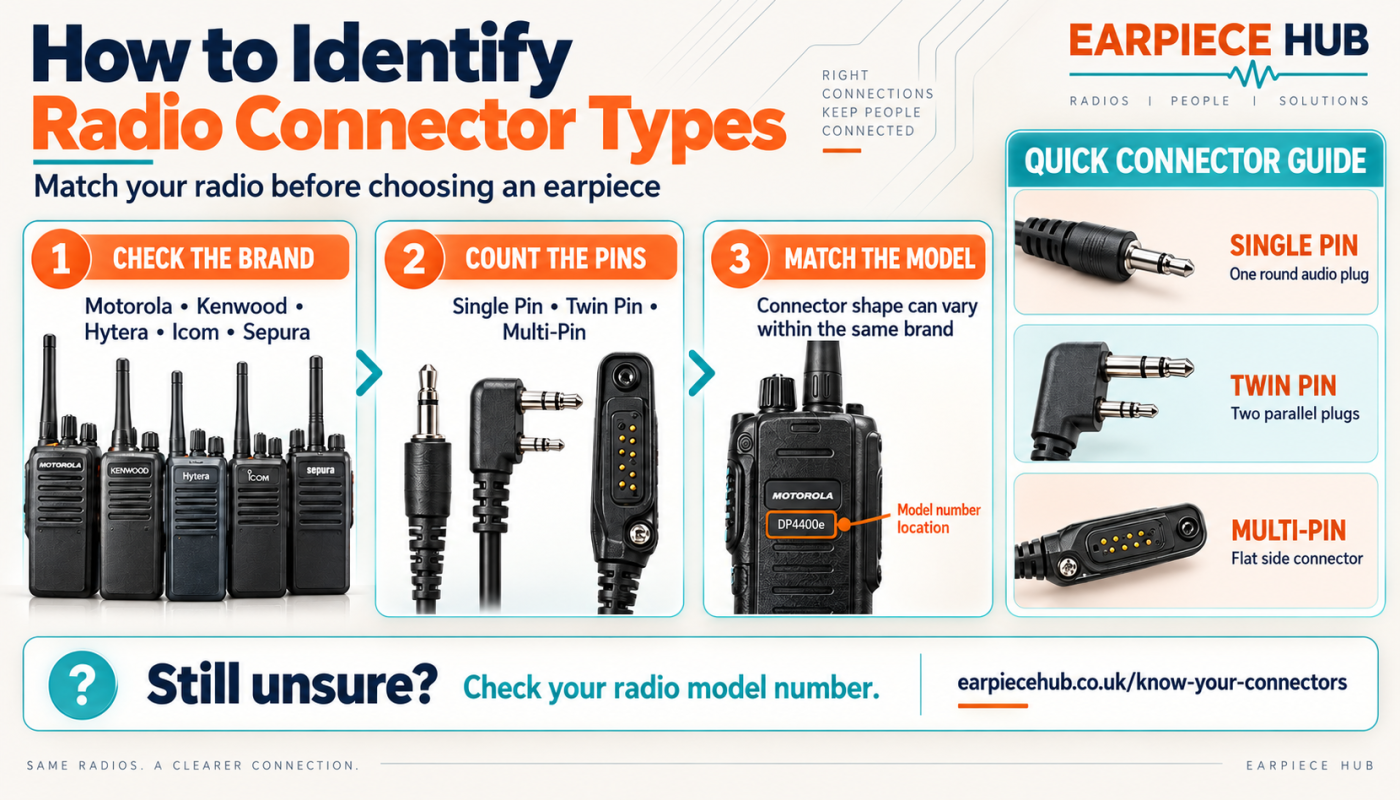
We know that as a professional, you don’t have time to waste on trial and error. This guide provides a definitive visual breakdown of pins, spacing, and brand-specific configurations to help you identify your radio accessory plug in seconds. We’ll walk you through the technical differences between 1-wire and 3-wire setups and explain how to confirm the exact connector type for your model. By the end of this article, you’ll know exactly which earpiece to purchase to ensure your communications remain reliable and secure.
Key Takeaways
- Identify proprietary connectors from major brands like Motorola, Kenwood, and Hytera by measuring pin diameter and spacing.
- Distinguish between visually similar 2-pin plugs, such as the Kenwood K1 and Motorola M1, to ensure a secure and reliable connection.
- Diagnose common radio earpiece connector problems, including intermittent audio and PTT failure, by checking for poor physical alignment.
- Recognise professional multi-pin interfaces used on digital handsets like the Motorola DP series to maintain your equipment’s IP-rated seals.
- Utilise the “Photo Method” to capture precise details of your radio socket for expert confirmation of the exact accessory you need.
Understanding Two-Way Radio Audio Connectors
An audio connector serves as the vital physical interface between your radio and essential accessories like acoustic tube earpieces or remote speaker microphones. Many radio earpiece connector problems occur because users assume these plugs are interchangeable. In reality, manufacturers like Motorola and Hytera use proprietary designs to ensure a secure fitment and exact electrical compatibility. You’ll generally encounter three main categories of connectors in the field:
- Single-pin: Often 2.5mm or 3.5mm jacks found on smaller, licence-free radios.
- 2-pin: The most common variety, though spacing and pin diameter vary significantly between brands.
- Professional multi-pin blocks: Side-mounted interfaces that are often bolted or clipped for high-security environments.
A radio connector is the physical bridge ensuring clear audio transmission whilst maintaining device integrity. Understanding the technical nuances of RF Connector Types helps in recognising why precision is necessary for signal integrity in any professional communication setup.
The Problem with Universal Claims
Whilst many unbranded accessories claim to be “universal,” there’s no such thing as a true universal plug amongst major manufacturers. A plug that looks similar might fit into the socket but fail to make electrical contact. Forcing a slightly misaligned plug into a Kenwood or Motorola side-socket can lead to permanent internal damage or snap the delicate pins inside. This mismatch is a primary driver of equipment failure in mixed-fleet organisations.
Common Terminology You Will Encounter
Identifying the root cause of radio earpiece connector problems often starts with understanding basic industry terms. You’ll frequently see PTT (Push-to-Talk) mentioned. This is the signal that tells the radio to transmit; a poor connector often causes “hot-mic” issues where the radio stays keyed. Additionally, you must choose between 1-wire and 2-wire earpiece setups. A 1-wire earpiece combines the PTT and microphone on a single lead, whilst a 2-wire earpiece separates them for more covert operations. Both require a connector capable of routing these specific signals without interference.
Identifying Common 2-Pin and Single-Pin Connectors
Most radio earpiece connector problems arise from the deceptive similarity between 2-pin plugs. Whilst they look nearly identical at a glance, the physical dimensions differ by millimetres. To identify your connector accurately, you must measure the distance between the centres of the two pins using a standard ruler. Place the zero mark at the dead centre of the top pin and read the distance to the centre of the bottom pin. This measurement, combined with the pin diameters, will confirm your connector type immediately.
The Kenwood vs Motorola 2-Pin Comparison
The Kenwood Style (K1) and Motorola 2-Pin (M1) are the most prevalent connectors in the UK market. You can distinguish them using these specific technical markers:
- Kenwood K1: Features 12mm spacing between the pin centres. The top pin is 3.5mm in diameter, whilst the bottom pin is 2.5mm. This is the standard for Kenwood, Baofeng, and many unbranded radios.
- Motorola M1: Features a much tighter 7.5mm spacing. Both pins are typically 2.5mm in diameter. Visually, you can spot an M1 plug by the distinctive “step” in the plastic moulding around the pins.
Attempting to force a K1 plug into an M1 socket will cause physical damage to the radio’s internal housing. If you need a reliable fit for your specific brand, you can find professional G-Shape earpieces designed for both Kenwood and Motorola configurations.
Threaded vs Non-Threaded Single Pins
Single-pin connectors are often found on compact or older professional handsets. You will encounter 2.5mm and 3.5mm variants. Threaded jacks are common on professional models; they feature a screw-down collar that locks the earpiece into the radio. This is essential for security personnel, as non-threaded pins are prone to pulling out during physical activity or whilst moving through crowds. If your audio cuts out when you move, a loose non-threaded connection is likely the culprit. Always check if your radio socket has internal threads before purchasing a replacement to ensure a secure, fail-safe connection.
Identifying Professional Multi-Pin and Proprietary Connectors
Moving beyond basic 2-pin setups, professional digital fleets rely on high-density multi-pin blocks to ensure signal stability. These connectors are the standard for digital (DMR) radio fleets because they support advanced data transfer alongside audio. Many radio earpiece connector problems in professional environments are actually caused by debris buildup in these multi-pin interfaces or loose mounting screws. Unlike standard jacks, these blocks use a side-mounted design that bolts or clips onto the radio chassis, providing superior weatherproofing and maintaining the device’s IP rating against dust and water ingress.
Motorola DP1400 and DP4400 Connectors
Motorola’s DP series uses two distinct professional interfaces. The DP1400 features a 2-pin socket but includes a central screw hole to lock the accessory in place. This prevents the earpiece from being pulled out during high-intensity shifts. When performing a full kit maintenance check, it’s wise to inspect your Motorola DP1400 replacement batteries and connector pins simultaneously for signs of wear. In contrast, the DP4400 and the newer R7 series use a high-density multi-pin side connector. This interface has no pins on the earpiece side; instead, it uses gold-plated contact pads that press against spring-loaded pins on the radio.
Hytera and Kenwood Multi-Pin Blocks
Hytera PD series radios, such as the PD785, use a proprietary screw-down multi-pin block that differs significantly from Motorola. You can identify these by their specific locking notches and a row of gold-plated contact points. Kenwood’s professional digital range also employs a multi-pin system, often featuring a unique “D” shaped connector housing. Always perform a visual check for bent pins or corrosion on these contact points. If you’re managing a mixed fleet, you can shop earpiece adapters to bridge the gap between different proprietary systems without compromising on audio quality.
Troubleshooting Connector Problems and Ensuring Compatibility
Most radio earpiece connector problems manifest as frustrating audio dropouts or “crackling” during movement. You might also experience constant PTT activation, where the radio remains in transmit mode without the button being pressed. These symptoms usually point to a physical mismatch or a degraded connection point. To avoid these issues, always verify your pin count, pin diameter, and the specific locking mechanism, whether it’s a screw-down collar or a simple friction fit. You should check the radio model number behind the battery to confirm compatibility before purchasing any new accessories.
If you’re still struggling to identify the plug, use the “Photo Method.” Take a clear, well-lit, top-down photograph of your radio’s accessory socket and the earpiece plug you’re currently using. Sending this to a specialist eliminates guesswork and ensures you receive the correct part the first time. This is particularly helpful for identifying subtle differences in 2-pin spacings that aren’t obvious to the naked eye.
The Importance of a Snug Fit
When to Use a Universal Earpiece Adapter
For organisations managing mixed-brand radio fleets, earpiece adapters are an essential tool. These allow you to use a single type of headset across various handsets, simplifying inventory and reducing the cost of replacements. Adapters also provide a sturdier interface for radios that only feature basic friction-fit sockets, often adding a screw-down point where one didn’t exist. Still unsure which connector you need? Contact Earpiece Hub for expert advice or browse our professional range of Acoustic Tube Earpieces to find your perfect match.
Secure Your Communications with the Correct Connection
Earpiece Hub provides specialist UK support for all Motorola, Kenwood, and Hytera accessories. If you’re still uncertain about a specific connector type, our team offers reliable 24/7 customer support to assist with technical identification. We understand that security and communication requirements are often urgent; that’s why next-day delivery is available across our entire professional range. Don’t let a mismatched plug compromise your operational safety or equipment lifespan.
Shop Professional Radio Earpieces at Earpiece Hub today to find the exact match for your radio model. Equip your team with confidence and ensure your communications remain uninterrupted when it matters most.
Frequently Asked Questions
Can I use a Kenwood earpiece with a Motorola radio?
No, you cannot use a Kenwood earpiece with a Motorola radio without a specific adapter. Kenwood K1 plugs have a 12mm spacing between pins, whilst Motorola M1 plugs use a much tighter 7.5mm spacing. Attempting to force a mismatch is a leading cause of radio earpiece connector problems, often resulting in snapped pins or cracked internal radio housing. Always match the connector to the specific brand requirements.
What is the most common radio connector type for security earpieces?
The Kenwood-style 2-pin (K1) is the most common connector for entry-level and unbranded security radios. However, professional digital fleets in the UK predominantly use Motorola multi-pin blocks or the Hytera PD series interfaces. These professional connectors are favoured for their screw-down security and superior IP-rated weatherproofing, ensuring reliable performance in demanding environments where a standard friction-fit plug might fail.
How do I know if my radio has a 2.5mm or 3.5mm jack?
You can identify the jack size by comparing it to a standard smartphone headphone plug, which is 3.5mm. If the radio’s socket is significantly smaller, it’s likely a 2.5mm jack. For precise identification, use a ruler to measure the diameter of the pin. Many professional single-pin radios also feature internal threading to lock the accessory in place; check for these threads before purchasing your replacement.
What should I do if my radio connector has no visible pins but a flat gold contact block?
A flat gold contact block indicates a high-density professional side connector, common on digital radios like the Motorola R7 series. This design replaces traditional pins with contact pads that press against spring-loaded pins on the radio chassis. If you’re experiencing radio earpiece connector problems with this type, gently clean the gold pads with a dry, lint-free cloth to remove oils and debris that prevent a clear electrical connection.
Will a 2-pin earpiece work with a single-pin radio using an adapter?
Yes, a 2-pin earpiece can work with a single-pin radio if you employ a dedicated earpiece adapter. This is a cost-effective solution for mixed-fleet organisations that want to standardise their accessory inventory across different radio brands. Ensure the adapter is specifically designed for your radio’s model number to maintain audio signal integrity and full PTT functionality without the risk of intermittent connection issues.
