





Uncategorized
A Comprehensive Guide to Multi-Pin Radio Connector Types for 2026
Jun
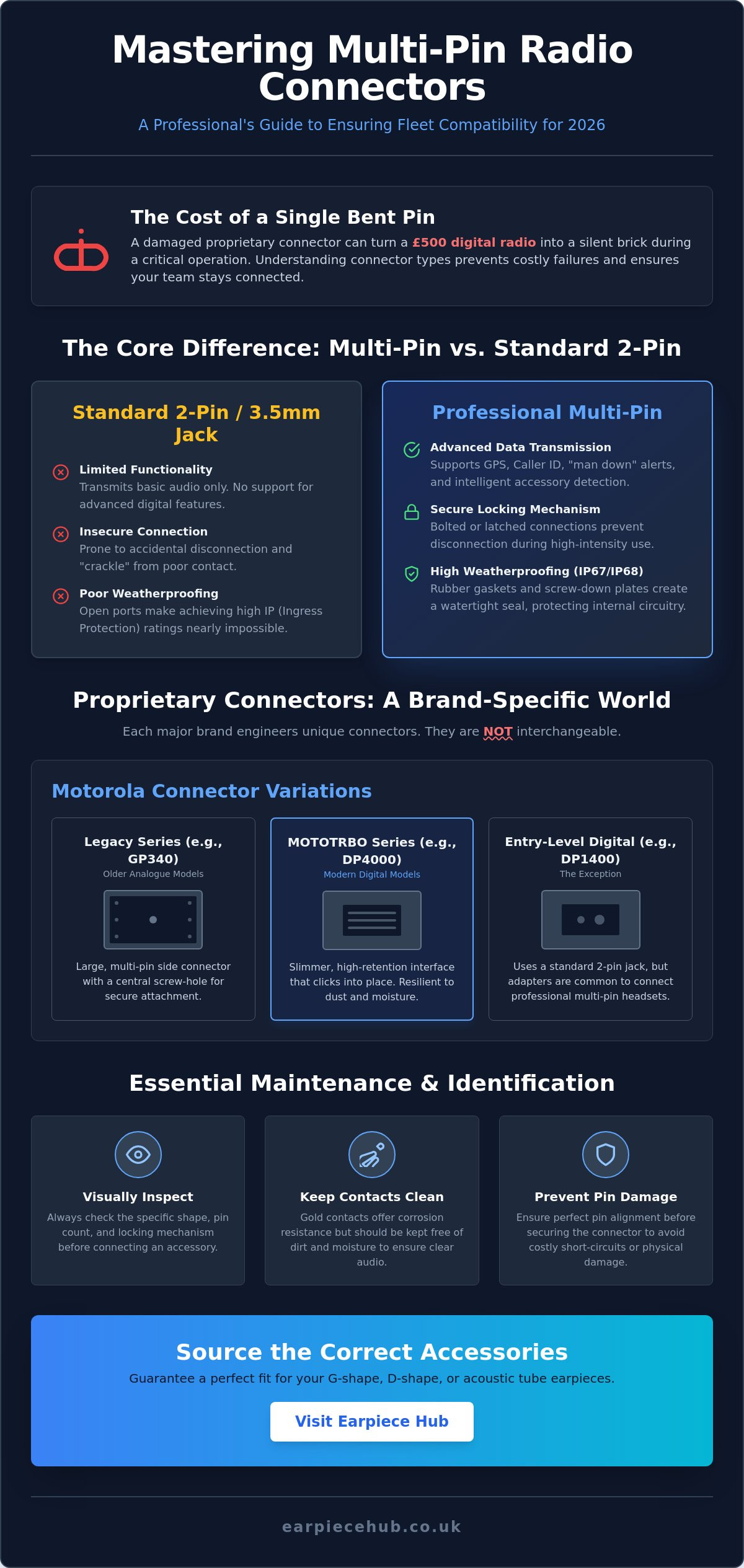
A single bent pin on a proprietary connector can turn a £500 digital radio into a silent brick during a critical security operation. It’s frustrating to invest in high-end audio gear only to find the plug doesn’t fit your port or causes audio failure due to poor pin alignment. Most professionals struggle with confusing brand terminology whilst trying to maintain a diverse fleet of equipment. Understanding the nuances of different multi-pin radio connector types is the only way to avoid these costly mistakes and ensure your team stays connected.
This comprehensive guide helps you master the technical differences between various professional connectors for 2026 to ensure your fleet remains compatible and your communications stay crystal clear. You’ll learn why multi-pin configurations are essential for advanced digital features and how to identify your specific connector with total certainty. We’ll break down the proprietary standards for major brands and show you how to source reliable UK-based replacements for your Motorola, Hytera, and Kenwood setups so you can stop guessing and start communicating.
Key Takeaways
- Understand the transition from basic 3.5mm jacks to specialised proprietary interfaces designed for modern digital radio features.
- Identify specific multi-pin radio connector types for Motorola and Hytera handsets to eliminate compatibility errors across your fleet.
- Compare the durability and security benefits of multi-pin designs versus standard 2-pin connectors in high-intensity professional settings.
- Master simple visual identification and maintenance techniques to keep gold contacts clean and prevent costly audio failures.
- Learn how to source the correct G-shape, D-shape, or acoustic tube earpieces from a specialist UK hub to guarantee a perfect fit.
What are Multi-Pin Radio Connectors and Why Do They Matter?
A multi-pin connector is a specialised interface designed to bridge the gap between a professional two-way radio and its accessories. Unlike the simple 3.5mm jacks found on consumer headphones, these connectors use a series of contact points arranged in a specific pattern. This design allows for more than just basic audio transmission. It creates a robust, multi-functional link that supports the advanced features of modern digital handsets. As the industry moves towards 2026, the complexity of these interfaces continues to grow to accommodate higher data speeds and more compact radio designs.
The evolution from analogue to digital has transformed how we look at common microphone connector types. Older systems relied on simple two-contact plugs that were prone to “crackle” and accidental disconnection. Today, professional multi-pin radio connector types provide a secure, bolted, or latched connection that can’t be easily pulled out during a struggle or when snagged on a tactical vest. This physical security is paired with improved audio fidelity, ensuring that instructions are heard clearly even in high-noise environments like construction sites or music festivals.
Waterproofing is another critical factor. Most high-tier radios carry an IP (Ingress Protection) rating, such as IP67 or IP68. Achieving this rating with a standard 3.5mm hole is nearly impossible. Multi-pin interfaces allow manufacturers to use rubber gaskets and screw-down plates. This creates a watertight seal that protects the radio’s internal circuitry from the unpredictable UK weather, ensuring your equipment doesn’t fail during a downpour. If you also need to ensure a secure, professional fit for your building’s electrical infrastructure, you can visit SocketSpacers.com to find custom-fit spacer plates for sockets and light switches.
The Shift from Analogue to Digital Connections
Modern digital radios require far more than two contact points. Whilst an analogue radio only needs to send and receive voice, a digital handset transmits data packets. Extra pins are used to carry GPS coordinates, caller ID signals, and emergency “man down” alerts. These additional contacts also enable advanced Push-To-Talk (PTT) functions and allow the radio to identify exactly which accessory is attached. This intelligence ensures the radio optimises its audio settings for an acoustic tube or a heavy-duty headset automatically.
Understanding Pin Counts and Layouts
You’ll encounter various configurations depending on your hardware, including 6-pin, 12-pin, and high-density 14-pin arrays. Precision is key here. A pitch below 0.4 mm is becoming more common as devices shrink, requiring accessories with perfect pin alignment to avoid short-circuiting. Gold-plated contacts are standard for professional-grade connectors because they offer superior corrosion resistance. This is vital in the UK, where moisture and salt air can quickly degrade inferior metals. You’ll generally find these in two styles: “side-mount” connectors that screw into the side of the casing, and “top-mount” styles often found on smaller, more covert handsets.
Common Multi-Pin Connector Types by Major Brand
Proprietary engineering is the hallmark of the professional radio industry. Manufacturers like Motorola, Hytera, and Kenwood design their own multi-pin radio connector types to ensure a secure fit and high-fidelity audio. This creates a challenge for fleet managers. You cannot simply swap an earpiece from a Motorola handset to a Hytera model, even if the pin count looks similar. Identifying the specific shape and locking mechanism of your radio’s accessory port is the first step in maintaining a functional communication system.
Motorola remains the industry standard for professional digital handsets. Their M-series connectors have evolved significantly over the last decade. Older analogue models used different configurations than the modern digital Mototrbo range. This evolution was driven by the need for more data-heavy features like GPS tracking and remote programming. If you’re managing a mixed fleet, you’ll need to pay close attention to these subtle physical differences to avoid damaging the delicate gold contacts on your accessories.
Motorola Multi-Pin Variations
The legacy GP340 and GP380 handsets utilised a large, multi-pin side connector with a central screw-hole. Whilst these are still found in some sectors, they’ve been largely replaced by the DP4000 series. Modern Mototrbo radios use a slimmer, high-retention multi-pin interface that clicks into place. This design is much more resilient to dust and moisture. Interestingly, the popular DP1400 uses a 2-pin jack rather than a multi-pin port. However, many organisations use adapters to allow the DP1400 to share the same professional headsets as their DP4400 models. If you need a Replacement Battery for Motorola DP1400 or a specialised multi-pin earpiece, our team can confirm the exact fit for your model.
Hytera and Kenwood Specialist Connectors
Hytera’s high-tier PD-series, including the PD705 and PD785, features a distinctive rectangular multi-pin connector. These are easily identified by their screw-down mechanism. This creates a watertight seal that is essential for outdoor security or industrial use. It’s one of the most secure multi-pin radio connector types available. It simply won’t budge, even if the cable is snagged during a shift. Be careful to distinguish between these “standard” multi-pins and the “compact” versions found on smaller, covert Hytera handsets.
Kenwood has also transitioned its NXDN and TK series radios to a more robust multi-pin interface. Moving away from the classic K1 2-pin was necessary to support digital protocols and improved noise cancellation. These connectors are wider and often feature a side-locking screw. To identify your Kenwood connector, look for:
- A wide, flat contact area on the side of the radio.
- A single or double screw-thread for accessory retention.
- A specific array of 6 to 14 gold pins.
Counting these pins is the most reliable way to ensure you’re ordering the correct earpiece for your specific Kenwood model.
Multi-Pin vs. 2-Pin: Which Connector Type Do You Need?
Choosing between these two formats often comes down to your specific operational environment. Standard 2-pin jacks are ubiquitous and familiar, but professional multi-pin radio connector types offer a level of reliability that simple plugs can’t match. In high-intensity security work, the physical connection is your lifeline. A 2-pin plug can easily be knocked loose or pulled out during a struggle, causing your radio to broadcast audio through the external speaker at the worst possible moment. Multi-pin interfaces solve this with mechanical locks and screw-down plates that keep the accessory firmly seated.
Beyond physical security, durability is a major factor. 2-pin connectors rely on the tension of the internal jack, which inevitably weakens over time. Multi-pin versions use a side-loading or top-loading array that distributes stress across a larger surface area. Whilst the initial investment for multi-pin accessories is higher, the longevity usually justifies the cost. You aren’t just paying for the plug; you’re paying for reinforced cabling and gold-plated contact points that survive thousands of duty cycles without signal degradation.
Feature support is where the difference becomes most apparent. Advanced functions like dedicated emergency buttons and complex PTT (Push-To-Talk) logic require the extra “lanes” provided by multi-pin layouts. On a 2-pin setup, the radio often struggles to distinguish between a microphone signal and a data command. Multi-pin systems eliminate this interference. This ensures your emergency alert triggers instantly when you press it, providing a level of safety that analogue-style connectors simply can’t guarantee.
When to Stick with 2-Pin Connectors
2-pin connectors remain the best choice for budget-conscious fleets using licence-free PMR446 radios. If you manage temporary event staff or have a high turnover of equipment, the low replacement cost is a significant advantage. They’re also essential for maintaining older analogue hardware that lacks the digital architecture to support complex multi-pin radio connector types. It’s a functional, “no-frills” solution for low-risk environments like small retail stores or local cafes where covertness and high-speed data aren’t priorities.
When to Upgrade to Multi-Pin Systems
If your team operates in high-stakes environments like emergency services, high-end security, or large-scale public events, multi-pin is non-negotiable. These systems are also the standard for Intrinsically Safe (ATEX) radios used in hazardous areas where a spark from a loose connection could be catastrophic. Upgrading now future-proofs your fleet. As digital software updates bring new features to your handsets, only a multi-pin interface will have the necessary contact points to support them. It’s a long-term investment in communication clarity and team safety.
How to Identify and Maintain Your Multi-Pin Connections
Identifying the correct accessory requires more than just knowing your radio’s brand. Since there’s no universal standard, multi-pin radio connector types vary wildly between specific models. A mistake here doesn’t just mean a returned parcel; it can lead to damaged ports and costly radio repairs. If you find your team also needs support with other vital hardware, First Help Tech provides professional repair services for smartphones and tablets to ensure your mobile communication tools stay in top condition. Mastering a few simple identification and maintenance steps will keep your communications clear and your hardware in service for years.
The Professional Identification Checklist
Before ordering new gear, follow these three steps to ensure a perfect match:
- Check the model number: On most professional handsets, the model number is located on a white label behind the battery. You’ll need to clip the battery off to see it. This number is the most accurate way to verify compatibility.
- Inspect the side port: Look for a central threaded screw hole or side-locking grooves. Some high-tier Motorola models use a latching mechanism, whilst Hytera often favours a screw-down plate.
- Count the contacts: Accessories for a 12-pin radio won’t work with a 6-pin port, even if the outer casing looks identical. Use a torch to verify the pin array on both the radio and the accessory jack.
Preventative Maintenance for Longevity
Audio issues like static or intermittent PTT are often caused by a build-up of skin oils, dust, or moisture on the gold contacts. Clean these points regularly using a lint-free cloth and 99% isopropyl alcohol. Avoid using cotton buds. They leave behind tiny fibres that can interfere with the signal and cause “one-way” audio. If a quick clean doesn’t solve the problem, it’s usually a sign of internal cable fatigue.
Never force a connector into place. If it doesn’t slide in smoothly, the pins are likely misaligned or you have the wrong connector type. Forcing it can bend the delicate pins on the accessory or damage the internal contacts of the radio port. If your radio port is compromised, it may require a professional service. If the earpiece itself is failing, you should Shop for high-quality radio accessories at the Hub to ensure a perfect fit and restored audio clarity.
Organise your storage to prevent damage whilst in transit. Don’t throw earpieces into a kit bag where they can tangle. Use a dedicated case or individual pouches for each accessory. This prevents the physical stress that leads to cable fraying and bent pins, ensuring your gear is ready for the next shift without fail.
Sourcing Reliable Multi-Pin Accessories at Earpiece Hub
Sourcing the correct gear shouldn’t be a gamble. When you deal with complex multi-pin radio connector types, generic retailers often fail to understand the technical requirements of high-tier handsets. Earpiece Hub operates as a specialist resource. We ensure that every accessory we sell matches the specific electrical and mechanical profile of your radio. This commitment to precision eliminates the risk of “dead on arrival” equipment or loose connections that compromise your team’s safety during a shift. Dealing with a UK specialist means you get technical equipment that’s fit for purpose and designed for the rigorous demands of professional environments.
Our inventory includes a vast array of hardware designed for maximum compatibility. We offer everything from specialised acoustic tubes to heavy-duty remote speaker microphones. We also provide an earpiece adapter for any radios. These are vital for fleets transitioning between different connector standards. They allow you to use your existing 2-pin accessories with newer multi-pin handsets, saving your organisation significant costs whilst you upgrade your hardware. Every product undergoes rigorous testing for durability and audio fidelity. We check for pin alignment, cable strain relief, and signal clarity to ensure your fleet remains crystal clear in any situation.
Specialist Earpieces for Motorola and Hytera
Our Acoustic Tube Earpiece for Motorola Radios is a top choice for covert operations. It features a high-retention multi-pin plug that won’t fail under physical pressure. For security teams requiring all-day comfort, our D-Shape Earpiece for Hytera Radios and G-Shape Earpiece for Kenwood Radios provide ergonomic fits that stay secure whilst you’re on the move. These designs are favourites amongst professionals who need to maintain situational awareness whilst receiving clear instructions. We also stock a Remote Speaker Microphone (RSM) featuring a robust multi-pin connector. These are ideal for users in high-stakes environments who need quick access to PTT without reaching for their handset in a crisis.
The Earpiece Hub Advantage
Reliability is our core character trait. We understand that in the security and communications industry, a broken earpiece is an urgent problem. That’s why we offer next-day shipping across the UK to get your fleet back to full strength immediately. If you’re still confused about your specific multi-pin radio connector types, our expert support team is available to help you identify the correct port. We don’t just sell boxes; we provide the technical expertise you need to keep your fleet compatible. It’s about being a dependable partner that understands the high-stakes nature of your work. Shop our full range of multi-pin earpieces today and experience the specialist difference that keeps your team connected.
Future-Proof Your Fleet with the Right Connections
Mastering the technical differences between multi-pin radio connector types ensures your communication fleet remains reliable throughout 2026 and beyond. These sophisticated interfaces are the essential gateway to advanced digital features like GPS data and emergency alerts. They provide the physical security and waterproofing that standard jacks simply cannot match in high-stakes environments. By following professional identification checklists and maintaining your gold-plated contacts with isopropyl alcohol, you avoid the common pitfalls of audio failure and expensive equipment damage.
Earpiece Hub is your dedicated UK specialist for professional radio accessories. We are experts in Motorola, Hytera, and Kenwood equipment, ensuring you get a perfect fit every time. Our commitment to quality means every connector is tested for the rigorous demands of your shift. With our Next Day Shipping and 24/7 Support, you don’t have to worry about downtime during critical operations.
Find the perfect multi-pin earpiece for your radio fleet
Stay connected with the right gear for the job.
When upgrading your communication equipment, you might also need to clear away old external hardware; Dish Goodbye provides professional removal of redundant satellite dishes and antennas for properties across the UK.
Frequently Asked Questions
What is a Motorola M1 vs M2 connector?
Motorola M1 and M2 are specific accessory codes used to identify connector styles. The M1 is the standard 2-pin jack featuring 2.5mm and 3.5mm plugs. The M2 is the legacy multi-pin connector found on professional analogue models like the GP340. Identifying these correctly is vital for fleet compatibility whilst ordering replacements or upgrades for your team.
Can I use an adapter to turn a 2-pin earpiece into a multi-pin one?
Yes, you can use a specialised earpiece adapter for any radios to bridge this gap. These adapters allow you to plug standard 2-pin accessories into professional multi-pin handsets. It’s a cost-effective solution for organisations that want to use existing headsets with newer digital hardware without the expense of a full fleet replacement.
Why does my multi-pin earpiece keep falling out?
This usually happens because the locking screw isn’t tightened or the retention clips have worn down. Ensure the side-mount screw is firmly seated into the radio’s threaded hole. If the connection remains loose, you might be using the wrong multi-pin radio connector types for your specific handset model, leading to poor physical alignment.
Are all 14-pin connectors the same across different brands?
No, 14-pin connectors are not universal and vary significantly between manufacturers. A 14-pin Motorola plug will not fit a 14-pin Hytera port because the physical layout and pin pitch are proprietary. Always check your radio’s exact model number before purchasing to ensure the accessory’s pin array matches your handset’s port perfectly.
How do I clean the pins on my radio earpiece safely?
Use 99% isopropyl alcohol and a lint-free cloth to gently wipe the gold contact points. Avoid using water or abrasive cleaners as these cause corrosion and permanent signal degradation. Regular cleaning prevents the build-up of oils and dust that lead to audio static or intermittent Push-To-Talk (PTT) failure during critical operations.
Will a multi-pin connector make my radio waterproof?
A multi-pin connector supports waterproof designs but does not guarantee them on its own. The handset and the accessory must both carry an IP rating, such as IP67. The multi-pin interface allows for a gasket seal and a screw-down plate that keeps moisture out of the radio’s internal circuitry during wet UK weather.
Why are multi-pin earpieces more expensive than single-pin ones?
Multi-pin earpieces are more expensive because they support advanced digital data and safety features. They require more gold-plated contacts and a complex internal wiring structure to handle GPS signals and emergency buttons. The higher price reflects the reinforced materials needed to survive high-intensity professional use in security and emergency services.
How can I tell if my radio has a proprietary connector?
Look for a side-mount port that features a screw hole or a complex array of gold contacts. If your handset doesn’t have a standard 3.5mm or 2-pin jack, it’s using proprietary multi-pin radio connector types. The most reliable way to confirm this is by checking the specific model number located behind the radio’s battery.
