





Uncategorized
Wireless Earpiece for Two-Way Radio: A UK Buying Guide
Oct
A wireless earpiece for two way radio may still connect to the radio by a cable. “Wireless” can describe how the radios communicate, rather than how the earpiece connects. Bluetooth is a separate connection option, so it’s worth knowing which meaning applies before you buy.
It’s easy to focus on the word “wireless” and overlook the detail that determines whether an earpiece will work: compatibility with your radio’s make, model and connection. The style matters too. Your working conditions, preferred fit and how you wear your radio can all affect which option is practical.
This guide explains the difference between radio communication and an earpiece connection, and sets out the checks to make before choosing. You’ll also compare acoustic tube, D-shape and G-shape styles, so you can narrow down an option that suits your radio and job.
Key Takeaways
- Before choosing a wireless earpiece for two way radio, identify your radio’s make, exact model and connection requirements.
- Bluetooth or another wire-free earpiece connection depends on compatibility between the radio and accessory.
- Compare acoustic tube, D-shape and G-shape styles, then consider fit, cable routing and how discreetly you need to wear the earpiece.
- Think about wearing time and your surroundings to narrow down a practical option for the job.
Wireless earpiece for two-way radio: what does “wireless” actually mean?
A two-way radio sends and receives messages wirelessly, but an earpiece attached to it may still connect by cable. The word “wireless” can describe the radio link between users, not the connection from the radio to the earpiece. That distinction is central when choosing a wireless earpiece for two way radio.
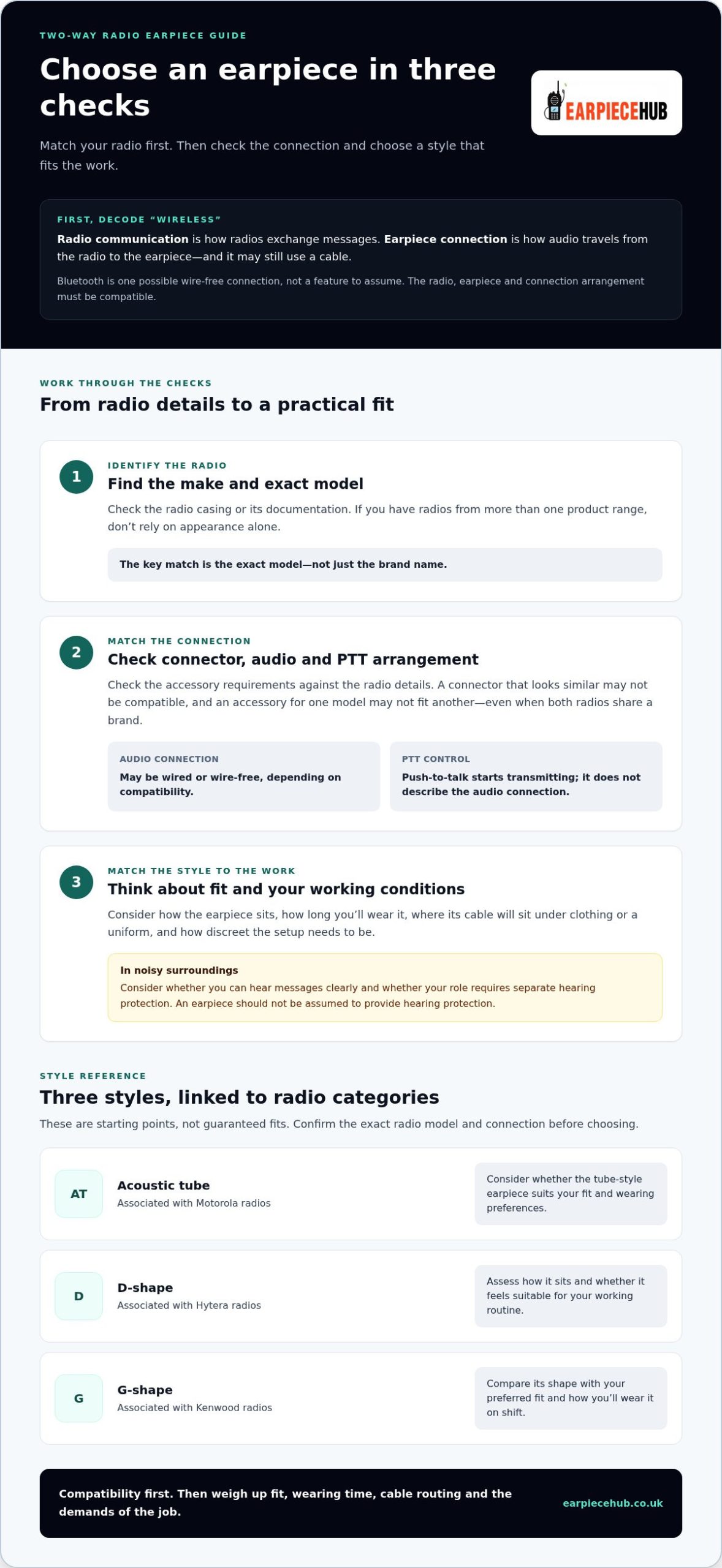
Wireless radio communication describes how radios exchange messages; a wireless earpiece connection describes how audio travels from the radio to the earpiece.
Does a wireless radio earpiece mean Bluetooth?
Not necessarily. Bluetooth is one possible way to connect an earpiece without a cable, using Bluetooth technology. It isn’t a feature to assume in every radio or earpiece. The radio, earpiece and connection arrangement must be compatible for the setup to work.
Keep the earpiece connection separate from push-to-talk (PTT). PTT is the control used to start transmitting; it doesn’t describe whether audio reaches the earpiece over a cable or wirelessly. The position and operation of the PTT control can vary between setups, so include it in your compatibility check.
Before buying, identify the radio’s make and exact model, then check its supported connection and the accessory’s requirements. A connector that looks similar may not be compatible. Check the connection type and PTT arrangement against the radio and accessory details rather than relying on the brand name alone. A wired acoustic tube earpiece, for example, can be used with a radio that communicates wirelessly; its cable is simply the local audio connection.
How to choose a wireless earpiece for your two-way radio
Start with compatibility, then choose a style that suits the job. Work through these three steps before comparing options:
- 1. Identify the radio. Note its make and exact model, usually shown on the casing or in the radio’s documentation. Don’t rely on appearance alone if you have radios from more than one product range.
- 2. Match the connection. Check the required connector and control arrangement, including how push-to-talk works. An accessory for one model may not fit another, even if both radios share a brand.
- 3. Match the style to the work. Consider how the earpiece fits, how long you’ll wear it, where its cable will sit under clothing or a uniform, and how discreet the setup needs to be.
Which compatibility details should you check first?
Match the accessory to the exact radio model and connection, not the brand alone. Motorola, Hytera and Kenwood are distinct brands, and their earpiece options aren’t interchangeable by name. Earpiece Hub’s range includes acoustic tube earpieces for Motorola radios, D-shape earpieces for Hytera radios and G-shape earpieces for Kenwood radios. Use the model and connection details to guide your selection.
Consider your surroundings as well. In a busy or noisy workplace, think about whether you can hear radio messages clearly and whether your role requires separate hearing protection. An earpiece shouldn’t be assumed to provide hearing protection.
Compare radio earpiece options by radio compatibility and job requirements, rather than choosing a wireless earpiece for two way radio by its label alone. If you’re considering a wire-free connection, check that the radio and accessory support the same connection arrangement.
Which two-way radio earpiece style suits your work?
The right style depends on your radio and how you’ll wear the earpiece during a shift. Acoustic tube, D-shape and G-shape refer to different earpiece styles, not interchangeable names or a guaranteed fit. Use the comparison below as a starting point, then weigh up your preferred fit, wearing time and how discreet the setup needs to be.
Acoustic tube, D-shape or G-shape: what is the difference?
| Style | Confirmed radio category | Practical consideration |
|---|---|---|
| Acoustic tube | Motorola radios | Consider whether the tube-style earpiece suits your fit and wearing preferences. |
| D-shape | Hytera radios | Assess how the earpiece sits and whether it feels suitable for your working routine. |
| G-shape | Kenwood radios | Compare its shape with your preferred fit and the way you’ll wear it on shift. |
These categories identify options associated with particular radio brands; they don’t establish compatibility with every model. Check the exact radio model and connection requirements before choosing. For prolonged use, consider how the earpiece feels over time, whether its cable can be routed neatly and whether it works with your uniform or other equipment. In noisy surroundings, consider your communication needs alongside any workplace hearing-protection requirements. Don’t assume an earpiece itself provides hearing protection.
Browse Earpiece Hub’s radio earpiece options to compare acoustic tube, D-shape and G-shape styles for Motorola, Hytera and Kenwood radios. Choose a wireless earpiece for two way radio by matching the radio connection and the demands of your job.
Shop radio earpieces at Earpiece Hub.
Choose your earpiece with confidence
“Wireless” can describe how radios communicate, not necessarily how an earpiece connects. Before choosing a wireless earpiece for two way radio, match the accessory to the exact radio model and connection. Then consider fit, wearing time, cable routing and how discreet it needs to be at work.
Style matters too. Earpiece Hub offers acoustic tube options for Motorola radios, D-shape options for Hytera and G-shape options for Kenwood. These are distinct categories, not universal fits. Earpiece Hub specialises in professional radio communication accessories, with earpiece options across these brands.
Ready to compare styles and compatibility? Shop two-way radio earpieces at Earpiece Hub and choose an option suited to your radio and working conditions.
Frequently Asked Questions
Can I use a Bluetooth earpiece with any two-way radio?
No. A Bluetooth earpiece works only when the radio and accessory support a compatible connection arrangement. Some radios use wired earpieces, and push-to-talk controls may also differ between setups. Before choosing a wireless earpiece for two way radio, check the radio’s exact model and connection requirements. Don’t assume Bluetooth compatibility from the radio brand alone.
Are two-way radio earpieces wireless?
Not always. A radio communicates wirelessly with other radios, but its earpiece may connect to the radio by cable. “Wireless earpiece” usually refers to a wire-free connection between the accessory and radio, such as Bluetooth. That connection is separate from the radio’s transmission method, and compatibility depends on the specific radio and earpiece.
How do I know which earpiece fits my two-way radio?
Start with the radio’s make and exact model, then match the earpiece’s connector and control arrangement. Brand alone isn’t enough to establish compatibility. Earpiece Hub’s range includes acoustic tube earpieces for Motorola radios, D-shape earpieces for Hytera radios and G-shape earpieces for Kenwood radios. Use the model details to select a suitable style.
Which is better for a two-way radio, an acoustic tube or a D-shape earpiece?
Neither is universally better; compatibility and wearing preference should guide your choice. Acoustic tube earpieces are an option for Motorola radios, whilst D-shape earpieces are an option for Hytera radios. First check that the style suits your radio model and connection. Then consider how you want the earpiece to fit and feel during your working day.
