





Uncategorized
Professional Motorola DP1400 Earpiece Guide: Choosing Reliability in 2026
Sep
Your Motorola DP1400 is only as reliable as the cable connecting it to your ear. In a high-pressure security environment, a snapped wire or a muffled speaker isn’t just an inconvenience; it’s a total operational failure. You’ve likely dealt with the frustration of audio cutting out mid-sentence or the nagging ache of a poorly designed Motorola DP1400 earpiece during a twelve-hour shift. It’s exhausting to manage equipment that fails when you need it most, especially when clear communication is the only thing keeping your team safe.
This guide ensures you never lose contact again. You’ll discover how to select the most durable, high-clarity peripherals to ensure seamless communication in any setting. We’ll break down the technical differences between 1-wire and 2-wire configurations, explore the benefits of acoustic tubes versus G-shape designs, and explain how the right accessories can extend the life of your kit. We’re covering everything from IP54-rated durability to professional hygiene standards for shared equipment, giving you the specialist knowledge needed to make a reliable investment.
Key Takeaways
- Master the technical specifications of the M1 2-pin connector to ensure your Motorola DP1400 earpiece maintains a secure, uninterrupted audio connection during critical operations.
- Identify the ideal earpiece style for your specific environment, whether you require the covert profile of an acoustic tube or the all-day comfort of a G-shape design.
- Learn professional maintenance techniques to prevent common audio failures, such as clearing moisture from acoustic tubes and protecting wires from stress-related kinks.
- Maximise operational uptime by sourcing high-quality peripherals from a UK specialist offering next-day shipping and 24/7 professional support.
Understanding the Motorola DP1400 Connector and Audio Profile
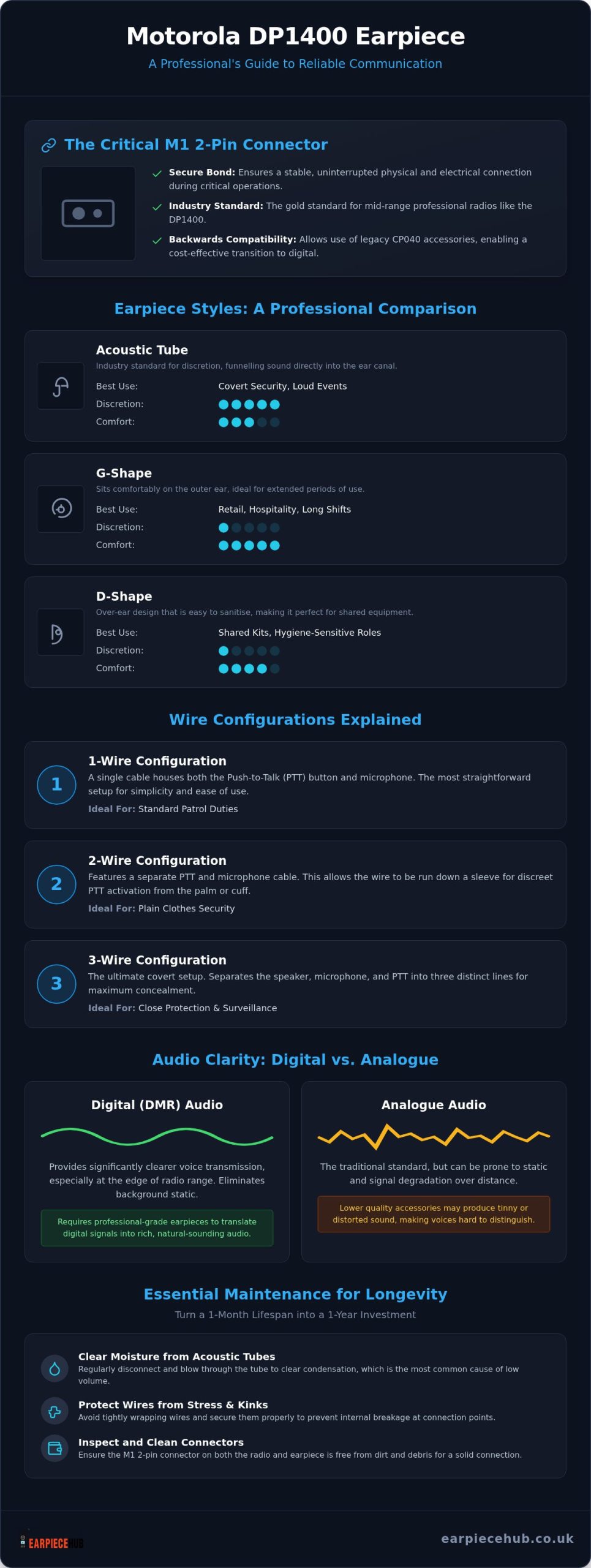
The Motorola DP1400 relies on the M1 2-pin side connector, a design that’s stood the test of time for a reason. It’s the gold standard for mid-range professional portables. For a Motorola DP1400 earpiece to function correctly, the physical bond between the radio and the accessory must be absolute. Security teams and event staff are constantly moving; any slight gap in the connection leads to intermittent audio or complete silence during a radio call. It’s a failure that professionals can’t afford.
Professional accessories use a high-tension friction-fit or a dedicated security bracket to lock the pins in place. This level of physical security was refined by the pioneering communications company Motorola to ensure their equipment survived the rigours of field use. Without this secure interface, your communication remains vulnerable to the slightest bump or snag against a uniform or equipment vest.
The Technical Specification of the M1 2-Pin
The M1 interface features two distinct pins with specific diameters designed for a precise, snug fit. This configuration ensures that a Motorola DP1400 earpiece provides a stable electrical path for both the microphone and the speaker. A major advantage for long-term users is the backwards compatibility. You can use your legacy CP040 accessories whilst maintaining the superior digital audio quality the newer DP1400 provides, allowing for a cost-effective transition to digital fleets.
Digital vs Analogue Audio Output
The DP1400 operates in both analogue and digital (DMR) modes. Digital signals provide clearer voice transmission at the edge of the radio’s range, but they require high-quality components to sound natural. Professional earpieces utilise high-impedance speakers to translate these digital packets into rich, clear audio. Cheaper alternatives often produce a tinny, distorted sound that makes it difficult to distinguish voices in noisy environments. Choosing professional-grade hardware ensures that your reception remains crisp, regardless of whether you’re operating on an older analogue channel or a modern digital network.
Choosing the Best Earpiece Style for Your Environment
Selecting the right Motorola DP1400 earpiece requires matching the hardware to your specific operational environment. For security personnel working in loud venues, clear reception is a safety requirement. High-noise environments often necessitate specialised gear to meet OSHA’s occupational noise exposure standards, ensuring that critical messages aren’t lost amongst background din.
Acoustic Tube vs G-Shape: A Professional Comparison
| Style | Best Use Case | Discretion Level | Comfort |
|---|---|---|---|
| Acoustic Tube | Covert security, loud events | High | Moderate |
| G-Shape | Retail, long shifts | Low | High |
| D-Shape | Shared kits, hygiene-sensitive | Low | High |
The Acoustic Tube Earpiece for Motorola Radios remains the industry standard for discretion. It funnels sound directly into the ear canal, providing passive noise isolation that’s vital in crowded spaces. Conversely, G-shape and D-shape designs sit on the outer ear. These are often preferred for twelve-hour shifts because they don’t cause the “plugged” sensation of in-ear tips. D-shape models are particularly useful for teams sharing equipment, as the over-ear design is easier to sanitise than an internal earbud.
Wire Configurations: From Simple to Covert
Managing your Motorola DP1400 earpiece wires effectively prevents snags and equipment damage.
- 1-Wire: A single cable houses both the PTT and microphone. It’s the most straightforward setup for standard patrol duties where simplicity is key.
- 2-Wire: Features a separate PTT and microphone cable. This allows you to run the wire down a sleeve, enabling you to trigger the PTT from your palm.
- 3-Wire: The ultimate covert configuration. It separates the speaker, microphone, and PTT into three distinct lines, perfect for close protection roles where total concealment is mandatory.
If you’re unsure which configuration fits your team’s requirements, browse our full range of professional radio accessories to find the right match.
Maintenance and Longevity: Preventing Audio Failure
Maintaining your Motorola DP1400 earpiece is the difference between a one-month lifespan and a one-year investment. The most frequent cause of volume loss in covert setups is moisture build-up within the acoustic tube. Condensation from body heat blocks the air column, muffling the speaker. You can clear this by detaching the tube and using a small air blower or simply allowing it to air-dry. Regular ear tip replacement is the most cost-effective way to maintain audio clarity whilst ensuring professional hygiene standards are met amongst team members.
Stress on the wiring is another common failure point. Wires often kink near the M1 2-pin connector due to improper storage. Once the internal copper strands fracture, you’ll experience intermittent audio that cuts out when you move your head. This is why a secure physical connection, as discussed earlier, must be paired with careful handling.
Cleaning and Storage Best Practices
Use alcohol-free wipes on the plastic components of G-shape or D-shape models. Harsh chemicals degrade the outer coating, making the plastic brittle and prone to snapping. When finishing a shift, don’t wrap the cable tightly around the radio. Instead, coil the wire loosely in a circular motion to prevent internal fractures and preserve the cable’s memory.
Signs Your Earpiece Needs Replacing
Crackling audio usually indicates a failing PTT switch or a frayed internal wire. If the sound only returns when you wiggle the connector, the internal pins are likely damaged. Ensure your radio has a fresh Replacement Battery for Motorola DP1400, as low voltage can sometimes mimic earpiece failure by providing inconsistent power to the audio circuit. If cleaning the tube doesn’t restore volume, it’s time to invest in a new unit.
Keep your comms kit in peak condition by browsing our range of Replacement Acoustic Tubes and Ear Tips to ensure your team remains connected.
Professional Communication Solutions at Earpiece Hub
Earpiece Hub serves as the central resource for UK radio professionals who cannot afford communication downtime. We understand that in high-stakes environments, a Motorola DP1400 earpiece isn’t just a peripheral; it’s a critical lifeline. Our status as a reliable specialist comes from a deep focus on technical excellence and industry-specific needs. We provide 24/7 professional support and rapid next-day shipping to ensure your security team or event staff never lose contact when it matters most.
Next Day Reliability for UK Businesses
Security firms and event organisers frequently face urgent equipment requirements. Whether you’re scaling up for a national event or replacing damaged gear after a shift, our logistics are tuned for speed. Being a UK-based specialist retailer allows us to offer technical expertise that generic retailers lack. We provide detailed guidance on 1-wire, 2-wire, and 3-wire configurations, ensuring your personnel have the correct setup for their specific duties. This specialised knowledge ensures you don’t waste budget on incompatible hardware.
Beyond the Earpiece: Full Fleet Support
Maintaining a professional fleet requires a comprehensive approach to peripherals. To ensure your Motorola DP1400 earpiece receives consistent power for the full duration of a shift, we supply high-capacity replacement batteries and six-way multi-unit chargers. Whilst standard earpieces suit most roles, some high-noise environments require more robust noise-cancelling overhead headsets or remote speaker microphones (RSMs). Our universal earpieces and headset adapters further ensure that your equipment remains versatile across different radio brands. Keeping your fleet operational is our priority, providing a single point of contact for all technical radio accessories.
Browse our full range of Motorola DP1400 accessories at Earpiece Hub to secure your communication infrastructure today.
Secure Your Professional Communications in 2026
Reliable communication depends on matching hardware to your specific operational needs. By ensuring a secure M1 2-pin connection and selecting a style that balances discretion with long-shift comfort, you protect your team from critical audio failure. Regular maintenance is the most cost-effective way to extend equipment life and maintain hygiene. Your Motorola DP1400 earpiece is a vital link in your safety chain. Don’t let it be the weakest one.
Earpiece Hub has served as a dedicated UK Specialist Retailer since 2015. We understand high-stakes radio communication. Whether you require a covert 3-wire setup or a robust G-shape design, we provide the expertise to keep your fleet operational. Next-day shipping is available for all urgent requirements. We’re the partner you can depend on for technical excellence. Shop Professional Motorola DP1400 Earpieces now to upgrade your kit. Invest in reliability and communicate with absolute confidence.
Frequently Asked Questions
Is the Motorola DP1400 earpiece compatible with other Motorola radios?
Yes, the Motorola DP1400 earpiece uses the industry-standard M1 2-pin connector. This makes it compatible with a wide range of legacy and current Motorola models, including the CP040, CP140, and GP300 series. It’s a versatile choice for fleets that mix older analogue equipment with newer digital portables. Always ensure the 2-pin spacing matches exactly to maintain a secure physical connection and prevent audio dropouts during active shifts.
What is the difference between a 1-wire and 2-wire earpiece?
A 1-wire earpiece features a single cable housing both the microphone and Push-to-Talk (PTT) button, typically clipped to a lapel. In contrast, a 2-wire configuration splits these into two separate lines. This allows you to run the PTT and microphone down your sleeve, enabling discreet operation from the palm of your hand. 2-wire setups are the preferred choice for covert security roles requiring high discretion.
How do I clean the acoustic tube on my Motorola earpiece?
To clean the acoustic tube, first detach it from the earpiece transducer by twisting the plastic connector. You can clear minor blockages with a small air blower or by rinsing the tube in warm, soapy water. It’s vital to ensure the tube is completely dry before reattaching it. Moisture trapped inside will muffle the sound or damage the sensitive electronic components of your audio kit.
Why is my Motorola DP1400 earpiece audio very quiet or muffled?
Quiet or muffled audio is frequently caused by moisture build-up or earwax blockages within the acoustic tube or ear tip. Check for condensation droplets in the clear tube, as these block sound waves. If the hardware is clear, the issue may stem from a low-voltage radio battery. Switching to a fresh Replacement Battery for Motorola DP1400 often restores full volume by providing consistent power to the internal audio circuitry.
Can I use a 3.5mm jack earpiece with the Motorola DP1400?
You cannot plug a standard 3.5mm jack earpiece directly into the radio because it lacks the necessary M1 2-pin interface. However, you can use an earpiece adapter for any radios to bridge this gap. This allows you to connect standard headphones or headsets to your professional portable. Using an adapter is a practical solution for teams that require specific audio hardware not natively designed for the DP1400.
