





Uncategorized
Multi-Unit Radio Charger: Fleet Manager’s Guide 2026
That tangled nest of individual chargers taking over your comms room isn’t just an eyesore; it’s a genuine operational risk. If even one radio heads into a shift under-charged, your team’s coordination suffers. And if batteries are cycling through cheap, incompatible chargers, you’re quietly shortening their lifespan with every rotation.
Most fleet managers already know the problem. Radios left on mismatched chargers, sockets fighting for space, and that sinking feeling when a handset comes off charge at 60%. Switching to a dedicated multi-unit charger for two-way radios solves all three issues at once, and it costs far less than replacing a fleet of degraded batteries ahead of schedule.
This guide covers everything you need to centralise your charging setup properly. You’ll learn how intelligent multi-unit charging protects battery health, what to look for when specifying a unit for your fleet size, and why compatible replacement batteries are just as important as the charger itself. Whether you’re managing a security team, an events crew, or a logistics operation, the right charging solution keeps every radio shift-ready, every time.
Key Takeaways
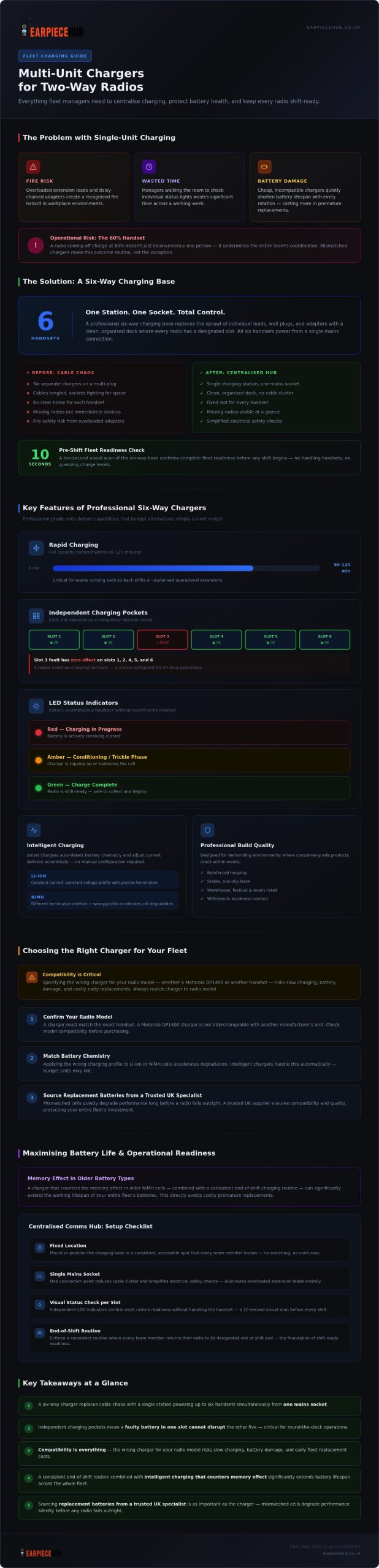
- A multi-unit charger for two-way radios replaces cable chaos with a single, centralised station that powers up to six handsets simultaneously from one mains socket.
- Professional six-way chargers use independent charging pockets, meaning a faulty battery in one slot cannot disrupt the charge cycle of the others — a critical safeguard for operational fleets.
- Compatibility is everything: specifying the wrong charger for your radio model, whether a Motorola DP1400 or another handset, risks slow charging, battery damage, and costly early replacements.
- A simple end-of-shift routine, combined with a charger that counters the memory effect in older battery types, can significantly extend the working lifespan of your entire fleet’s batteries.
- Sourcing replacement batteries from a trusted UK specialist is just as important as the charger itself — mismatched cells quietly degrade performance long before a radio fails outright.
Streamlining Operations with Multi-Unit Radio Charging Stations
A multi-unit charger for two-way radios is exactly what the name suggests: a single, centralised station that powers multiple handsets simultaneously from one mains connection. A professional six-way charging base replaces the sprawl of individual leads, wall plugs, and adapters with a clean, organised dock where every radio has a designated slot. That physical simplicity translates directly into operational clarity.
The psychological effect on staff shouldn’t be underestimated. When every radio has a fixed home, team members know precisely where to collect a fully charged handset before a shift. There’s no searching, no guessing, and no picking up a radio only to discover it’s at 40%. That certainty builds confidence before a shift even begins.
Centralisation also tightens equipment accountability. A six-way base makes it immediately obvious if a handset is missing from rotation. Managers can see at a glance whether all six slots are occupied, rather than mentally tracking which radio went where across a building.
The Problem with Single-Unit Charging for Large Teams
Running six individual chargers through a multi-plug adapter isn’t just untidy; it’s a genuine fire safety concern. Overloaded extension leads are a recognised hazard in workplace environments, and a comms room full of daisy-chained adapters compounds that risk with every additional charger added. Beyond safety, the time a manager spends walking the room checking individual status lights adds up quickly across a working week.
Creating a Centralised Communication Hub
A dedicated comms desk built around a six-way charging base gives fleet managers one single point of failure to check. Before any shift, a ten-second visual scan confirms fleet readiness. Consider organising the space with these fundamentals:
- Fixed location: Mount or position the charging base in a consistent, accessible spot every team member knows.
- Single mains socket: One connection point reduces cable clutter and simplifies electrical safety checks.
- Visual status check: Independent charging indicators per slot confirm each radio’s readiness without handling the handset.
That single-point discipline is what separates a reactive comms setup from a genuinely reliable one.
Key Features of Professional Six-Way Multi-Unit Chargers
Not all charging stations are built to the same standard. A professional-grade multi-unit charger for two-way radios delivers a specific set of technical capabilities that budget alternatives simply can’t match. Understanding those features helps fleet managers specify the right unit rather than discovering its limitations mid-operation.
Rapid charging is the headline capability. Professional six-way units return most commercial handsets to full capacity within 90 to 120 minutes, depending on battery chemistry and depletion level. That turnaround window matters enormously for teams running back-to-back shifts or responding to unplanned operational extensions.
Independent charging pockets are equally critical. Each slot operates as a discrete circuit. If a battery in slot three is faulty, degraded, or behaving erratically, it has no effect on the charge cycles running in slots one, two, four, five, or six. For a security team rotating six radios through a 24-hour operation, that isolation isn’t a luxury; it’s a safeguard.
LED status indicators give users instant, unambiguous feedback without touching the handset:
- Red: Charging in progress. Battery is actively receiving current.
- Amber: Conditioning or trickle phase. The charger is topping up or balancing the cell.
- Green: Charge complete. The radio is shift-ready.
Build quality is a non-negotiable consideration for high-traffic environments. Warehouse floors, festival backstages, and event control rooms are demanding spaces. A professional unit uses reinforced housings and stable, non-slip bases designed to withstand the kind of incidental contact that would crack a consumer-grade product within weeks.
Intelligent Charging and Voltage Regulation
Smart chargers detect battery chemistry automatically, adjusting current delivery for Li-ion and NiMH cells without manual configuration. This matters because Li-ion batteries require a precise constant-current, constant-voltage profile to charge safely, whilst NiMH cells use a different termination method entirely. Applying the wrong profile accelerates capacity loss. Overcharge protection actively monitors cell voltage and cuts current before swelling or permanent degradation occurs, which is the primary cause of premature battery failure in unmanaged charging setups.
Space-Saving Design and Portability
A standard six-way base occupies a fraction of the surface area that six individual desktop pods would require. Wall-mountable options eliminate bench space entirely, keeping work surfaces clear and the charging station out of the operational flow. For fleet managers specifying a comms room layout, that compact footprint is a genuine practical advantage. If you’re sourcing compatible replacement batteries alongside your charger, browse the radio battery range at Earpiece Hub to ensure your cells and charging station are matched from the outset.
Choosing the Right Multi-Unit Charger for Your Radio Fleet
Compatibility is the single most important factor when specifying a multi-unit charger for two-way radios. A charger that fits the wrong model doesn’t just charge slowly; it can fail to make proper contact with the battery terminals entirely, leaving you with a radio that’s been sitting in a dock all night and still reads 50% come shift start. Getting the specification right before purchase is far cheaper than discovering the mismatch after deployment.
The first question to answer is whether your fleet is uniform or mixed. A single-model fleet, say, six Motorola DP1400 handsets, is straightforward to specify. A mixed fleet running DP1400s alongside CP040s, or handsets from different manufacturers, requires a charger with interchangeable pods or a universal base that genuinely accommodates each model’s specific battery contact geometry. Not all “universal” units do this reliably.
You’ll also need to account for radios fitted with high-capacity extended batteries. These are physically taller than standard cells and won’t seat correctly in pockets designed for slim-profile batteries. Check the charger’s maximum battery depth before ordering. Similarly, if your team routinely leaves belt clips attached, confirm the dock’s clearance dimensions accommodate the clip without forcing the radio into an angled, incomplete connection.
UK plug compatibility is non-negotiable for site-wide deployment. Verify that any unit is rated for 230V, 50Hz mains supply and carries a UK three-pin plug as standard rather than requiring an adapter. An adapter introduces another potential point of failure in a high-rotation charging environment.
Compatibility with Motorola, Kenwood, and Hytera
Each manufacturer uses distinct battery contact configurations. Motorola’s DP1400 uses a specific pin layout that differs from Kenwood and Hytera contact points. A charger designed for one brand will not reliably charge another, regardless of how similar the handsets appear physically. “Universal” chargers that lack precise fitment for professional handsets often rely on friction-fit contacts that shift over time, producing intermittent charging rather than a clean, consistent cycle. Always specify by exact model rather than brand family alone.
Charging with Accessories: Earpieces and Cases
Acoustic tube earpieces should always be disconnected before placing a radio into a charging dock. The connector jack sits on the radio’s side or top port, and a cable under tension whilst the handset is docked risks both port damage and an incomplete seating position in the charging pocket. If your radios are stored in protective holsters, check whether the holster’s design allows the battery contacts to align fully with the charger’s pins. Many rigid cases block contact entirely and must be removed before docking.
Specifying the right charger is straightforward once you know your fleet’s exact models and accessories. Check the six-way charger and compatible battery range at Earpiece Hub to confirm the right fit for your handsets before ordering.
Maximising Battery Life and Operational Readiness
A professional multi-unit charger for two-way radios is only as effective as the habits built around it. The hardware does the heavy lifting, but a consistent end-of-shift routine is what separates a fleet that lasts three years from one that’s quietly degrading after twelve months.
Best Practices for Daily Fleet Maintenance
Four steps, applied consistently, will extend your battery pool’s working lifespan significantly:
- Step 1: Inspect battery contacts. Before docking, check both the radio’s battery terminals and the charger’s pins for dust, corrosion, or debris. A build-up of grime on the contacts creates resistance, which means incomplete charging cycles even when the status light turns green.
- Step 2: Switch the radio off before docking. A powered-on radio draws current from the battery whilst simultaneously receiving charge. This creates a phantom drain loop that artificially extends charge time and stresses the cell. Off means off.
- Step 3: Rotate handsets deliberately. Don’t always return the same radio to the same slot. Rotating handsets across the pool ensures even wear across all batteries, preventing one or two cells from cycling far more frequently than the rest.
- Step 4: Check the environment. Charging stations should be positioned away from direct heat sources, in a ventilated area between 10°C and 25°C. Excessive heat accelerates electrolyte breakdown in Li-ion cells. A warm comms room cupboard with no airflow is one of the fastest ways to shorten a battery fleet’s lifespan.
On the memory effect: this is a genuine concern for older NiMH batteries, where repeated partial discharge and recharge cycles cause the cell to “remember” a reduced capacity. Modern intelligent chargers counter this through a conditioning cycle that fully discharges the cell before recharging, effectively resetting the usable capacity. If your fleet still runs NiMH chemistry, a charger with an active conditioning mode isn’t optional.
Knowing when to replace a battery versus the charger base itself is straightforward in practice. If a single radio consistently underperforms whilst others charge correctly in the same unit, the battery is the fault. If multiple radios fail to reach full charge regardless of which slot they occupy, the charger base warrants inspection. Independent pocket circuitry makes this diagnosis simple: isolate the variable, and the answer becomes obvious.
The Role of High-Quality Replacement Batteries
A professional charging station paired with a substandard replacement battery is a false economy. Low-grade cells often use inferior separators and inconsistent cell chemistry that intelligent chargers can’t fully compensate for. For Motorola DP1400 fleets specifically, using a correctly rated replacement battery ensures the charger’s voltage profile matches the cell’s actual requirements, delivering a clean, complete cycle every time.
Sourcing from a specialist matters. A UK-based supplier with next-day shipping means a degraded battery can be replaced before it becomes an operational gap, not after. Browse our range of Motorola-compatible multi-unit chargers and batteries at Earpiece Hub to keep your fleet running at full capacity, shift after shift.
Build a Fleet That’s Ready Before Every Shift
Operational readiness starts long before a shift begins. A professional multi-unit charger for two-way radios removes the guesswork from fleet management, replacing cable clutter and inconsistent charging with a single, organised station that delivers shift-ready handsets, every time. Pair that with a disciplined end-of-shift routine and correctly specified replacement batteries, and you’re protecting the long-term performance of your entire fleet, not just solving today’s problem.
The difference between a reactive comms setup and a reliable one often comes down to two decisions: choosing a charger that’s genuinely compatible with your handsets, and sourcing replacement batteries from a specialist who understands your equipment. Both matter equally.
Earpiece Hub offers specialist UK support across Motorola, Kenwood, and Hytera fleets, with next-day delivery available on core lines and products expertly tested for Motorola DP1400 compatibility. When a battery degrades, you can replace it before it becomes an operational gap.
Shop professional multi-unit chargers for your radio fleet at Earpiece Hub and keep every handset performing at full capacity, shift after shift.
Frequently Asked Questions
Can I charge different brands of radios in the same multi-unit charger?
Generally, no. Each manufacturer uses a distinct battery contact geometry, so a charger designed for Motorola handsets won’t reliably seat a Kenwood or Hytera radio. Some units advertise universal compatibility, but these often rely on friction-fit contacts that shift over time and produce inconsistent charging cycles. If your fleet mixes brands, you’ll need either a charger with confirmed interchangeable pods for each specific model, or separate dedicated units per brand.
How long does a six-way multi-unit charger take to fully power a fleet?
A professional-grade multi-unit charger for two-way radios typically returns a fully depleted handset to complete charge in 90 to 120 minutes, depending on battery chemistry and how deeply the cell was discharged. Because each pocket operates independently, all six radios charge simultaneously rather than sequentially. A fleet of six handsets placed on charge at the end of a shift will be fully ready within two hours, making overnight charging straightforwardly reliable for most operational schedules.
Is it safe to leave radios in a multi-unit charger over the weekend?
Yes, provided the charger includes overcharge protection. Professional units switch to a trickle or maintenance mode once a cell reaches full capacity, preventing the voltage from continuing to climb. What you should avoid is leaving radios in a poorly ventilated, warm space over an extended period, as sustained heat accelerates battery degradation regardless of charging status. Position the station in a cool, ventilated area and ensure the mains connection is on a properly rated socket, not an overloaded extension lead.
Why is my multi-unit charger flashing red or amber?
A solid or flashing red light typically indicates active charging; the battery is receiving current and hasn’t yet reached capacity. Amber usually signals a conditioning or trickle phase, where the charger is balancing or topping up the cell in the final stage of the cycle. If a slot flashes red continuously without progressing to amber or green, that points to a battery fault rather than a charger fault. Swap the battery into a different slot; if the issue follows the battery, the cell needs replacing rather than the base unit.
Do I need to remove my earpiece or belt clip before charging?
Yes to both. An acoustic tube earpiece connected at the radio’s port creates cable tension that can prevent the handset from seating fully in the charging pocket, risking an incomplete contact connection. Belt clips present a similar problem: many rigid clips alter the radio’s profile enough to misalign the battery terminals with the charger’s pins. Remove both accessories before docking to ensure a clean, consistent charge cycle every time. It takes seconds and prevents the frustrating outcome of a radio that’s been docked all night but hasn’t actually charged.
