





Uncategorized
Motorola Radio Earpiece Compatible: The 2026 Professional Guide

Jul
Professional compatibility is about matching the earpiece wiring architecture to your specific operational environment, not just finding a plug that fits. You’ve likely experienced the frustration of connector pins that don’t sit securely or audio that fails during a critical security shift. We understand that when you’re evaluating Motorola DP4400e earpiece options, reliability is the only metric that truly matters for your team’s safety.
It’s a challenge every fleet manager faces, but the right gear can eliminate ear fatigue and cut your long-term maintenance costs. This guide will show you how to select the perfect compatible earpiece for your Motorola radios whilst ensuring crystal clear audio and professional-grade durability. We’ll break down the essential differences between 1-wire, 2-wire, and 3-wire technical specifications and help you identify which acoustic tube or D-shape style best suits your daily professional use.
Key Takeaways
- Understand why multi-pin locking mechanisms and audio impedance matching are critical for stable, professional communication.
- Evaluate high-performance Motorola DP4400e earpiece options by comparing 1-wire, 2-wire, and 3-wire technical configurations to match your operational needs.
- Select the ideal earpiece style for your sector, prioritising discreet acoustic tubes for security or comfortable D-shape loops for retail.
- Maximise gear longevity and reduce fleet maintenance costs by utilising specialist replacement parts and high-capacity batteries from a UK-based hub.
Understanding Motorola Radio Earpiece Compatibility
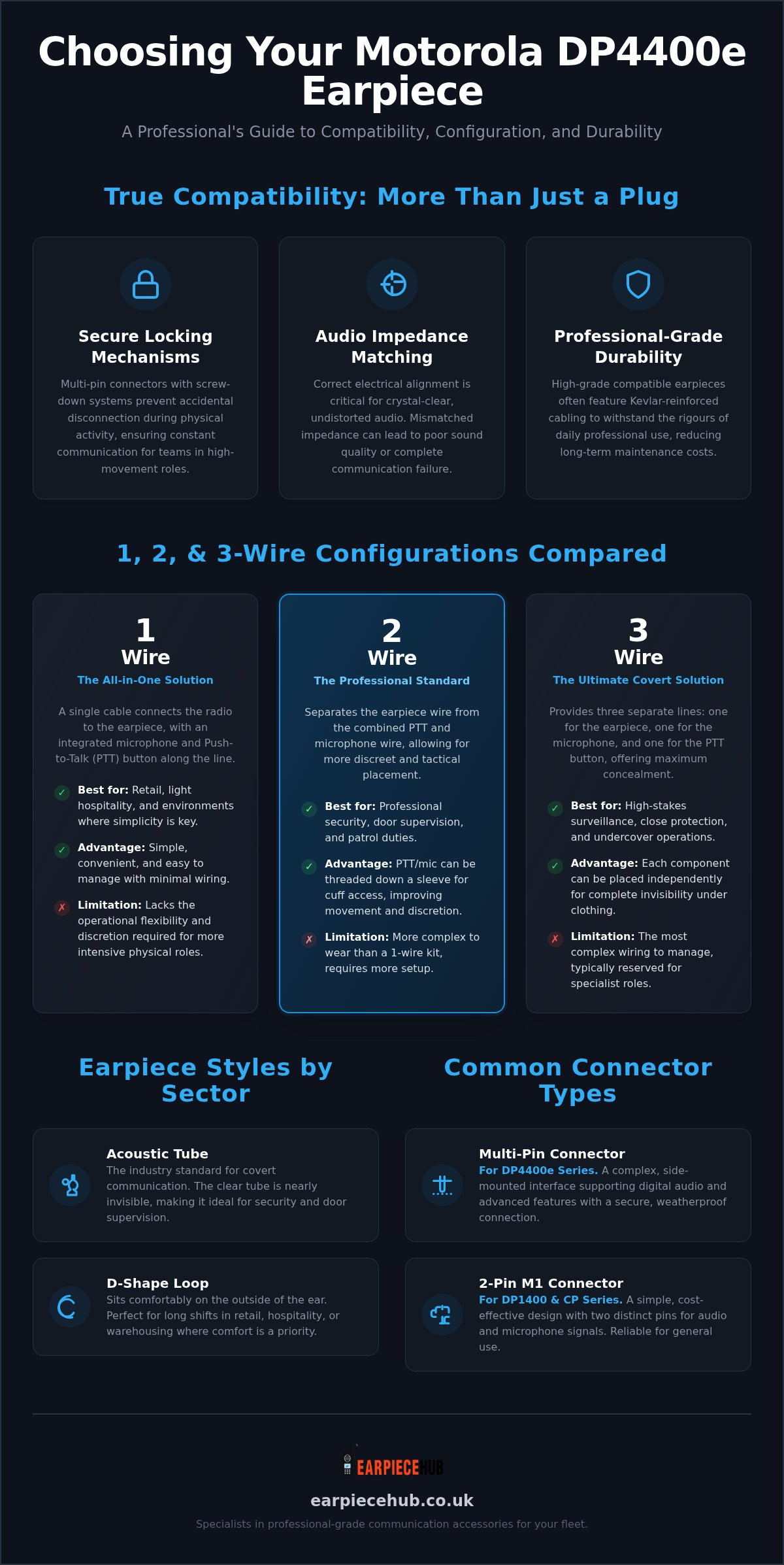
True compatibility isn’t just about a plug fitting into a socket. It represents the seamless integration of audio impedance and physical connector fit. In professional environments, compatibility is the alignment of electrical specs and physical housing. If these don’t match, you’ll face distorted audio or, worse, a complete communication blackout during a shift. Selecting from various Motorola DP4400e earpiece options involves understanding these technical nuances to avoid buying gear that looks right but fails on the job.
The Motorola DP4400e requires specific multi-pin locking mechanisms for stability. These connectors don’t just push in; they secure via a screw-down or clip-in system that prevents the earpiece from being yanked out during physical activity. Whilst exploring Motorola DP4400e earpiece options, you must prioritise this secure interface to maintain fleet reliability. This is especially true for teams in high-movement roles like door supervision or warehouse logistics.
In the same way that mobile professionals like Merton Car Keys rely on precision equipment for vehicle security, your team requires robust audio gear to maintain operational integrity during physical shifts.
We often see the “Genuine vs Compatible” debate. The reality is that high-grade compatible accessories often use Kevlar reinforcement in the cabling to ensure professional-grade durability. This focus on build quality ensures your two-way radio technology remains a dependable tool rather than a maintenance burden. Since 2015, Earpiece Hub has focused on these technical specifications to provide gear that survives daily professional use.
Common Motorola Connector Types
The 2-pin M1 connector: This remains the standard for the Motorola DP1400 and older CP series. It’s a simple, cost-effective design that uses two distinct pins for audio and microphone signals. It’s reliable for general use but lacks the sophisticated data paths found in higher-tier models.
Multi-pin connectors: The DP4400e series uses a complex side-mounted multi-pin interface. This design supports advanced features like digital audio processing and emergency button passthrough. It’s built for high-stakes environments where a secure, weatherproof connection is non-negotiable.
Single-pin variants: Users of the CLP and SL series radios will require single-pin connectors. These are engineered for compact, discreet setups in retail or hospitality, prioritising a slim profile over the heavy-duty locking mechanisms of the DP series.
Comparing 1-Wire, 2-Wire, and 3-Wire Configurations
Wire counts serve as the industry standard for organising professional communication gear. They define the physical architecture of your kit and how it integrates with your uniform. When reviewing Motorola DP4400e earpiece options, you’ll typically choose between 1-wire, 2-wire, or 3-wire configurations. A 1-wire setup is the simple, all-in-one solution ideal for retail and light hospitality roles. It features a single cable connecting the radio to the ear, with an integrated microphone and Push-to-Talk (PTT) button. While convenient, it lacks the flexibility required for more intensive physical roles.
The 2-wire configuration is the professional security choice. It separates the PTT and microphone from the earpiece, allowing for better movement and more discreet operation. For high-stakes surveillance or close protection, a 3-wire kit is the ultimate covert solution. It provides three separate lines for the earpiece, the microphone, and the PTT button. This setup ensures maximum concealment under clothing. Understanding these technical requirements is as vital as following Ofcom radio communication regulations regarding equipment standards and signal interference, even when operating within UK-specific frequency bands.
Choosing Your Setup Based on Movement
2-wire kits allow the PTT to be threaded down a sleeve, placing the control at your cuff. This is a tactical advantage for security personnel who need to communicate without reaching for their chest or shoulder. 3-wire setups take this further by allowing the microphone to be clipped to a lapel whilst the PTT remains hidden in a pocket or palm. If you need a robust setup for your team, you can view our professional range of wired earpieces.
PTT and Microphone Placement
The “barrel” PTT is widely favoured amongst UK door supervisors for its ease of use with gloved hands. Its cylindrical shape provides a tactile surface that’s easy to locate in low-light environments. Positioning the microphone centre on the chest ensures optimal voice pickup whilst moving, preventing the muffled audio often caused by mics swinging toward the shoulder. These small adjustments in Motorola DP4400e earpiece options make a significant difference in clarity during critical incidents.
Selecting the Best Earpiece for Your Sector
Security teams prioritising discreetness almost always opt for acoustic tubes. These are the industry favourite for covert communication. The clear tube is nearly invisible against the skin, making it ideal for door supervision where a high-profile radio setup might escalate a situation. However, in loud environments like stadium concerts, even the best tube can struggle. In these scenarios, noise-cancelling overhead headsets are essential to ensure staff can hear commands over the roar of the crowd.
Retail and warehousing staff often work long shifts, making ear fatigue a genuine concern. G-shape and D-shape loops are the preferred Motorola DP4400e earpiece options here. They sit on the outer ear rather than inside the canal. This design is also superior for shared radio pools amongst staff, as the surface is easier to wipe down than an internal ear tip. When selecting gear for loud event centres, remember that following OSHA hearing protection standards is a professional necessity to protect your team’s long-term health.
Hospitality and event staff must balance a professional appearance with rugged, long-lasting durability. Gear needs to survive the rigours of a busy venue whilst looking smart in front of guests. For these roles, 1-wire or 2-wire setups provide a clean look that doesn’t compromise on audio quality. You can shop our full range of professional earpieces to find the right fit for your sector.
Acoustic Tube vs D-Shape: The Comfort Factor
Acoustic tubes offer superior audio clarity by delivering sound directly into the ear canal. This makes them perfect for high-stakes security work. D-shape and G-shape loops prioritising a non-invasive fit are better for general staff who need to remain aware of their physical surroundings whilst listening to the radio.
Maintenance: Ear Tips and Replacement Tubes
Moisture buildup is the primary cause of audio failure in acoustic tubes. You should regularly disconnect the tube and blow through it to clear condensation. Carrying spare ear tips and replacement tubes ensures hygiene and extends the lifespan of your gear. Specialist replacement parts are essential for keeping a large fleet operational without the cost of full kit replacements.
Professional Motorola Accessories from Earpiece Hub
Earpiece Hub serves as the definitive UK specialist for Motorola compatible communication peripherals. We provide the technical expertise needed to maintain large fleets without the complexity of unverified third-party sellers. Beyond providing high-quality earpieces, we stock essential hardware like the high-capacity replacement battery for Motorola DP1400. This ensures your team stays connected for the duration of every shift without power failure. Our gear is built for the high-stakes nature of security and radio communication.
Managing a professional radio fleet requires more than just individual accessories. Our six-way multi-unit chargers allow for efficient organisation and charging of multiple units from a single power source. This reduces cable clutter and ensures every radio is ready for immediate deployment. We back our hardware with 24/7 support and nationwide next-day shipping. This service caters to a clientele that often requires equipment on short notice to replace damaged gear.
Why Professionals Trust the Hub
Our specialist knowledge in 1, 2, and 3-wire technical specifications ensures we can support diverse sectors from close protection to retail logistics. We understand that many professional fleets are mixed. Because of this, we offer a comprehensive range of earpiece adapters for cross-brand compatibility with Kenwood or Hytera radios. This flexibility positions the Hub as a central, essential resource for companies looking to streamline their communication gear across different platforms with minimal fuss.
Ready to Upgrade Your Comms?
Selecting the correct Motorola DP4400e earpiece options is critical for maintaining professional standards and clear audio. Browse our full range of Motorola compatible gear today to find the perfect match for your specific radio model. If you’re managing a large-scale operation, contact our support team for expert fleet-wide compatibility audits. We’ll ensure every piece of hardware is optimised for your specific operational environment.
Equip Your Team for Professional Success
Selecting from the available Motorola DP4400e earpiece options requires a clear understanding of your team’s movement and environment. You’ve seen how matching the correct wire architecture to the specific role prevents equipment failure and reduces long-term costs. Whether you need the discreetness of a 3-wire covert kit or the comfort of a G-shape loop for long retail shifts, the right choice ensures crystal clear audio when it matters most.
Don’t let audio failure compromise your security or operational efficiency. As a UK specialist since 2015, Earpiece Hub provides professional 1, 2, and 3-wire kits designed for the most demanding environments. We offer next-day UK shipping to keep your fleet operational without delay. Our expertise ensures you receive gear that fits securely and performs reliably every single shift.
Shop the Motorola Compatible Earpiece Range at Earpiece Hub and experience the difference that specialist equipment makes to your daily operations. We’re here to support your communication needs with no-nonsense, high-performance gear.
Frequently Asked Questions
Will using a compatible earpiece void my Motorola radio warranty?
Using a high-quality compatible earpiece won’t void your Motorola radio warranty. Manufacturers can’t invalidate a warranty simply for using third-party accessories unless the specific part causes physical or electrical damage to the handset. It’s vital to use professional-grade gear that matches the required technical specifications. This ensures there’s no risk of short-circuiting the radio’s accessory port during critical operations.
How do I know if my Motorola radio uses a 2-pin or multi-pin connector?
You can identify the connector type by inspecting the side of your radio. Entry-level models like the DP1400 use the 2-pin M1 connector, which consists of two distinct prongs. Higher-tier models feature a large side-mounted multi-pin interface with a screw-down locking mechanism. When evaluating Motorola DP4400e earpiece options, always check for this specific multi-pin configuration to ensure a secure and functional connection.
What is the difference between a 1-wire and 2-wire earpiece setup?
A 1-wire setup combines the earpiece, microphone, and Push-to-Talk (PTT) button into a single cable system. It’s best for roles where simplicity is the priority. In contrast, a 2-wire setup splits the components into two separate cables. This allows you to run the earpiece up to your ear whilst threading the PTT and microphone down your sleeve or clipping it to your lapel for more discreet operation.
How often should I replace the acoustic tube on my Motorola compatible earpiece?
You should replace your acoustic tube every three to six months to maintain optimal hygiene and audio clarity. Over time, moisture from perspiration and environmental humidity builds up inside the tube, leading to muffled sound or complete audio failure. If the tube begins to discolour, turn yellow, or become stiff and brittle, it’s a clear sign that it requires immediate replacement with a fresh specialist tube.
Can I use a Motorola earpiece with a Kenwood or Hytera radio using an adapter?
Yes, you can use your Motorola accessories with Kenwood or Hytera radios by using a specialist earpiece adapter. These adapters bridge the gap between different connector types, such as converting a Motorola multi-pin to a Kenwood 2-pin K1 interface. This is a cost-effective solution for organisations managing mixed radio fleets, as it allows you to standardise your Motorola DP4400e earpiece options across all handsets whilst maintaining professional audio standards.
