





Uncategorized
Motorola DP1400 Battery Replacement: A Professional UK Guide (2026)
Jul
Imagine you’re managing a crowded venue entrance when your radio cuts out without warning. It’s a scenario every security professional fears, yet many fleets are currently running on degraded power cells that won’t last a full shift. Choosing the right Motorola DP1400 battery replacement is the only way to prevent these critical communication failures and keep your team safe. We understand that technical specs can be confusing, especially when your priority is on-site safety rather than battery chemistry.
This professional guide provides the technical clarity you need to ensure your communication remains uninterrupted. We’ve simplified the process of identifying, selecting, and maintaining the correct power source for your specific environment. You’ll learn the vital differences between Li-Ion and NiMH chemistries, how to stay compliant with 2026 UK waste regulations, and the best practices to extend the operational life of your radio fleet. Whether you’re managing a single handset or a large security team, this guide ensures your equipment is ready for the high-stakes nature of the job.
Key Takeaways
- Recognise early warning signs of cell degradation, including muffled audio distortion and radios that fail to last a full shift.
- Navigate the technical differences between Li-Ion and NiMH chemistries to select the most durable Motorola DP1400 battery replacement for your environment.
- Learn the correct procedure for swapping batteries and cleaning gold-plated terminals to maintain a secure connection with your radio chassis.
- Optimise the performance of your acoustic tube earpieces and speaker mics by ensuring they’re powered by stable, high-voltage cells.
- Ensure your business remains compliant with the latest 2026 UK WEEE regulations regarding professional battery disposal and recycling.
Recognising When Your Motorola DP1400 Battery Needs Replacing
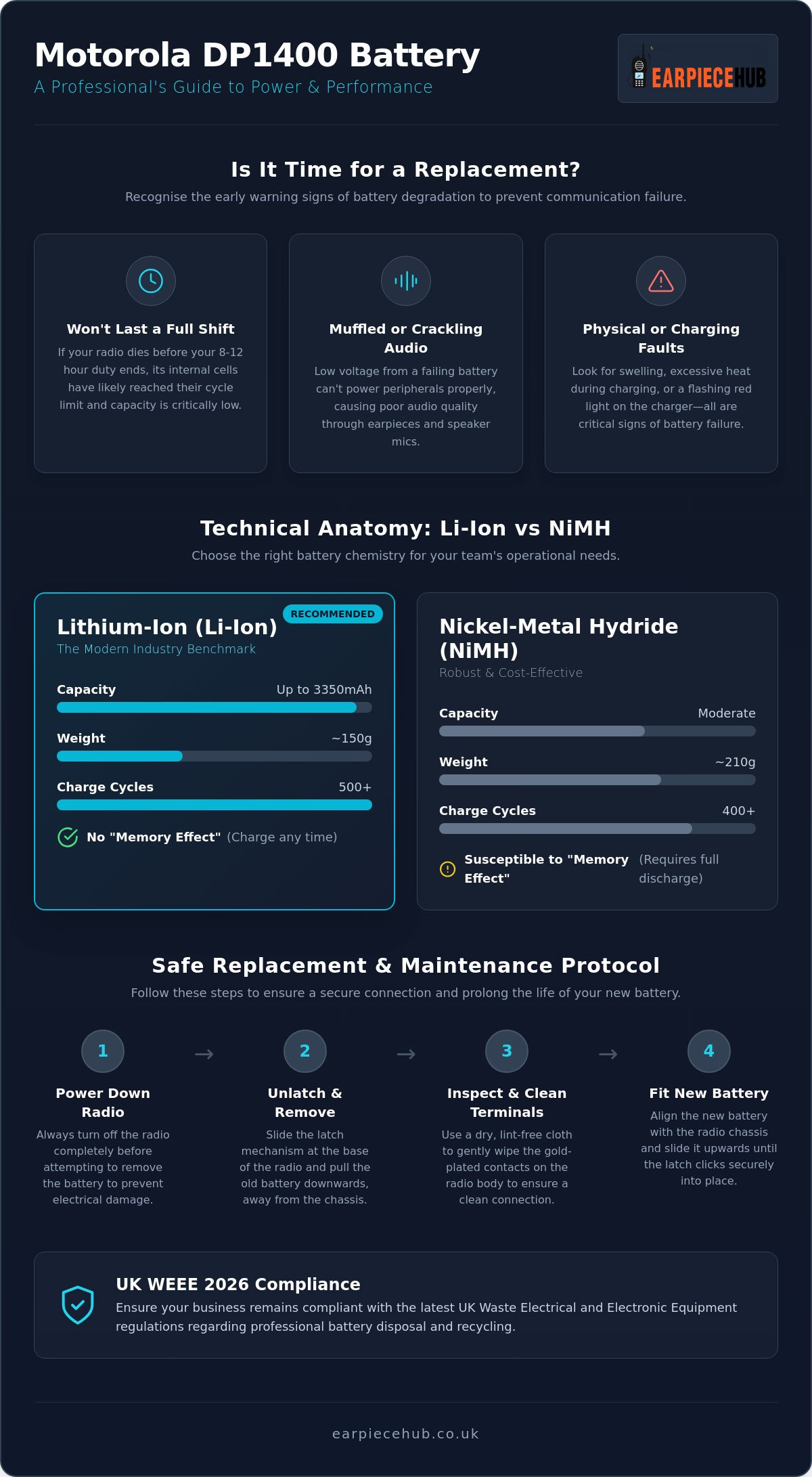
Detecting the right moment for a Motorola DP1400 battery replacement is essential for maintaining site security. Most professional users expect a standard 8 to 12 hour shift from their equipment. If your radio is dying before the end of your duty, the internal cells have likely reached their cycle limit. This degradation is a natural part of rechargeable battery technologies, where every charge and discharge cycle slightly reduces the total capacity.
Many users don’t realise that poor battery health directly impacts audio quality. Low voltage output often results in muffled or crackling sounds through your acoustic tube earpiece. Because high-performance peripherals require a stable current to function, a failing battery can make communication nearly impossible during high-stress situations. Don’t mistake a dying battery for a faulty earpiece.
Keep a close eye on physical changes and charging behaviour:
- Physical Deformities: Any swelling or “bloating” of the battery casing is a critical safety risk. If the battery feels tight against the radio chassis, replace it immediately.
- Charging Errors: Frequent red-light flashing on your multi-unit charger usually indicates a battery that can no longer hold a stable charge.
- Heat Build-up: Excessive heat during the charging process or while the radio is on standby is a clear sign of internal resistance.
The Duty Cycle Reality: How Long Should a Battery Last?
Technical Anatomy: Comparing Li-Ion and NiMH Replacement Options
Selecting the correct Motorola DP1400 battery replacement requires a clear understanding of how different cell chemistries perform under pressure. Following two-way radio best practices involves matching your power source to your team’s specific duty cycle. The two primary options available for the DP1400 are Lithium-Ion (Li-Ion) and Nickel-Metal Hydride (NiMH), each offering distinct advantages for professional security environments.
Li-Ion is the modern industry benchmark. These cells provide a high energy density in a lightweight package, which is vital for guards on long foot patrols. One major benefit is the lack of “memory effect”. You can place a Li-Ion battery on charge at any time without reducing its overall lifespan. In contrast, NiMH batteries are robust and often more cost-effective. They perform exceptionally well in extreme temperature fluctuations, though they require strict charging discipline. To maintain NiMH health, you must fully discharge the battery before recharging it, or you risk a permanent loss of capacity.
Capacity is measured in milliampere-hours (mAh). While a standard 1500mAh cell might suffice for light use, high-activity teams should prioritise 2300mAh or 3350mAh versions. These higher-capacity units provide the necessary headroom for frequent transmissions and the use of high-drain accessories like noise-cancelling headsets. Switching to a high-capacity Li-Ion Motorola DP1400 battery replacement also improves ergonomics by reducing the radio’s total weight, making the handset less cumbersome during twelve-hour shifts.
Chemistries Compared: Which is Right for Your Fleet?
- Li-Ion: High capacity, lightweight (approx. 150g), no memory effect, 500+ charge cycles.
- NiMH: Moderate capacity, heavier (approx. 210g), susceptible to memory effect, 400+ charge cycles.
For modern covert surveillance and standard security work, Li-Ion is the superior choice. Its flexible charging and slim profile ensure your team stays mobile and connected without the bulk of older technologies. If you need to upgrade your current fleet, you can find professional-grade Replacement Battery for Motorola DP1400
How to Safely Replace and Initialise Your DP1400 Battery
Performing a Motorola DP1400 battery replacement is a straightforward mechanical task, but the technical preparation determines the long-term health of the cell. To remove the existing unit, locate the primary latch mechanism at the base of the radio. Slide the latch across and pull the battery downwards, away from the chassis. This method prevents unnecessary stress on the internal mounting pins and ensures the housing remains watertight.
Before fitting your new Motorola DP1400 battery replacement, inspect the gold-plated terminals on the radio body. Dust, skin oils, or pocket lint can create resistance, leading to heat build-up or intermittent power loss. Use a dry, lint-free cloth to ensure a perfect connection. This step is particularly vital for security teams using high-drain peripherals, as clean contacts ensure the radio delivers a stable voltage to your acoustic tube earpiece.
New batteries arrive in a partially charged state for safety during transit. You must charge a new cell for 14 to 16 hours before its first operational shift. This extended initial soak ensures the chemistry is fully activated. To properly initialise the unit, allow the radio to run until the low-battery alert sounds during its first few uses. This “cycling” helps the radio’s internal software accurately calibrate and report the remaining capacity. Secure your fleet’s reliability today by purchasing a high-capacity Replacement Battery for Motorola DP1400 from our specialist shop.
Maintenance Tips to Extend Battery Lifespan
Maintaining Fleet Reliability with Earpiece Hub Spares
Sourcing your Motorola DP1400 battery replacement from a dedicated communications specialist ensures your equipment meets rigorous professional standards. We focus on high-durability peripherals that withstand the demands of the UK security sector. Outside of radio communications, those who manage accessibility fleets can explore Direct-to-consumer e-commerce product sales from UK Mobility Batteries to find guides on VAT relief for specialist cells. Unlike generic retailers, we provide technical support based in the UK to help you manage large-scale radio fleets efficiently. This specialist expertise is what makes us a central resource for professionals who cannot afford equipment downtime.
A reliable power source does more than just keep the radio on; it provides the consistent voltage required for high-performance accessories to function correctly. When you use a fresh battery, you’ll notice improved response from your Push-to-Talk (PTT) buttons and clearer transmissions through noise-cancelling overhead headsets. This synergy between the power cell and the peripheral is what maintains operational safety during critical incidents. Our logistical support ensures that a Motorola DP1400 battery replacement is always available when your fleet requires it most.
We understand that a dead radio means a hole in your security line. That’s why we offer next-day shipping across the UK for urgent fleet requirements throughout 2026. This rapid delivery service allows you to maintain a lean inventory whilst ensuring you have the spares needed to replace failing units immediately. Our team also provides expert advice on battery rotation programmes to help you get the maximum value from your investment.
Upgrade Your Communication Kit Today
Switching to high-capacity Li-Ion cells offers immediate benefits in weight reduction and shift longevity. Don’t wait for a total failure to refresh your fleet. Ensure your team stays connected with professional-grade power solutions and peripherals.
Secure Your Fleet’s Operational Future
Restoring your radio fleet doesn’t require a total hardware overhaul. Often, a strategic Motorola DP1400 battery replacement is all that’s needed to eliminate audio distortion and mid-shift power failures. By selecting the correct Li-Ion chemistry and adhering to a strict initialisation cycle, you ensure your security team remains connected when it matters most. Remember that clean terminals and high-capacity cells are the foundation of clear communication through your acoustic tube earpieces.
Earpiece Hub serves as your central resource for professional-grade spares. As a specialist UK retailer, we provide the technical expertise and rapid logistics required for high-stakes environments. We offer next day shipping for urgent requirements and provide 24/7 professional support to help you manage your equipment effectively. Don’t let degraded cells compromise your site safety or team coordination.
Shop Professional Motorola DP1400 Batteries at Earpiece Hub and experience the reliability that comes from industry-leading communication spares. Your team’s safety depends on equipment that works every time.
Frequently Asked Questions
How long does a Motorola DP1400 battery typically last before needing replacement?
A standard battery typically lasts between 18 to 24 months or approximately 400 to 500 charge cycles. This duration depends heavily on your daily duty cycle and environmental conditions. If you notice your radio dying before the end of an 8 hour shift, it’s a clear signal that the internal cells have degraded and require a Motorola DP1400 battery replacement to maintain fleet reliability.
Can I use a CP040 battery on a Motorola DP1400 radio?
Yes, CP040 batteries are fully compatible with the Motorola DP1400 as they share the same physical form factor and contact configuration. This backward compatibility is helpful for teams transitioning between older analogue fleets and newer digital handsets. You should ensure the older CP040 cell still holds a sufficient charge to power modern digital features and high-drain earpieces before deploying it on a shift.
What is the “memory effect” and does it affect Li-Ion batteries?
The memory effect is a phenomenon where a battery “remembers” a shorter charge cycle if it’s repeatedly recharged before being fully depleted. This issue primarily affects older NiCd and NiMH chemistries. Modern Lithium-Ion (Li-Ion) batteries don’t suffer from memory effect. You can place your Li-Ion Motorola DP1400 battery replacement on the charger at any time without damaging its long-term capacity or lifespan.
Why is my Motorola charger light flashing red when I insert the battery?
A flashing red light typically indicates a charging fault or a battery that’s no longer serviceable. This often happens when the battery voltage has dropped too low for the charger to recognise it safely or if the internal cells are damaged. Before discarding the unit, try cleaning the gold-plated contacts with a dry cloth. If the red light persists, the battery has likely reached the end of its life.
How should I store spare Motorola batteries when they are not in use?
Store spare batteries in a cool, dry environment at approximately 40% to 50% charge capacity. Avoid storing them completely flat or fully charged for long periods, as this can lead to permanent capacity loss or cell dormancy. If you’re managing a large rotation programme, check your stored spares every few months and top them up to 50% to ensure they remain ready for immediate deployment.
