





Uncategorized
Troubleshooting Motorola DP1400 Battery Issues: A Professional Guide
Sep
That flashing red light on your charger doesn’t always mean your power cell is destined for the bin. Most users immediately ask why their Motorola DP1400 battery is blinking red, but many common power failures are actually preventable maintenance issues rather than terminal hardware faults. It’s incredibly frustrating when your radio dies mid-shift, which is why troubleshooting motorola dp1400 battery performance is a critical skill for any professional team.
This professional guide provides the technical expertise to diagnose and fix issues whilst avoiding unnecessary downtime. You’ll master the specific meanings behind every charger light pattern and learn the exact steps to restore declining talk-time. We’ll also help you identify the precise moment a replacement becomes essential to maintain fleet reliability. From cleaning contacts to managing Li-Ion health, this is your definitive resource for uninterrupted communication. Get your equipment back to peak performance with specialist advice from the industry hub.
Key Takeaways
- Decode charger LED signals to distinguish between temporary temperature faults and permanent battery failures.
- Master essential techniques for troubleshooting motorola dp1400 battery performance, such as cleaning contacts with isopropyl alcohol to ensure a reliable connection.
- Recognise when a replacement is necessary by monitoring talk-time degradation and applying the 12 to 18 month standard cycle rule.
- Maximise the operational lifespan of your radio fleet by adopting professional storage conditions and avoiding damaging overnight charging habits.
Deciphering Motorola DP1400 Battery Faults and LED Codes
Dealing with a radio that won’t power up often starts at the charging dock. Understanding LED signals is the first step in troubleshooting motorola dp1400 battery issues. Most errors are actually protective measures designed by the manufacturer to prevent hardware damage. You must distinguish between a temporary state and a terminal failure to keep your fleet operational.
Common Charger Error Signals
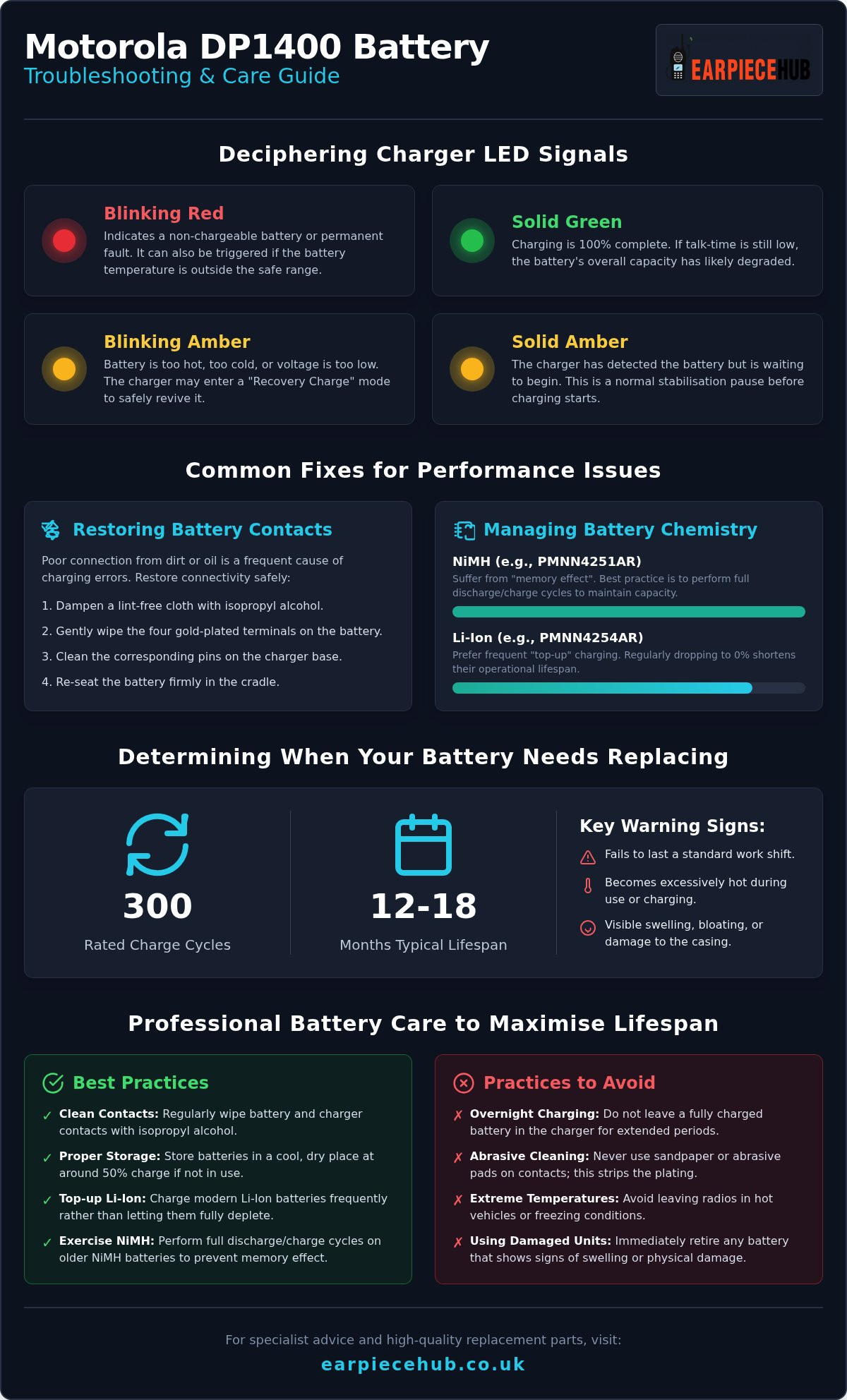
A Blinking Red signal is the most common alert. It usually indicates that the battery is non-chargeable or has a permanent fault. However, it can also trigger if the internal temperature is outside the safe range. If the light is Solid Amber, the charger has detected the battery but is waiting to start the cycle; this is a standard pause whilst the unit stabilises.
A Blinking Amber signal indicates the battery is too hot, too cold, or the voltage is too low. In these cases, the charger often enters a “Recovery Charge” phase to safely revive the unit. Once the battery reaches 100%, you’ll see a Solid Green light. If the radio still dies quickly despite a green light, the cell’s capacity has likely degraded beyond repair.
Physical Symptoms of Battery Failure
Visual inspections are as vital as LED codes. Understanding how lithium-ion batteries work helps clarify why physical changes occur during the chemical aging process. If you notice swelling or bloating in the casing, stop using the unit immediately. This indicates internal gas buildup and poses a significant safety risk.
Check the gold-plated contacts for oxidisation or dirt. A dull appearance suggests poor connectivity, which often triggers false error codes. Troubleshooting motorola dp1400 battery problems frequently concludes with a simple cleaning of these terminals to restore a reliable electrical circuit.
Common Fixes for Charging and Performance Issues
Before assuming a battery is dead, perform a physical audit. Effective troubleshooting motorola dp1400 battery performance often comes down to simple maintenance. Start by examining the charger base itself. Ensure the transformer isn’t overheating and that the internal pins are upright and clean. If the pins are bent or recessed, the radio won’t draw current correctly.
Restoring Battery Contacts
Dirt, sweat, and oils from daily use create an invisible barrier on the battery terminals. Follow these steps to restore connectivity safely:
- Dampen a clean, lint-free cloth with a small amount of isopropyl alcohol.
- Gently wipe the four gold-plated terminals on the rear of the battery.
- Clean the corresponding pins on the charger base.
Never use sandpaper or abrasive pads. These materials strip the gold plating, leading to rapid corrosion and permanent failure. If cleaning doesn’t resolve the issue, a full “Battery Reset” by re-seating the unit firmly into the cradle may clear minor software glitches.
Managing NiMH vs Li-Ion Chemistry
Your approach must change based on the battery type. Older NiMH units, like the PMNN4251AR, suffer from “memory effect” where they lose capacity if not fully discharged. When troubleshooting motorola dp1400 battery reliability for these older cells, you can often “exercise” them by performing two or three full discharge and charge cycles.
In contrast, modern Li-Ion cells, such as the PMNN4254AR, prefer frequent “top-up” charging. The Motorola Solutions Battery Care Guide states that letting Li-Ion batteries drop to 0% regularly actually shortens their lifespan. If your battery fails to hold a charge after these steps, it’s time to consider a high-quality Replacement Battery for Motorola DP1400 to ensure your team remains connected during critical shifts.
Determining When Your DP1400 Battery Needs Replacing
Even the most diligent maintenance has its limits. Troubleshooting motorola dp1400 battery performance eventually reveals that chemical ageing is irreversible. Most professional cells are rated for approximately 300 charge cycles. For teams working daily shifts, this threshold is typically reached within 12 to 18 months. Beyond this point, internal resistance climbs, and the battery’s ability to hold a charge diminishes rapidly. When troubleshooting motorola dp1400 battery issues, knowing the age of your equipment is half the battle.
If your radio fails before a standard shift ends, the cell is spent. Watch for excessive heat generation during use. A battery that becomes hot to the touch whilst transmitting is a potential fire risk and must be retired immediately. Always ensure any new unit matches the DP1400’s specific 7.5V requirements to avoid damaging the radio’s internal circuitry.
The Lifecycle of a Professional Battery
Battery chemistry breaks down over time, even if the unit sits on a shelf. This is why “bulk” deals on third-party marketplaces are often a false economy. These units are frequently older stock that has already lost a portion of its service life. For critical communications, only use fresh cells from a specialist partner to guarantee maximum operational hours and safety.
Upgrading to High-Capacity Li-Ion
Many older fleets still use the 1400mAh NiMH packs. Upgrading to a 2300mAh Li-Ion version provides a significant boost in talk-time without adding bulk. This higher capacity is essential for long shifts or high-transmission environments. We recommend the Replacement Battery for Motorola DP1400 for its proven reliability and perfect fit.
If your current power cells are failing the mid-shift test, shop our range of Motorola DP1400 batteries for next-day delivery across the UK.
Professional Battery Care to Maximise Operational Lifespan
Consistent maintenance routines significantly reduce the frequency of troubleshooting motorola dp1400 battery failures. High-performance radios require disciplined charging habits to stay reliable. Avoid the common mistake of “over-nighting” radios by leaving them in the dock for days. This practice subjects the cells to unnecessary heat and constant micro-cycles, which shortens their total service life. Always remove the unit once the LED turns solid green.
Storage conditions for spare units are equally critical. Keep your inventory in a cool, dry location away from direct sunlight. Never store Li-Ion cells fully depleted or at 100% capacity for long periods. Aim for a 40-50% charge level to maintain chemical stability. For larger teams, a Six-Way Multi-Unit Charger is a superior choice. These professional stations manage heat dissipation far better than individual single-unit plugs, protecting your fleet from thermal stress.
Daily Maintenance Routine
Operatives should perform a five-second check at the start of every shift. Inspect the casing for cracks and ensure the terminals are bright and clean. To maximise the lifespan of your entire inventory, organise a battery rotation system. Label your power cells with numbers or dates to ensure even usage across the fleet. This prevents specific units from being overworked whilst others sit idle and lose their ability to hold a charge.
Why Order from Earpiece Hub?
Sourcing from a specialist UK retailer guarantees you receive genuine, fresh-cell replacements. Earpiece Hub has supported the security and communications industry since 2015 with technical expertise. We understand that communication is mission-critical, which is why we offer Next Day Shipping for urgent battery replacements. Complete your tactical gear with our professional Acoustic Tube Earpieces, designed for clarity and comfort during long shifts. Rely on the industry hub for equipment that never lets you down.
Secure Your Fleet’s Operational Readiness
Maintaining a reliable radio fleet requires more than just reactive fixes. By mastering troubleshooting motorola dp1400 battery techniques, you can significantly extend the lifespan of your equipment and avoid mid-shift failures. Simple habits, such as cleaning gold-plated terminals and managing a strict rotation system, often resolve the most common charging errors. However, when talk-time consistently falls short or cells begin to show physical signs of chemical wear, immediate replacement is the only way to guarantee operative safety.
As a UK specialist since 2015, Earpiece Hub provides the high-performance components your team needs to stay connected. Don’t let a failing power cell compromise your security operations. Shop Genuine Motorola DP1400 Batteries at Earpiece Hub for professional-grade 2300mAh cells and reliable next-day UK delivery. Equip your team with the best tools to ensure clear, uninterrupted communication in every high-stakes environment. Your critical communications deserve the reliability of fresh, specialist-grade power.
Frequently Asked Questions
Why is my Motorola DP1400 charger light flashing red?
A flashing red light indicates a non-chargeable condition or a permanent battery fault. This often happens if the unit is too deeply discharged or if the internal temperature is outside the safe operating range. Start troubleshooting motorola dp1400 battery issues by cleaning the gold-plated contacts with isopropyl alcohol. If the flashing persists after a cooling period, the internal cells have likely failed and the unit requires a replacement.
How long does a Motorola DP1400 battery typically last?
A professional radio battery typically provides peak performance for 12 to 18 months, or approximately 300 charge cycles. Whilst the unit may continue to power the radio after this period, you’ll notice a significant drop in talk-time. Chemical degradation is inevitable in both Li-Ion and NiMH cells. If your radio fails to last a full eight-hour shift, it’s a clear sign that the battery has reached its end of life.
Can I use a high-capacity Li-Ion battery in an older DP1400 radio?
Yes, the Motorola DP1400 is fully compatible with various battery chemistries, including high-capacity 2300mAh Li-Ion units. Upgrading from a standard NiMH pack is a common way to improve fleet reliability. These modern cells offer a higher energy density and don’t suffer from memory effect. Always ensure you use a compatible charger, as Li-Ion batteries require a different charging profile than older nickel-based versions to ensure safety.
My battery is getting very hot whilst charging; is this normal?
It’s normal for a battery to feel slightly warm during a rapid charge cycle, but it should never feel hot to the touch. Excessive heat suggests an internal short circuit or a failing cell. If the charger LED flashes amber, the unit has paused the cycle to prevent thermal damage. Continued overheating is a significant safety risk. You should stop using the unit immediately and seek a replacement to avoid potential hazards.
How do I know if the battery or the charger is faulty?
The most effective method is a cross-check test using a known working radio and charger. Place the suspect battery in a different charger base; if the error light persists, the battery is the problem. If a working battery fails to charge in the suspect base, inspect the charger pins for damage or debris. This simple step is vital when troubleshooting motorola dp1400 battery performance across a large fleet of professional devices.
