





Uncategorized
Improving Radio Audio Clarity in Loud Environments: A Professional Guide
Jul
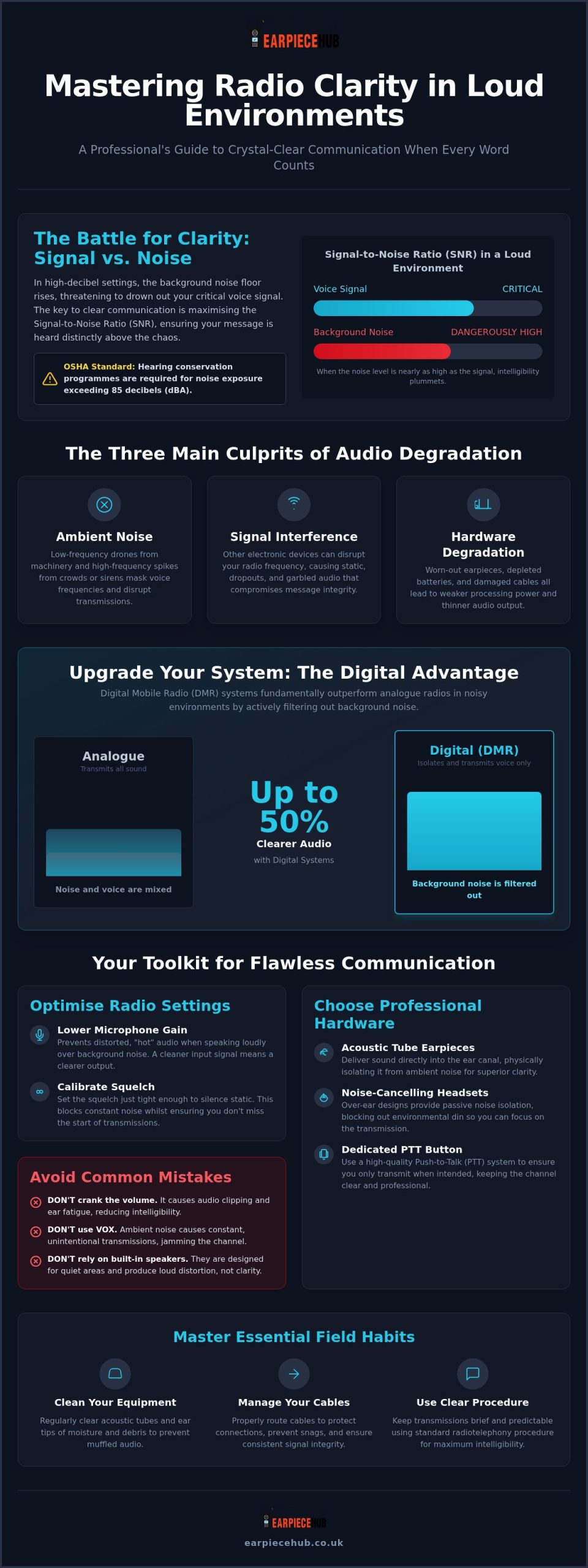
With OSHA standards requiring hearing conservation programmes for noise exposure exceeding 85 decibels, cranking your volume to the maximum isn’t a viable strategy for improving radio audio clarity in loud environments. You’ve likely felt the physical strain of ear fatigue after a shift spent deciphering garbled instructions over the roar of a crowd or heavy machinery. Constant “say again” requests aren’t just a nuisance; they’re a critical failure point when you’re managing high-pressure security or industrial operations.
We recognise that clear communication is your most essential tool. This guide will help you master the technical settings, hardware choices, and maintenance habits required to ensure crystal-clear radio communication in high-decibel surroundings. You’ll learn how to choose the right noise-cancelling overhead headsets, why digital systems provide up to 50% better clarity than analogue alternatives, and how to maintain your equipment for peak performance. It’s time to eliminate background interference and ensure every message is intelligible the first time it’s sent.
Key Takeaways
- Understand the Signal-to-Noise Ratio (SNR) and how to identify the primary culprits behind audio degradation in high-decibel settings.
- Learn to optimise technical radio settings, including squelch levels and microphone gain, to filter out background interference and prevent distorted transmissions.
- Discover professional hardware strategies for improving radio audio clarity in loud environments, from isolating acoustic tubes to full noise-cancelling overhead headsets.
- Master essential field maintenance habits, such as cleaning acoustic tubes and ear tips, to prevent the muffled audio caused by moisture and debris build-up.
- Implement proper cable management and routing techniques to protect your equipment and ensure consistent signal integrity during high-pressure operations.
Understanding the Challenges of Audio Clarity in Loud Environments
Professional radio communication relies on a healthy Signal-to-Noise Ratio (SNR). This technical metric measures the strength of your voice signal against the unwanted background noise floor. When you’re working in high-decibel settings, the noise floor rises, often burying the signal entirely. Success in improving radio audio clarity in loud environments requires widening this gap so the intended message stands out clearly against the chaos.
Three main factors typically degrade this clarity. Ambient noise from machinery or crowds is the most obvious. Signal interference from other electronic devices and physical hardware degradation, such as worn-out ear tips or depleted batteries, also play major roles. If your hardware is failing or your battery is low, the radio’s processing power drops, which leads to weaker, thinner audio output that can’t cut through the din.
Standard communication often breaks down because there’s a significant gap between hearing a sound and understanding a message. Professionals use Radiotelephony procedures to keep transmissions brief and predictable, which helps when audio quality is compromised. Without these protocols, users often resort to cranking the volume. This is a mistake. Excessive volume leads to audio clipping, where the sound waves are flattened at the peaks, causing harsh distortion. This doesn’t just make the message harder to hear; it causes permanent ear fatigue amongst staff and can lead to long-term hearing issues.
The Impact of Ambient Noise on Radio Signals
Different types of noise affect your equipment in unique ways. Low-frequency drones, such as idling engines or ventilation systems, create a constant masking effect. This overlaps with the lower frequencies of human speech, making voices sound muffled. High-frequency spikes, like sirens or shouting crowds, can trigger the radio’s automatic gain control. This causes the volume to dip just as you’re trying to speak, cutting off the start or end of your sentences.
Why Standard Radio Speakers Fail in Chaos
Built-in radio speakers are designed for quiet environments, not industrial sites or crowded events. They are small, open-air components that struggle to push sound through dense ambient noise. When you turn the volume to 100%, the speaker coil reaches its physical limit. You aren’t getting more clarity; you’re just getting louder distortion. Much like how specialist components from Fat Boy Design USA are required for the extreme demands of Bagger racing and custom builds, professional-grade radio peripherals are essential for any operator in high-pressure environments where every word counts.
Essential Radio Settings for Improved Audio Output
Software configurations are your first line of defence when improving radio audio clarity in loud environments. Even the most expensive hardware fails if the internal logic isn’t calibrated for high-decibel chaos. You must start with microphone gain. In loud areas, users naturally shout. If the gain is set too high, the audio becomes “hot” and clips, resulting in a garbled mess for the receiver. Lowering the gain ensures the radio processes a cleaner signal, even when you’re speaking loudly to be heard over machinery.
Digital standards like Digital Mobile Radio (DMR) offer a distinct advantage here. Research indicates that digital radios can provide up to 50% clearer audio compared to analogue systems because they use vocoders to filter out background noise before the signal is even transmitted. This technical precision is why OSHA signal transmission standards emphasise that communication must be effective and reliable, particularly in safety-critical roles.
Configuring Squelch for Maximum Intelligibility
Squelch acts as a noise gate; it keeps the speaker silent until a signal of a certain strength is received. If it’s too loose, you’ll hear constant static; if it’s too tight, you’ll miss the start of critical messages. To find the sweet spot, turn the squelch down until you hear static, then tighten it just past the point where the noise stops. Remember that moving from a concrete warehouse to an open field changes your RF environment. You should re-adjust your squelch whenever your surroundings shift significantly.
The Problem with VOX in High-Decibel Areas
Voice-Operated Exchange (VOX) is often a liability in professional settings. In loud crowds, the ambient noise triggers the microphone constantly, flooding the channel with “dead air” and background roar. This prevents others from transmitting and drains your battery. Reliable communication requires a dedicated Push-to-Talk (PTT) button. Using a high-quality PTT earpiece or adapter ensures you only transmit when intended, keeping the channel clear for everyone else.
Choosing the Right Hardware for High-Decibel Workplaces
Selecting the correct peripheral is the most effective physical step for improving radio audio clarity in loud environments. While internal settings filter the signal, your hardware determines how that signal reaches your ear and how your voice enters the system. In environments where ambient noise exceeds 90 decibels, relying on a standard radio speaker is a safety risk. You need equipment designed to isolate the message from the surrounding roar.
Acoustic Tubes vs D-Shape and G-Shape Earpieces
The choice between earpiece styles depends entirely on your specific noise floor. Acoustic tube earpieces are the industry standard for high-noise areas like nightclub doors or construction sites. They use a clear plastic tube to deliver audio directly into the ear canal, providing passive noise isolation that blocks out external sound. In contrast, G-shape and D-shape earpieces sit on the outer ear. These are excellent for event stewards in moderate noise who value long-term comfort, but they offer less isolation in truly chaotic settings. For maximum clarity amongst heavy machinery, the acoustic tube remains the superior professional choice.
When noise levels become extreme, such as on airport tarmacs or in industrial plants, you should switch to a noise-cancelling overhead headset. These provide full ear-cup protection, combining hearing safety with crystal-clear reception. For those who prefer a Remote Speaker Microphone (RSM), ensure it features a 3.5mm jack. This allows you to plug in a secondary earpiece, effectively turning your RSM into a private, high-clarity communication hub whilst keeping the radio securely on your belt.
The Role of Noise-Cancelling Microphones
Clarity is a two-way street. Modern professional headsets often utilise dual-microphone arrays to filter out background clatter. One mic captures your voice whilst the second monitors ambient noise to phase it out. To make the most of this tech, follow the “two-finger” rule: position the microphone roughly two finger-widths from the corner of your mouth. This prevents “popping” and ensures your voice remains the priority signal, even in the middle of a crowd.
Professional Maintenance and Field Techniques
Even the highest-grade hardware fails without a rigorous maintenance schedule. For those focused on improving radio audio clarity in loud environments, the physical condition of your peripherals is just as important as your radio settings. Neglected equipment leads to muffled reception and intermittent transmissions, which can be disastrous in high-stakes security or industrial roles.
Battery health is a frequently ignored factor in audio quality. As a battery nears the end of its life cycle, it struggles to provide the consistent voltage required for complex digital processing. This is particularly noticeable with a Replacement Battery for Motorola DP1400; when power is low, users often experience signal “flutter” or sudden audio drops. Ensure your team uses a Six-Way Multi-Unit Charger to maintain a rotation of fresh, fully charged cells for every shift.
Physical cable management also plays a role in signal integrity. You should always route earpiece wires under your uniform or jacket. This prevents the cables from snagging on equipment and protects the internal copper shielding from the repetitive flexing that causes “crackle” during transmissions. Regular inspection of ear tips is equally vital. Fresh silicone ear tips ensure a tight seal in the ear canal, maintaining the passive noise isolation discussed in previous sections whilst improving overall hygiene.
Step-by-Step Acoustic Tube Maintenance
The clear acoustic tube is a primary point of failure because it traps moisture from condensation and earwax build-up. Over time, this creates a physical blockage that makes incoming audio sound distant or “underwater.” To fix this, you must:
- Disconnect the tube from the transducer.
- Use a can of compressed air to blow out any trapped moisture or debris.
- Check the tube’s colour; if it has become yellowed or brittle, it requires immediate replacement.
Keeping a stock of Replacement Acoustic Tubes and Ear Tips ensures that your team never has to work with compromised audio.
Field Techniques for Clearer Transmissions
Your physical behaviour in the field can compensate for extreme noise levels. If you’re working in high winds or near heavy machinery, use your body as a shield. Turning your back to the noise source creates a pocket of calmer air for the microphone to pick up your voice. Additionally, adopt the “Pause-Key-Speak” rhythm. Press the PTT button, wait a fraction of a second for the digital handshake to complete, then speak. This prevents the “clipping” of the first word, ensuring your message is understood the first time without needing a repeat.
Mastering Your Communication Environment
Achieving professional-grade clarity requires more than just high volume. It’s a strategic combination of precise technical calibration, environment-specific hardware like acoustic tubes, and disciplined maintenance of components like ear tips and batteries. By implementing these standards, you’re actively improving radio audio clarity in loud environments to protect your team and ensure operational success.
Don’t let background roar compromise your safety or efficiency. As a UK specialist in Motorola, Hytera, and Kenwood accessories, Earpiece Hub is the trusted partner for security professionals nationwide. Our equipment is designed for the high-stakes nature of your work, backed by 24/7 support and next-day shipping for those who need reliability without the wait.
Upgrade your audio clarity with our professional range of earpieces and headsets. Clear communication is the foundation of every successful operation; take control of your audio today and hear the difference that specialist equipment makes.
Frequently Asked Questions
Why does my radio sound muffled even at full volume?
Muffled audio is usually caused by physical blockages or electronic clipping. If your volume is at 100%, the speaker coil may be distorting the signal rather than clarifying it. Additionally, moisture or earwax trapped in the transducer or acoustic tube acts as a physical filter, cutting out high-frequency speech sounds. Regular cleaning is essential for improving radio audio clarity in loud environments, as even a small obstruction can make a clear transmission sound distant and unintelligible.
Can I use a noise-cancelling earpiece with any radio brand?
You can use high-quality peripherals with various brands provided you have the correct connector or adapter. Whilst we supply specific models for Motorola, Hytera, and Kenwood, an earpiece adapter for any radio can bridge the gap between different hardware standards. This allows security teams to maintain a consistent fleet of noise-cancelling overhead headsets or acoustic tubes even if they use a mix of different radio handsets across different sites or contracts.
How often should I replace my acoustic tube and ear tips?
Professional users should replace silicone ear tips every three to four months for hygiene and comfort. Acoustic tubes require replacement whenever they become yellowed, brittle, or stiff, as this indicates the plastic is degrading and will soon crack. In high-intensity roles, fresh ear tips ensure a better acoustic seal, which is vital for blocking out ambient noise and ensuring you don’t have to rely on dangerously high volume levels to hear instructions.
What is the best earpiece for a security guard in a loud nightclub?
An acoustic tube earpiece is the most effective choice for nightclub security due to its superior passive noise isolation. By sealing the ear canal, it prevents the heavy bass and crowd noise of the venue from drowning out your comms. This hardware is a cornerstone of improving radio audio clarity in loud environments, allowing you to hear subtle verbal cues amongst the noise whilst maintaining a discreet, professional appearance on the door.
Does a low battery affect the audio quality of my radio?
A low battery significantly impacts audio quality because it reduces the voltage available for the radio’s internal signal processor. When power levels drop, the vocoder in digital radios may struggle to filter background noise, leading to “thin” audio or signal flutter. Using a Six-Way Multi-Unit Charger ensures your team always has access to fresh batteries, preventing the sudden drops in intelligibility that occur when a handset is forced into a low-power state.
