





Uncategorized
Radio Battery Life Extension Tips: The Ultimate Guide for Professional Users
Jun
What if the very charging habits your team relies on are actually cutting your hardware’s lifespan in half? It’s a common issue in high-pressure security environments where a radio failure during a critical incident isn’t just an inconvenience; it’s a safety breach. Finding reliable radio battery life extension tips can be difficult when faced with conflicting advice and rapidly changing technical standards. You need gear that lasts the full duration of a 12-hour shift without the constant worry of a “low battery” chirp.
We understand that high annual spends on replacement batteries for Motorola or Hytera units drain your budget. This guide provides the technical secrets and maintenance habits required to double your battery longevity and reduce hardware turnover costs. You’ll learn how to implement clear SOPs for your staff and master the “Golden Triangle” of chemistry-aware charging, accessory-optimised usage, and climate-controlled storage. We’ll also break down the critical 2026 IATA regulations and safety standards like UL 2580 to ensure your fleet remains compliant and operational.
Key Takeaways
- Learn how the 5-5-90 duty cycle impacts hardware performance and why Li-ion is the modern standard for high-stakes security environments.
- Master essential radio battery life extension tips such as the 14-hour initial charge rule to maximise the total cycle count of your fleet.
- Minimise power drain during long shifts by adjusting transmission power and disabling non-essential features like Bluetooth and heavy backlighting.
- Ensure reliable connectivity by storing cells at 40-50% capacity and maintaining low-resistance paths through regular contact cleaning.
- Identify when to retire failing hardware by tracking cycle counts and performing technical voltage drop tests to prevent mid-shift failures.
Understanding Two-Way Radio Battery Chemistry and the 5-5-90 Duty Cycle
The reliability of your communication equipment is rooted in the chemical reactions occurring inside the battery casing. Most professional users don’t realise that a battery begins to degrade from the moment it leaves the factory. This natural chemical ageing process involves the slow oxidation of internal components, meaning a cell sitting on a shelf for a year will never perform as well as a fresh one. To implement effective radio battery life extension tips, you must first understand the specific rechargeable battery technologies powering your devices and how they respond to your team’s daily habits.
Li-ion vs NiMH: Choosing the Right Chemistry
Modern professional fleets have largely transitioned to Lithium-ion (Li-ion) chemistry. This is the preferred choice for a Replacement Battery for Motorola DP1400 because it offers a superior energy density compared to older Nickel-Metal Hydride (NiMH) alternatives. Energy density refers to the amount of electrical energy a battery can store relative to its physical size. For a security professional on a 12-hour patrol, this high density translates to a lighter device that provides consistent voltage without the bulk.
A common point of confusion in the industry is the “memory effect.” Whilst NiMH batteries required a full discharge to maintain their capacity, Li-ion cells do not suffer from this issue. You don’t need to drain a Li-ion battery to zero before recharging it; in fact, shallow discharges are actually better for the long-term health of the cell. Li-ion also boasts a better weight-to-power ratio, which is critical for reducing user fatigue during long shifts where every extra gram of equipment matters.
The Impact of the 5-5-90 Duty Cycle on Your Shift
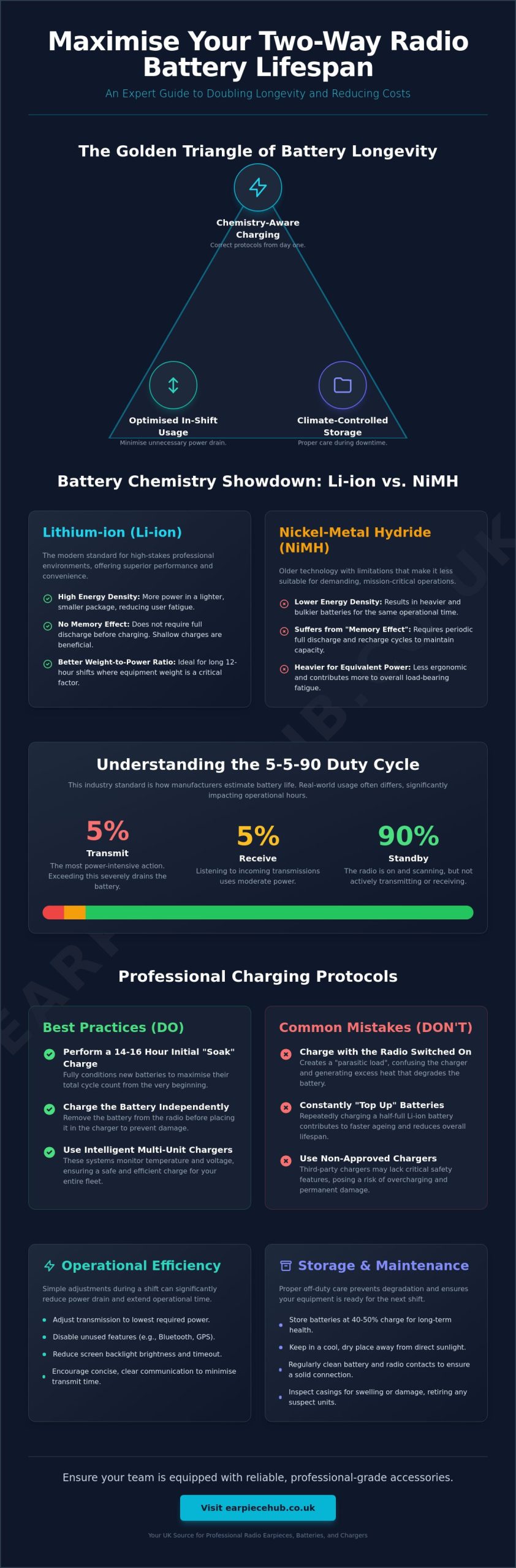
Manufacturers calculate expected battery life based on a standardised testing protocol known as the 5-5-90 duty cycle. This industry standard assumes your radio will be transmitting for 5% of the time, receiving for 5%, and remaining in standby for the remaining 90%. It serves as a baseline, but real-world security operations rarely follow this pattern. If your team is “heavy on the button” and transmits for 15% of the shift, your operational hours will plummet regardless of the battery’s quality.
Transmitting is the most power-intensive action a radio performs. When you exceed the 5% threshold, you’re drawing current at a rate the battery wasn’t designed to sustain for a full 12-hour duration. Standby power isn’t zero power. The internal circuitry is constantly active, scanning frequencies and maintaining the digital link with the repeater system. By monitoring team behaviour and encouraging concise communication, you can align your usage closer to the 5-5-90 standard and ensure your radio battery life extension tips actually result in full-shift reliability.
Professional Charging Protocols to Maximise Cycle Count
The first 14 to 16 hours of a battery’s life are the most critical. When you receive a new fleet, don’t rush the units into immediate service. This initial “soak” ensures the cells are fully conditioned rather than just showing a surface-level full charge on the display. Most radio battery life extension tips focus on daily use; however, failing this first step can permanently reduce the total cycle count of your hardware from day one.
Never leave your radio switched on whilst it sits in the charging cradle. This creates a “parasitic load” where the charger struggles to identify the battery’s true state of charge. It leads to a continuous cycle of “mini-charges” that generate excessive internal heat. This heat causes the electrolyte to break down, eventually leading to a swollen battery casing and reduced runtime. If you need to stay operational during a charge, swap the battery for a fresh one and charge the depleted cell independently.
Smart Charging vs. Standard Charging
Intelligent charging systems are now the industry standard for professional security fleets. These units communicate directly with the battery’s internal management chip to monitor voltage levels and temperature in real time. Research into best practices for battery lifetime extension confirms that avoiding extreme states of charge and managing heat are vital for longevity.
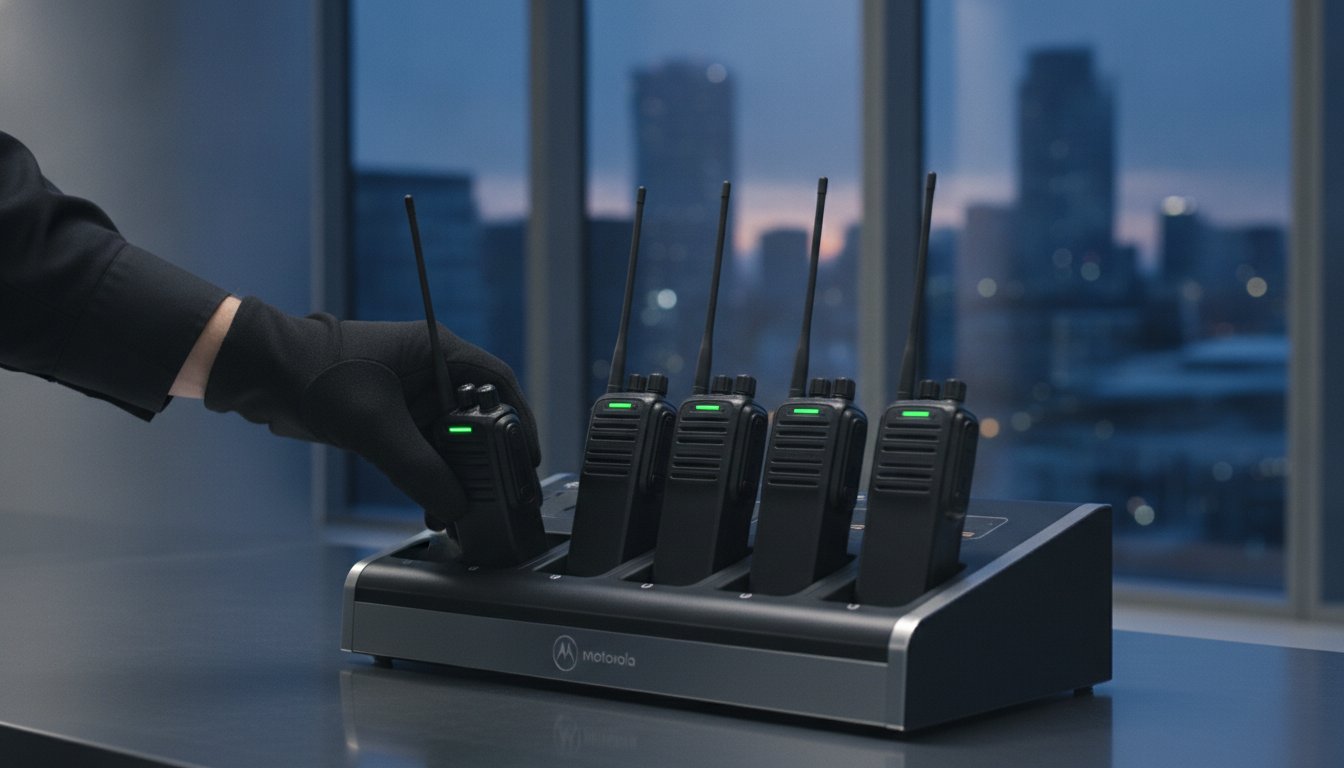
For large teams, using a Six-Way Multi-Unit Charger is the most efficient way to manage your hardware. These units provide a centralised hub for your equipment whilst preventing the common “topping up” habit. Repeatedly placing a half-full battery on a charger can prematurely wear out the chemical components. It’s better to wait until the battery is significantly depleted before starting a new cycle to ensure you aren’t wasting the limited number of charge cycles available to each cell.
Temperature Control During the Charge Cycle
Charging your equipment in a cold warehouse or a baking hot vehicle is a recipe for hardware failure. The optimal temperature range for a charging centre is between 15°C and 25°C. Outside this “comfort zone,” the chemical reactions inside the cell become inefficient. Charging at high temperatures accelerates the chemical “ageing” process we discussed in the previous section.
Extreme heat is the primary cause of thermal runaway. This is a condition where the battery enters a self-heating loop that can lead to permanent damage or fire. Professional charging banks must be kept in well-ventilated, climate-controlled areas to prevent heat build-up amongst multiple units. By maintaining a stable environment, you ensure every charge cycle is as efficient as possible and your equipment remains ready for a full 12-hour shift.
Operational Efficiency: Reducing Power Drain During Use
Managing how your team uses their devices in the field is just as vital as how they charge them. One of the most effective radio battery life extension tips involves adjusting the transmission power settings. Most professional radios, such as the Motorola DP1400, allow users to switch between “High” and “Low” power modes. Whilst High power (typically 4W or 5W) is necessary for long-distance communication, Low power (1W) is often sufficient for on-site security or warehouse operations. Switching to Low power can significantly reduce the milliampere (mAh) draw during every transmission, extending your runtime by several hours.
Modern digital radios are packed with “vampire” features that drain power silently in the background. GPS tracking, Bluetooth connectivity, and aggressive screen backlighting are the primary culprits. If your team operates within a localised area where GPS isn’t required for safety, disabling these sensors can save up to 15% of your total battery capacity. You should also be wary of the “VOX” (Voice-Operated Exchange) trap. In noisy environments, VOX can accidentally trigger the radio to transmit ambient sounds, which rapidly depletes the battery whilst cluttering the airwaves.
The Accessory Factor: Earpieces and Power Consumption
The quality of your accessories directly influences your battery performance. A high-quality Acoustic Tube Earpiece for Motorola Radios provides superior sound isolation by delivering audio directly into the ear canal. This allows the user to operate the radio at a much lower volume setting than if they were relying on the internal speaker. Since driving a speaker at high volume is a major power drain, using a professional earpiece can indirectly increase your battery longevity.
Similarly, using a Remote Speaker Microphone (RSM) brings the audio source closer to the user’s ear, further reducing the need for high-volume output. It’s also essential to inspect your gear for frayed or damaged wires. Faulty earpiece cables can cause intermittent internal shorts. These shorts might not immediately kill the device, but they create a constant, unintended electrical draw that will leave your battery flat before the end of a standard shift.
Optimising Radio Settings for Longevity
Internal software settings offer another layer of protection for your hardware. Setting a “Time-Out Timer” (TOT) is a mandatory best practice for professional fleets. This feature automatically cuts off a transmission if the PTT button is held down for more than a set duration, usually 60 seconds. This prevents accidental “hot mics” in a pocket or holster from draining the battery and blocking the channel for others.
Finally, review your “Scan” and “Battery Save” configurations. Constant channel scanning forces the radio to stay in an active receiving state, which is far more power-hungry than standard standby. If your team only uses one or two channels, disable the scan function. Ensure that “Battery Save” mode is enabled in your radio’s programming. This mode puts the receiver into a “sleep” state for millisecond intervals, waking up only to check for incoming signals, which drastically reduces the standby current draw without missing any calls.
Storage and Maintenance: The “Off-Duty” Care Guide
The way you handle your equipment after a shift is just as vital as how you use it on duty. One of the most overlooked radio battery life extension tips is the 40-50% storage rule. Storing a Li-ion cell at 100% capacity keeps the internal chemistry under high voltage stress, whilst storing it at 0% risks a “deep discharge” state. If a battery drops below its critical voltage threshold during storage, the internal protection circuit may trip, rendering the battery unable to accept a charge. Aim for a half-charge if the units will be off-duty for more than a few days.
Regularly clean your battery contacts to maintain peak performance. Use a lint-free cloth and 90% isopropyl alcohol to remove dirt, grease, and skin oils from the metal contact points on both the battery and the radio. This ensures a low-resistance path for electricity. If these contacts are dirty, the radio must work harder to pull power, which increases internal heat and drains the cell faster. Environmental threats like salt air in coastal security roles or fine dust on construction sites can also penetrate the housing, so a weekly wipe-down is a mandatory maintenance habit.
Manage large battery pools using the First-In, First-Out (FIFO) method. Label every battery with the date of purchase and a unique ID number. This organisation prevents specific batteries from sitting idle whilst others are over-worked. By rotating your inventory, you ensure even wear across the entire fleet. If your current cells are showing signs of physical wear or failing to hold a charge despite these steps, it is time to invest in a Replacement Battery for Motorola DP1400 to restore your team’s reliability.
Long-Term Storage Protocols
Decommissioning gear for the off-season, such as summer festival equipment, requires careful planning. Always remove batteries from the radio bodies before storage to prevent “vampire” drain from the device’s internal clock and memory. Li-ion batteries have a natural self-discharge rate of approximately 1-2% per month. Schedule a quarterly maintenance check to top these cells back up to the 50% mark. Re-conditioning a battery after months of inactivity involves one full discharge followed by a complete 14-hour charge cycle to recalibrate the internal fuel gauge.
Physical Inspections and Hygiene
Inspect your hardware weekly for “battery swell” or bulging casings. A swollen battery is a critical safety hazard caused by gas build-up inside the cell and must be removed from service and recycled immediately. You should also look for contact pitting, which appears as small black craters on the metal surface. This is often caused by electrical arcing when a radio is inserted into a low-quality or poorly maintained charger. Contact oxidation is the chemical reaction between metal and oxygen that creates a resistive film, which significantly reduces voltage efficiency and increases heat during operation.
When to Retire: Identifying the End of Life
Every battery has a finite lifespan defined by its cycle count. For most professional-grade Lithium-ion cells, this limit sits between 300 and 500 full charge cycles. Even if you strictly follow all radio battery life extension tips, the internal chemistry will eventually degrade to a point where it can no longer support a full 12-hour shift. Tracking these cycles is the only way for a fleet manager to justify new purchase orders before equipment starts failing in the middle of a security incident.
A technical way to identify a dying cell is the “Voltage Drop” test. If a battery shows a full charge but the radio cuts out or gives a low-power alert the moment you press the PTT button, the internal resistance has become too high. This resistance causes a sharp drop in voltage under load. You should also inspect the physical integrity of the battery housing. Worn locking mechanisms or perished rubber seals compromise the device’s IP rating, allowing moisture to reach the sensitive internal circuitry of your radio.
Avoid the false economy of “refurbished” or generic non-brand batteries. These third-party cells often lack the internal protection circuits and high-quality electrolytes found in professional hardware. Whilst they may be cheaper initially, their shorter lifespan and potential to damage your radio’s charging pins make them a poor investment for high-stakes environments. Reliability in the field depends on using equipment that meets the exact technical specifications of your radio manufacturer.
Signs Your Battery Has Reached its Limit
Keep a close eye on your charging times. If a battery that usually takes three hours to charge suddenly reaches “Full” in 45 minutes, it’s a major red flag. This “rapid charging” happens because the battery has lost its capacity to store energy; it hits its peak voltage quickly because there’s very little “room” left inside. Excessive heat during standard use is another warning sign of high internal resistance. The professional standard for retirement is the 80% capacity threshold. Once a battery can only hold 80% of its original rated mAh, it’s no longer considered reliable for frontline duty.
Choosing High-Quality Replacements
When the time comes to refresh your gear, prioritising compatibility is essential. Using a certified Replacement Battery for Motorola DP1400 ensures that the internal management chip communicates correctly with your charger. This communication prevents the overcharging issues often caused by “universal” chargers, which often lack the specific voltage-sensing technology required for specialist batteries. Investing in the right power source is the final step in maintaining a robust communication network. Upgrade your fleet with professional-grade radio batteries from Earpiece Hub to ensure your team stays connected when it matters most.
Optimise Your Fleet’s Performance Today
Maintaining a reliable communication network requires more than just high-quality hardware; it demands a disciplined approach to maintenance. By implementing these radio battery life extension tips, you can double your equipment’s longevity and ensure your team never faces a “low battery” alert during a security incident. Focus on the core principles of chemistry-aware charging, strict temperature control, and the 80% capacity retirement rule to keep your operations running at peak efficiency.
Earpiece Hub is a specialist UK stockist of Motorola, Hytera, and Kenwood accessories. We understand the high-stakes nature of professional security and provide expert technical support for all communication peripherals to ensure you get the right gear the first time. With Next Day Shipping available for urgent fleet requirements, we help you keep your team operational without unnecessary delay. Whether you need to replace failing cells or organise your charging centre, we have the technical expertise and stock to support your mission.
Browse our range of high-capacity radio batteries and multi-chargers at Earpiece Hub to secure your team’s reliability. Your communication infrastructure is the backbone of your safety protocols; invest in the professional power that supports it.
Frequently Asked Questions
How long should a standard two-way radio battery last on a single charge?
A professional Lithium-ion battery typically lasts between 8 and 12 hours on a single charge when used under the standard 5-5-90 duty cycle. Digital radios often provide better efficiency than older analogue models, which can extend this duration slightly. If your team transmits frequently or uses high-power settings, you’ll see this time decrease. High-capacity variants are available for those requiring consistent 14 to 16-hour shift coverage without the need for mid-shift swaps.
Is it okay to leave my radio in the charger overnight?
You should avoid leaving your radio in the charger once the cycle is complete. Whilst modern smart chargers have protection circuits to prevent overcharging, leaving the radio switched on in the cradle creates a parasitic load. This causes the charger to constantly cycle, generating unnecessary internal heat that degrades the chemical components over time. For the best results, remove the device once the LED indicator turns green to preserve the total cycle count of your hardware.
Why does my radio battery die faster in cold weather?
Cold weather increases the internal resistance of the battery, which slows down the chemical reactions needed to produce power. In temperatures below 5°C, you might notice a significant reduction in effective capacity. To mitigate this, keep the radio close to your body under a jacket when not in use. This helps maintain a stable operating temperature and prevents the voltage from dropping prematurely during critical transmissions.
What is the “memory effect” and does it affect my Motorola radio?
The “memory effect” refers to a loss of capacity when a battery is recharged before being fully depleted, causing it to “remember” the shorter cycle. This issue primarily affected older Nickel-Cadmium (NiCd) and some Nickel-Metal Hydride (NiMH) cells. Modern Motorola radios typically use Lithium-ion (Li-ion) technology, which doesn’t suffer from this effect. You can charge Li-ion batteries at any state of depletion without damaging their long-term storage capacity or performance.
How often should I clean the battery contacts on my radio and earpiece?
You should clean your battery and earpiece contacts at least once a month, or weekly if you work in dusty or coastal environments. Use a lint-free cloth and 90% isopropyl alcohol to remove skin oils, grease, and oxidation. Clean contacts ensure a low-resistance connection, which is one of the simplest radio battery life extension tips for maintaining consistent voltage and reducing heat build-up during long shifts.
Can I use a third-party charger for my professional radio batteries?
We don’t recommend using uncertified third-party chargers for professional equipment. These units often lack the specific voltage-sensing chips required to communicate with specialist batteries from brands like Motorola, Hytera, or Kenwood. Using an incompatible charger can lead to overcharging, excessive heat, or even permanent cell damage. Stick to OEM-approved or high-quality specialist multi-chargers to ensure your fleet remains safe and operational throughout the year.
How should I store spare batteries that aren’t being used every day?
Spare batteries should be stored in a cool, dry place at approximately 40% to 50% charge. Never store them completely flat, as they may enter a “deep discharge” state that prevents future recharging. Similarly, storing them at 100% puts unnecessary stress on the internal chemistry. Check your stored inventory every few months and top them up to the half-way mark to compensate for natural self-discharge and keep the cells healthy.
What are the signs that my radio battery needs replacing immediately?
Physical swelling or a bulging casing is a sign that a battery must be retired and recycled immediately as it poses a safety risk. Other red flags include the battery charging “too fast” or the radio cutting out the moment you press the transmit button. If a battery can no longer hold 80% of its original rated capacity, it’s time to invest in a replacement to prevent mid-shift failures and ensure your team stays connected.
