



Uncategorized
Helmet Headsets for Two-Way Radios in the UK

Nov
Two pins don’t guarantee a fit. A helmet headset for a two-way radio must match the radio model: two-pin connectors can differ in spacing, length and diameter, and radio headset connectors don’t follow one standard specification. Check compatibility before choosing a headset style.
It’s understandable to expect two-pin headsets to be interchangeable, but connector dimensions matter as much as the number of pins. This guide explains how to match a headset to your radio and compare wired and wireless options, including closed-helmet microphones with push-to-talk. It also covers fit, clear communication and practical use with protective equipment, helping you narrow down a setup for your work.
Key Takeaways
- Match the connector to your exact radio model; two pins alone don’t guarantee compatibility.
- Compare wired and wireless designs against how you move, wear protective equipment and use your radio.
- For a closed-face helmet, consider microphone placement, cable management and where push-to-talk sits.
- For Motorola radio earpiece options, explore Earpiece Hub’s acoustic tube design alongside the other radio-specific styles.
Do I need a specific headset for a two-pin connector, or will any fit?
No. A two-pin plug isn’t a universal fit: connector dimensions and radio compatibility matter. Match the headset to your radio model before choosing a helmet setup.
Radio and Connector Compatibility
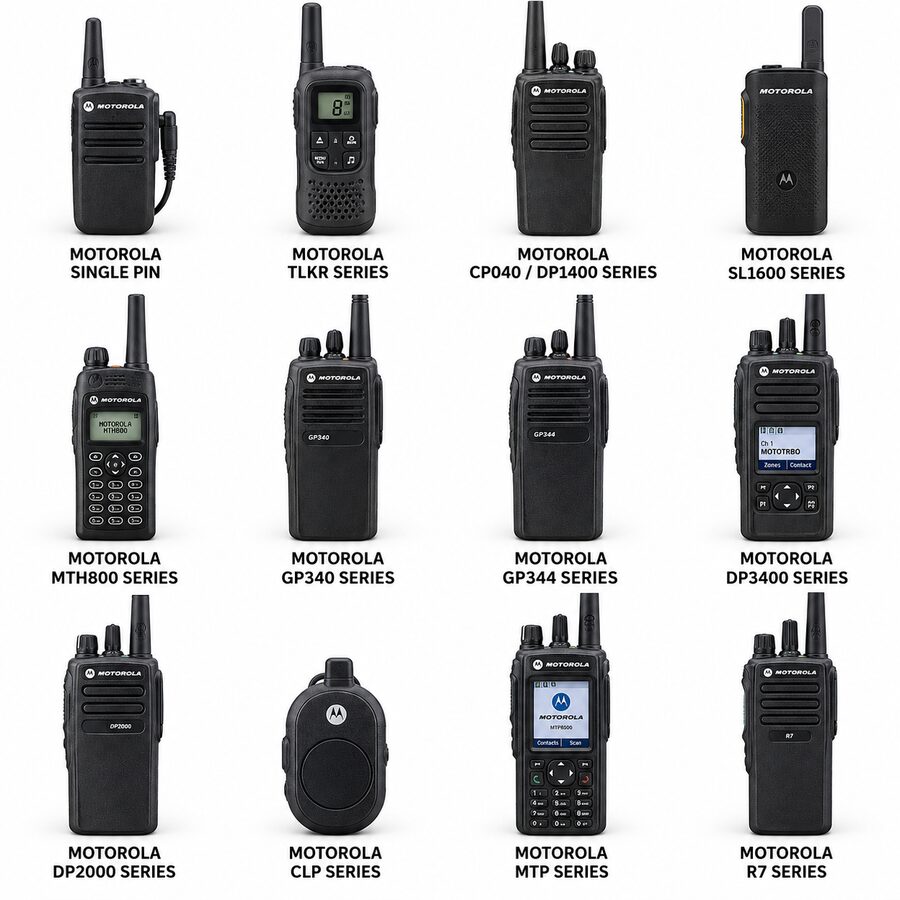
Two-pin connectors can differ in spacing, length and diameter. Radio headset connectors don’t follow one standard specification, so the number of pins alone can’t identify a match. Start with the radio’s make and model, then compare the headset’s stated compatibility and connector shape. A plug that fits one Motorola radio, for example, may not fit another model’s socket. A secure physical fit is only part of compatibility: the headset must also work with the radio’s audio connection.
A two-pin connector alone doesn’t establish whether a headset is legal while riding in the UK. Your setup should allow safe control and awareness. Don’t use it if it distracts you or masks essential sounds.
Installation and Connection
Fit the headset into the helmet as its instructions specify, positioning the speakers and microphone securely. Route the cable so it won’t snag or affect the helmet’s fit. With the radio switched off, align the plug with its socket and connect it gently. Don’t force a plug that resists. Switch on the radio and test receiving, speaking and push-to-talk before use. Keep the connector accessible for removal.
Choose equipment with a stated rating suited to your working conditions, and follow its weather limits. Consider speaker placement and volume: audio should be clear without excessive loudness or blocking important sounds.
If audio fails, check that the plug is fully seated and the radio volume is up. For poor transmission, inspect the microphone position and test push-to-talk. A loose connection or badly routed cable can also interrupt use.
Wired and wireless headset options
Choosing a helmet headset for a two-way radio depends on your movement, radio setup and charging routine. Wired connections link the headset directly to the radio, while wireless options reduce cable runs. Neither type suits every task.
A wired headset connects through its compatible plug, so there’s no separate wireless link to pair. Its cable still needs careful routing around helmet straps and clothing. For example, a lead crossing a jacket zip may snag as you move. Secure it without pulling the connector or restricting head movement. Your helmet headset for a two-way radio should suit your helmet arrangement and communication routine.
Bluetooth can reduce cables between the headset and radio, but both devices need compatible wireless functions. Check how the radio handles audio and push-to-talk: some setups use a separate button or accessory. Pair the devices as instructed, then test receiving and transmitting before work. Include charging in your routine and consider how you’ll communicate if the headset battery runs low.
Mesh communication differs from a simple Bluetooth link. Compatible mesh units can communicate over a network, which may suit teams needing group communication. However, mesh equipment won’t automatically connect to a standard two-way radio. Check that the radio interface, headset system and push-to-talk method work together. Choose a helmet headset for a two-way radio only after considering all three connections.
For noisy workplaces, assess the ear fit and whether controls remain reachable with gloves. Compare radio headset options against your radio, helmet and routine, then test the complete setup whilst stationary.

Closed-helmet microphones with push-to-talk
Closed-helmet systems position the microphone inside a full-face helmet. Fit, button position and speech clarity all matter during use.
Closed-Helmet Microphone Controls
A closed-helmet microphone is designed to fit in front of closed-face helmets. Motorola’s closed-helmet microphone is compatible with 2-pin Motorola two-way radios. Position the microphone as intended, then place push-to-talk where a gloved hand can reach it comfortably. Before use, fasten the helmet and test transmission. Check that the button activates reliably and the cable doesn’t catch on the chin strap or restrict movement.
Noise Reduction and Microphone Clarity
Helmet headsets vary in how they handle surrounding noise and transmit speech. A closed helmet provides a physical barrier, but microphone placement still affects how clearly your voice is picked up. In a noisy workplace, consider the ear seal, cable management and push-to-talk position together. A loose fit can let in more surrounding sound, while a poorly positioned microphone can make speech harder to understand.
Test the complete setup in the environment where you’ll use it. Speak normally, then listen for clear reception and check whether background noise masks your message. Adjust microphone position and control placement before work begins. The practical takeaway: prioritise a stable fit and reachable button, then assess clarity with the helmet fastened. Explore closed-helmet radio communication options for a setup suited to your radio and helmet.
Earpiece Hub: Acoustic Tube Earpiece for Motorola Radios
Earpiece Hub’s Acoustic Tube Earpiece for Motorola Radios is a radio-specific listening option. Match it to your Motorola radio and communication setup rather than assuming every connector will fit. For Hytera radios, the D-Shape Earpiece is a model-specific option; Kenwood users can consider the G-Shape Earpiece.
These earpieces are alternatives to a helmet-mounted microphone system, not a substitute for checking helmet fit or push-to-talk placement. Choose according to how you wear your equipment and where you need audio. If your Motorola DP1400 needs a replacement battery, Earpiece Hub also offers one.
Visit Earpiece Hub to explore its radio earpiece options.
Choose your setup with confidence
Before choosing a helmet headset for a two-way radio, note your radio model, helmet type and preferred push-to-talk position. These details help you focus on equipment that suits your setup, rather than selecting by connector shape alone. Also consider how you’ll route cables and operate controls during your usual work.
Earpiece Hub’s radio-specific options offer a starting point for choosing communication accessories for Motorola, Hytera or Kenwood radios. Share your requirements to get advice on the next step for your setup.
Contact Earpiece Hub for headset advice and move towards a setup that fits your needs.
Frequently Asked Questions
How do I choose the right headset for my walkie talkie model?
Start with the radio’s full make and model, then match the headset’s compatibility details. Knowing only that a radio is Motorola, for example, may not identify the right accessory. Note how you wear your helmet, where you need the microphone and whether you prefer wired or wireless equipment. These details help narrow the choice beyond brand alone.
What connector type do I need, and how do I identify it?
Identify the radio’s make, model and socket before selecting a plug. Check the connector itself, including its pin arrangement and overall shape, rather than relying on a “two-pin” label alone. When comparing equipment, take a clear photo of the radio socket and existing plug. Never force a connector that doesn’t seat smoothly.
What should I expect from all-day wear on long shifts?
Comfort depends on how the headset sits with your helmet, not just its design. During a stationary trial, check for pressure around the ears, movement when you turn your head and whether controls remain accessible with work gloves. For wireless equipment, include charging in your shift routine. A short test can reveal rubbing or cable tension before a full shift.
Who are Radio Headsets Best Suited to?
Radio headsets suit people who need to receive or send messages while working in security, events, broadcast, public services, warehouses, hospitality or retail. A helmet-mounted design is relevant when the job requires wearing a helmet while using a radio. The right style depends on the wearer’s protective equipment, surroundings and preferred control position.
What types of helmet headsets work with two-way radios?
Options include wired helmet kits, wireless or Bluetooth systems, mesh communication equipment and closed-helmet microphone setups with push-to-talk. Overhead headsets and earpieces are other radio accessories, but aren’t automatically designed for helmet mounting. Choose based on your helmet configuration and communication method, then confirm that the radio and accessory are compatible.
