




Uncategorized
Team Radio Accessories for Clearer Communication

Oct
Clear communication depends on more than the radio itself. Upgrading team radio accessories can support hands-free use, make speech easier to hear in noisy environments and help keep equipment ready for work. Most two-way radio batteries can power a radio for one shift, so compatible spares and charging options matter when teams rely on their radios throughout the day.
It’s easy to focus on the handset, but the right earpiece, headset, microphone or charger can make a practical difference. This guide covers how to choose accessories for team routines, radio brands and working environments, so you can plan an upgrade around real needs rather than adding equipment that may not be useful.
Key Takeaways
- Match each accessory to the radio’s model, connector and brand series before ordering.
- Plan spare batteries and charging around shift patterns to help keep radios ready for use.
- Choose an earpiece, headset or microphone to suit the noise level and communication needs of the work environment.
- Compare accessory options across radio brands, focusing on fit and compatibility rather than brand name alone.
Batteries and chargers
For longer shifts, choose a battery compatible with the exact radio model, then plan spare power and charging around the team’s working pattern. Match the battery and charger to the devices in use, and consider how many handsets need charging at the same time.
High-capacity and spare batteries
High-capacity batteries can extend operating time, but capacity alone doesn’t establish compatibility. Match the battery to the radio model and part code before ordering. For example, the Motorola PMNN4251AR battery for DP1400 and CP040 radios has a capacity of 1400 mAh. A spare compatible battery gives a user another power option during a long shift, rather than relying on a pack that may run low before work ends. Battery compatibility matters across brands, too: don’t assume a Motorola battery suits a Hytera radio.
Backup batteries and charging options
Choose charging equipment around how many batteries need charging and where the team can access power. A desktop charger charges a single battery, whilst a multi-unit charger charges several simultaneously. Multi-port charging can help reduce downtime when several talkies need fresh power together. In-vehicle chargers can charge multiple batteries, and two-way radio batteries may also be charged from a vehicle’s cigarette lighter socket. Match the charger to the batteries and devices in use.
Battery life during long shifts
Most two-way radio batteries can power a radio for one shift, but actual battery life depends on use. Frequent radio activity and the demands of the working pattern affect how quickly power is used. Batteries typically last 12-18 months, depending on use. Track how long batteries remain useful in your team’s routine, then organise charging and spares around the busiest periods. That gives staff a practical backup when a radio needs power before the shift ends.
Why are radio accessories important?
Earpieces, headsets and microphones support communication in demanding settings. An accessory itself does not determine whether a radio licence is required; licensing depends on the radio service and how it is operated.
Earpiece and headset types
Choose an earpiece or headset for the task, surroundings and preferred fit. Single-ear models leave one ear uncovered, whilst double-ear designs place speakers at both ears. A PTT headset lets users transmit using its push-to-talk control, and a speaker microphone can be clipped to clothing for access without handling the radio. In noisy construction environments, noise-cancelling headsets can help filter background sound. Coiled cables offer flexibility around the user, while pneumatic acoustic tubes carry audio to the earpiece.
Compatibility with radio models
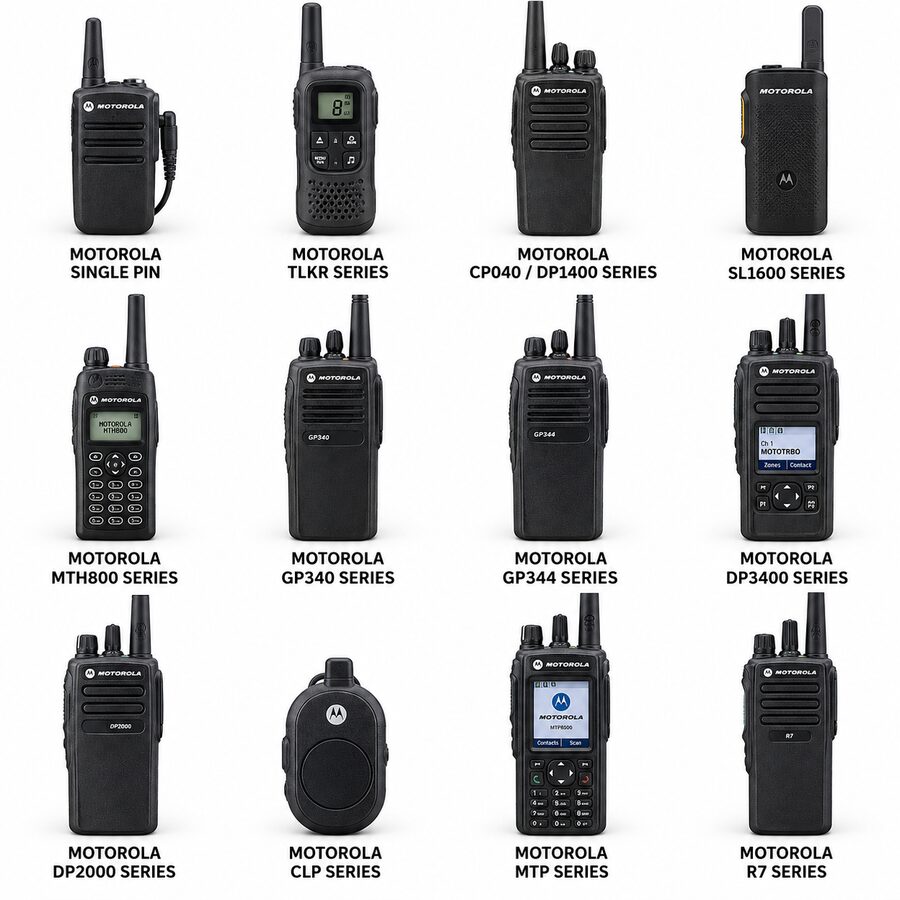
Compatibility depends on the radio model, brand series, connector and accessory part code. Earpieces and microphones described for two-way radios connect directly through a 2-pin plug, but that doesn’t mean every 2-pin accessory fits every radio. Match the connector and radio details before selecting an accessory. This applies across brands such as Motorola, Hytera and Kenwood, and helps avoid choosing equipment with the wrong connection.
Costs and safety risks
There is no single UK price for radio accessories: cost depends on the product and its configuration. Compare suitable designs and the features your team needs instead of choosing by price alone. Keep audio at a level that allows users to remain aware of their surroundings, especially outdoors or around moving equipment. Noise-cancelling equipment may help in a noisy environment, but users still need to follow workplace safety procedures. A comfortable fit and clear instructions also help teams use earpieces consistently.
Explore radio communication accessories to compare options for different team setups.

Radio accessory brands
The accessory must match the radio, so check the model and connection before choosing. Compare the listed compatibility details and intended use, rather than relying on brand name alone.
Team radio accessory brands
Motorola, Hytera, Kenwood, Icom and Sepura are brands used with two-way radio accessories, but accessories are not automatically interchangeable. Identify the radio’s brand and model, then match the accessory’s stated compatibility. For example, an earpiece listed for Kenwood radios should not be assumed to fit a Motorola radio. This approach helps narrow down options for different roles and environments.
Aftermarket and manufacturer accessories
Aftermarket accessories can be useful, but the label alone doesn’t establish reliability or compatibility. Manufacturer accessories and aftermarket alternatives should both be assessed against the exact radio model, connector and part code. Then consider the accessory’s construction and how it will be used, such as a remote speaker microphone for hands-free access. For antennas or batteries, check that the item is intended for the specific radio; brand recognition alone isn’t enough.
For a team using several radio models, record each device’s brand, model and connection before selecting accessories. Compare items with the same intended use, then identify where a shared option fits and where separate equipment is needed. A clear inventory also makes it easier to organise replacements as the team’s equipment changes.
Explore radio accessories by brand to find options for Motorola, Hytera and Kenwood radios.
Earpiece Hub: Acoustic Tube Earpiece for Motorola Radios
Earpiece Hub offers an Acoustic Tube Earpiece for Motorola Radios for teams choosing an earpiece to match their Motorola equipment. Checking the radio’s brand and model helps narrow down the options when replacing or upgrading accessories.
For other compatible setups, the range includes a D-Shape Earpiece for Hytera Radios, a G-Shape Earpiece for Kenwood Radios and a Replacement Battery for Motorola DP1400. Match the accessory to the radio you use, rather than assuming items suit every model. This is a practical next step when your team has identified a specific accessory need and wants options organised around familiar radio brands.
To explore the range or discuss your requirements, visit earpiecehub.co.uk.
Earpiece Hub offers an Acoustic Tube Earpiece for Motorola radios, a D-Shape Earpiece for Hytera radios and a G-Shape Earpiece for Kenwood radios. Match the accessory to the radio’s stated compatibility rather than assuming it fits every model.
Make your next equipment decision count
Before upgrading team radio accessories, create a simple equipment record for each role. Note the radio model, the accessory in use and any recurring fit or handling issues. This gives the team a practical reference as equipment needs change.
For teams upgrading radio accessories, Earpiece Hub offers an Acoustic Tube Earpiece for Motorola Radios, a D-Shape Earpiece for Hytera Radios and a G-Shape Earpiece for Kenwood Radios. Use the radio’s brand and model to guide your shortlist, then consider which design suits each user’s routine.
Use your team’s equipment details to guide the next choice. Contact Earpiece Hub to discuss accessories for your setup and take the next step with confidence.
Frequently Asked Questions
How do you choose the right product?
Start with the task the radio user performs most often, then choose an accessory to suit it. A door supervisor who needs discreet listening may prefer an acoustic tube earpiece, while someone who needs access to the radio without handling it may benefit from a remote speaker microphone. Consider fit, cable routing and how the equipment will be worn during a shift.
Walkie-Talkie Accessories: which ones are essential?
The essential accessories depend on how the team uses its radios. For routine listening, consider a suitable earpiece or headset; for access to a microphone and radio controls, consider a remote speaker microphone. Teams managing shared devices may also need replacement batteries, ear tips or a multi-unit charger. Choose accessories by role rather than issuing every item to every user.
What accessories can be added to team radios?
Team radios can be paired with audio, power and charging accessories. Examples include acoustic tube earpieces, overhead headsets, remote speaker microphones, replacement batteries, ear tips and multi-unit chargers. An adapter can also be useful when the connection needs to suit a particular radio setup. Select accessories according to each user’s duties and the equipment already in use.
How do I check compatibility before buying team radio accessories?
Record the radio’s brand and full model name, then compare them with the accessory’s compatibility details and connector. For a mixed fleet, label each handset and keep a separate accessory record for each model. This helps prevent similar-looking radios being treated as identical. Match the part code too, especially when replacing an existing earpiece or battery.
How do I fit and configure a new headset or microphone on a team radio?
Follow the instructions supplied with the radio and accessory. Align the connector correctly and attach it without forcing the plug, then check that the cable sits comfortably and stays clear of clothing or equipment. Test listening and transmission with a colleague in a safe, quiet area. If the accessory has a push-to-talk control, test it before normal use.
